
When you lost your mobile phone, you want to find its location and ping a phone in some way; or if your children have a long time to leave home, you need to locate them and ping their phone. But what’s the bottom line of pinging a phone? And how to ping a phone? This article on MiniTool Website will tell you the answers.
Actually, pinging a phone is not a rarely seen thing in our daily life. Whether iOS or Android, they both support this function. You can find the location of the devices to fetch the data required and know the availability or reachability of the required device.

Is It Legal to Ping a Phone?
You can find the location of a lost or stolen phone or track your children’s locations by pinging a phone. After receiving the consent of the phone owner, the cell phone ping is available legally.
For example, many third-party programs on your cell phones will ask for your permission to get your phone’s location so that they can send you targeted news or commodities that happen by your side to suspect your like.
If you have admitted this function available for those programs or other institutions, they can ping a cell phone for location legally; if you are involuntarily pinged, the whole process can be set against the law.
Anyway, there is no legal way to obtain cell phone location information without the customer’s permission and the source for this information is the carriers themselves.
Related article: 10 Best Free Phone Number Trackers Are Here! [Websites + Apps]
How to Ping a Phone?
Way 1: Ping a Phone from a PC
You can find the phone’s location on your PC but you need to remember your phone’s IP address.
To gain your phone’s IP address:
Step 1: Swipe down to show your phone’s quick setting menu and long-press the Wi-Fi icon.
Step 2: Scroll down to choose Advanced Settings and the IP address will show you here.
Or you can try to click on the icon next to your connected Wi-Fi and find the IP address in the Wi-Fi details.
Note: For different phone models, the method can be different.
To ping your phone on PC:
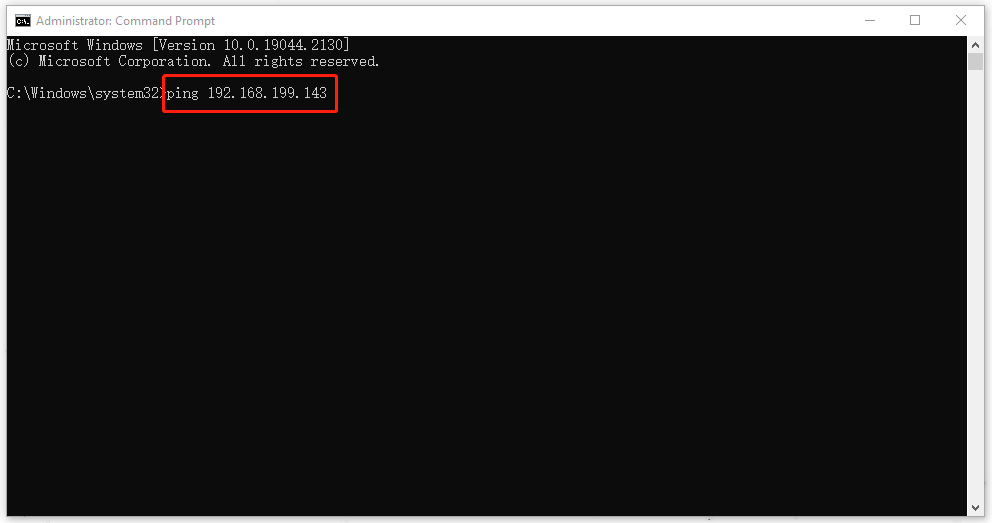
Step 1: Type Command Prompt in the Search box and run it as an administrator.
Step 2: Then type the command and press Enter to execute.
ping 192.168.199.143
Note: Please replace the above IP address with your phone’s IP address.
Way 2: Find Your Phone via Default Phone Services
For Android and iPhone users, you can enjoy the function called “Find My Device” or “Find My Phone” to ping a phone for location. Here is the way.
Note: This method is only available for those powered-on and Internet-connected phones with “Find My Device” configured.
For Android users
Step 1: Go to the Find My Device website and log in to your Google account.
Step 2: Then you can see the position of the missing phone on the map. Besides, you can also lock your smartphone from afar.
For iPhone users
Step 1: Go to the iCloud website and log in to your account.
Step 2: Then choose your device and click on Find My Phone to locate your phone.
Some Other Ways
- You can install the Ping program to search for your IP address.
- You can contact your phone carrier to find your phone’s position.
- Ping your phone by using GPS Tracking Software.
Bottom Line:
You can use the above methods to ping a phone when you need. It is easy to go and hope you have a nice day.
User Comments :