
To back up only changed data, creating differential backups is an efficient strategy. This post explains 7 differential backup software, such as EaseUS Todo Backup, Macrium Reflect, MiniTool ShadowMaker, Iperius Backup, and Hasleo Backup Suite.
What Is a Differential Backup
A differential backup is a backup method that copies only the data that has changed or been added since the last full backup. To restore data, only the last full backup plus the most recent differential backup is required. Compared with an incremental backup, it provides faster recovery.
Differential backups are cumulative: each subsequent differential backup re-copies all changes made since the last full backup, resulting in more storage over time. However, this can reduce the risk of data loss. If one differential backup is damaged, others are not affected.
In view of faster restoration, reduced risk, and simpler management, this backup strategy is chosen for scenarios:
- Data changes at a moderate speed.
- Quick recovery is critical.
- Storage space is not very limited.
Key Factors When Choosing Differential Backup Software
Creating such backups requires a piece of reliable, professional differential backup software. When choosing software, you should consider the following factors.
Recovery Time Objective
The software should streamline the restoration process, allowing you to easily identify the correct files and select the last full backup and the latest differential backup. Also, the recovery speed should be fast.
Moreover, ensure the backup tool can recover individual files and support bare metal recovery.
Storage and Data Changes
Differential backups can grow larger over time until the next full backup is created. In response to this situation, ensure the chosen software can efficiently compress image files to reduce storage footprint, and delete old backups to free up space.
Backup Scheduling and Automation
Look for the differential backup software that allows you to set a scheduling plan to automate full backups and differential backups.
The configuration frequency should follow a rule, based on time, such as daily, weekly, and monthly, or depending on specific events like user login. That way, you always have the up-to-date data, without manual intervention.
Security and Reliability
To keep data safe, it is recommended to encrypt the backups. Ensure the best differential backup software provides robust security, for example, encryption (at rest and in transit), ransomware detection, or multi-factor authentication (MFA).
Additionally, it can verify backup integrity, ensuring data can be restored successfully.
#1. EaseUS Todo Backup (Streamlined Automation Tool)
EaseUS Todo Backup is an all-in-one backup and recovery software designed for Windows and Mac. It provides a simple user interface, helping automatically create backups of files, disks, partitions, app data, and the entire operating system.
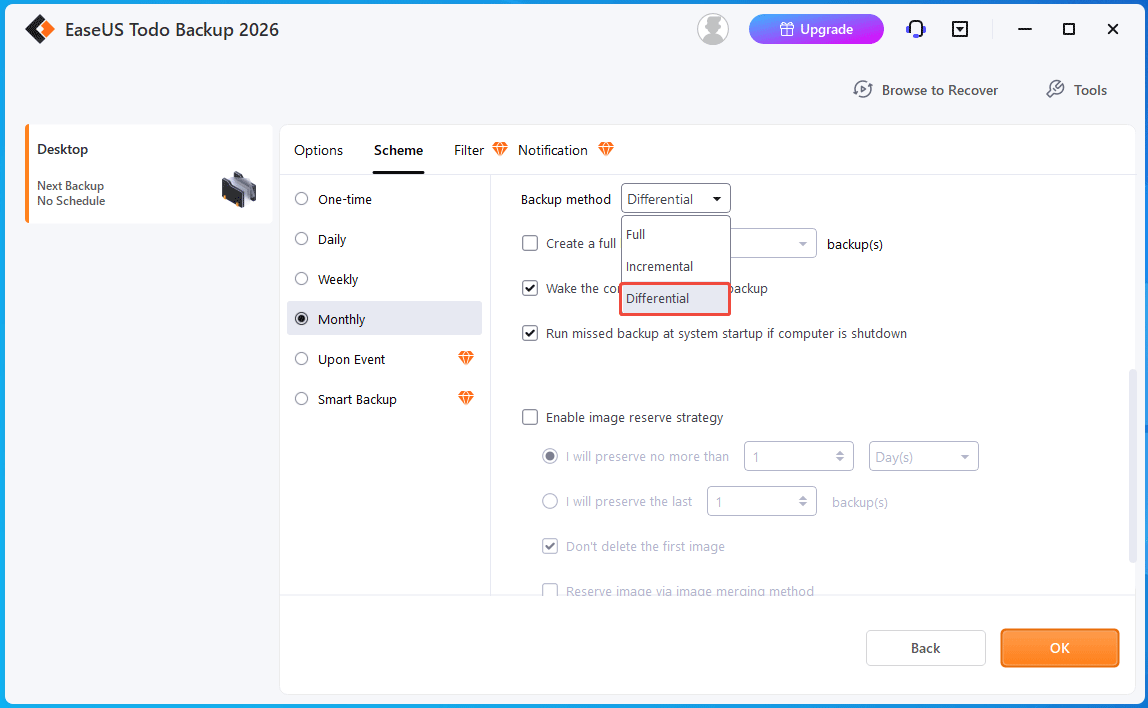
It can be a streamlined automation tool as it effectively executes precise differential backups and scheduled routines, which eliminates manual intervention.
Core Features
- Supports various backup types, including full backup, incremental backup, and differential backup, allowing you to choose the best method for different data sets.
- Enables you to store backups to a local drive, network, security zone, EaseUS Cloud, third-party cloud services, NAS, and FTP server.
- Sets up one-time, daily, weekly, monthly, or event-triggered backup plans (e.g., at system startup, system shutdown, user logon, user logoff, and USB device plugged in).
- Provides encryption protection using the AES-256 algorithm.
- Comes with the Smart Backup feature, intelligently monitoring changes in specified files/folders every 30 minutes and automatically creating a new backup.
- Automatically manages backups to save storage space.
- Compresses backup files in normal, fast, or high mode.
- Supports restoring a system image to a computer with dissimilar hardware with the System Transfer feature.
- Supports SQL Server backup and recovery.
Pros and Cons
| Pros | Cons |
| 1. Comprehensive features (Smart Backup and automated backups). 2. Versatile backup types. 3. Flexible storage destinations. 4. Emergency disk creation. | 1. Restrictive Free Edition. 2. Slow backup speed. |
User Suitability
EaseUS Todo Backup provides several editions for individuals and businesses.
- Free/Home: Designed for home users, compatible with Windows 11/10/8/7/Vista.
- Enterprise: Designed for business-critical PCs and Servers. This covers four versions, including Workstation, Server, Advanced Server, and Technician. They can work on Windows 11/10/8/7/Vista. Also, Windows Server 2025/2022/2019/2016/2012/2008/2003/SBS 2003/SBS 2008 are supported (except Workstation).
Personal Experience
Download and installation are simple.
While it is straightforward to configure differential backup parameters, the subsequent execution phase requires time to complete.
Upon completing the file backup, the system image backup option is inaccessible since the interface only displays the existing file backup task. Reverting to the primary backup menu for a new backup requires the deletion of the active task.
#2. Macrium Reflect (High-Speed Imaging Engine)
Macrium Reflect is a comprehensive utility, delivering disk imaging and disk cloning solutions for Windows PCs and Servers with fast speed.
It can create compressed image files of a disk, partitions, files, folders, and the operating system. In case of data loss or system crashes, Macrium Reflect provides fast, reliable recovery to restore the lost files or the system to a functional state.
Core Features
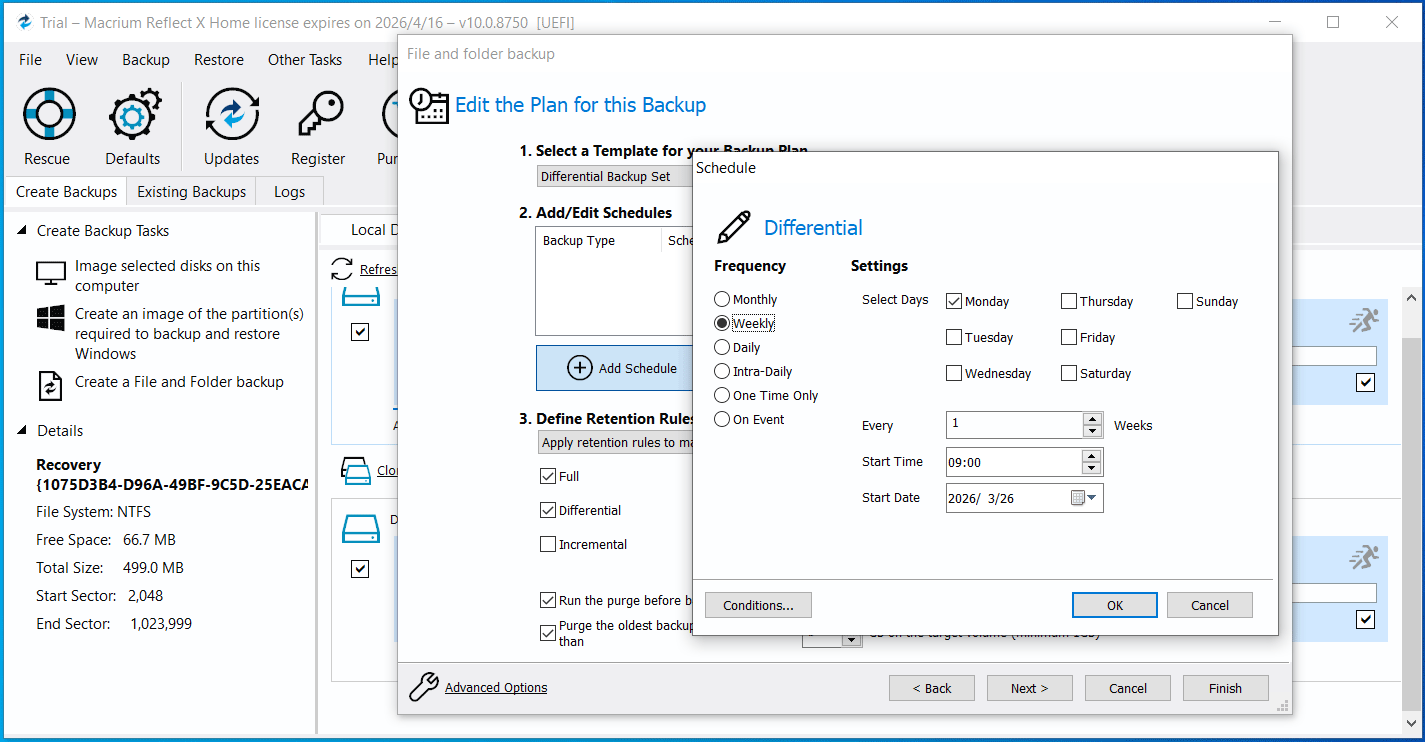
- Offers flexible backup types (full, incremental, or differential) and plans (Grandfather. Father. Son, Differential Backup Set, Incremental Backup Set, Intra-Daily Backup Set, and Incrementals Forever).
- Allows you to set a schedule to automatically create various backups, such as daily, weekly, monthly, intra-daily, one-time only, and on an event (when a computer starts or at logon).
- Customizes retention rules to delete old backups to manage storage space.
- Enables you to make advanced settings, for example, change the compression mode, enable password protection (AES-128/192/256 encryption), automatically verify images, and more.
- Only restores the changed data blocks, reducing the recovery time.
- Supports backup and recovery of SQL databases.
- Protects backup files on local drives from unauthorized modification through Macrium Image Guardian.
- Uses ReDeploy (available in rescue media) to modify an existing operating system to boot on new hardware or a virtual machine.
Pros and Cons
| Pros | Cons |
| 1. Comprehensive backup features. 2. Fast and reliable backup and restoration. 3. Flexible backup plans. 4. Rescue media creation. | 1. Complex settings. 2. No cloud backup. 3. Complicated user interface. |
User Suitability
- Macrium Reflect X Home: Designed for personal users.
- Macrium Reflect Workstation: Designed for organizations.
- Macrium Reflect Server: Designed for business-critical servers in commercial environments.
- Macrium Reflect LTSC: Designed for OEMs and mission-critical Systems. This edition can be divided into three LTSC editions: Workstation LTSC (for standard machines), Server LTSC (for server environments), and Server Plus LTSC (SQL and Exchange servers, covering SQL Server 2005 and above).
Personal Experience
Obtaining and deploying Macrium Reflect requires extended steps, including mandatory email registration during both the download and installation phases. This may take more time compared to other similar software.
Post-launch, the interface provides on-screen prompts for selecting a backup source and destination. Backup tasks can be quickly processed.
While basic tasks are straightforward, the backup scheduling configuration presents a steep learning curve.
The technical layout may pose navigation challenges for novice users, requiring advanced technical skills.

#3. MiniTool ShadowMaker (Comprehensive Disaster Recovery Solution)
MiniTool ShadowMaker is a comprehensive disk imaging backup and recovery, and disk cloning software for Windows. By backing up disks, partitions, systems, and individual files/folders, the PC can be protected effectively against viruses, system issues, and natural disasters.
In terms of differential backup software, MiniTool ShadowMaker is a practical option due to its professional features and reliability.
Core Features
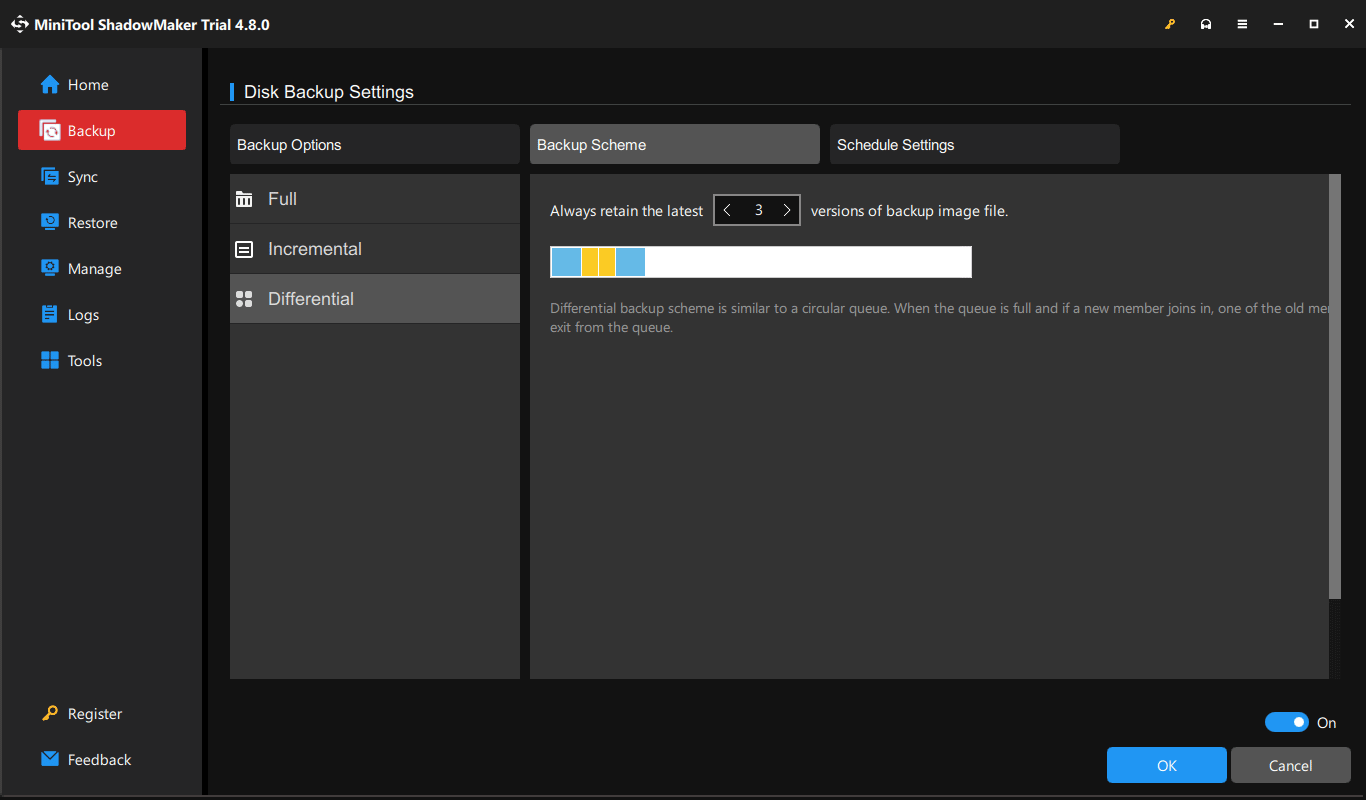
- Supports full, incremental, and differential backups, saving backup time and storage space.
- Sets backups to automatically run based on time, such as daily, weekly, and monthly, or specific events, such as user logon and logoff.
- Configures a backup scheme and deletes old backups in a group queue to manage storage space.
- Supports sector-by-sector backup, copying all used or unused sectors.
- Provides AES-128 password protection.
- Checks the integrity of the backup immediately after creation.
- Saves image files to an external hard drive, a USB flash drive, a network, and a NAS.
- Allows you to restore a system backup to another computer with dissimilar hardware with the Universal Restore feature.
- Mounts a backup image file of a partition, disk, or system as a virtual drive for file access.
Pros and Cons
| Pros | Cons |
| 1. Intuitive interface with clear navigation. 2. All-in-one backup types. 3. Versatile backup options and schemes. 4. WinPE bootable media builder. | 1. Lack of cloud support. 2. No AES-256 encryption. 3. No support for SQL Server. |
User Suitability
- Free/Pro Edition: Designed for home users, available in Windows 7/8/10/11.
- Business Standard/Business Deluxe: Designed for business users, supporting Windows Server (2025/2022/2019/2016), non-server systems, and workstations.
Personal Experience
MiniTool ShadowMaker is a user-friendly and fast backup solution, facilitating efficient navigation and rapid task execution.
Its Free Edition supports essential backup operations, but restricts access to the differential backup scheme. This functionality is accessible in the Trial Edition.
The tool currently focuses on local backup, lacking native cloud integration.
#4. AOMEI Backupper (Versatile Toolkit)
AOMEI Backupper is regarded as a comprehensive backup, disaster recovery, and cloning solution designed for Windows users.
It can be reliable differential backup software because of its robust features, helping create efficient backups for only modified or added data since the last full backup.
Core Features
- Creates a complete image of the entire operating system, specific partitions, a disk, files or folders, Outlook app data, and email data of any email account.
- Automates backup tasks at specific times. The scheduling options include daily (by interval), daily, weekly, monthly (by week), monthly (by date), and event triggers such as USB plug-in, user logon/logoff, and system startup/shutdown.
- Automatically deletes old backups to prevent insufficient backup space.
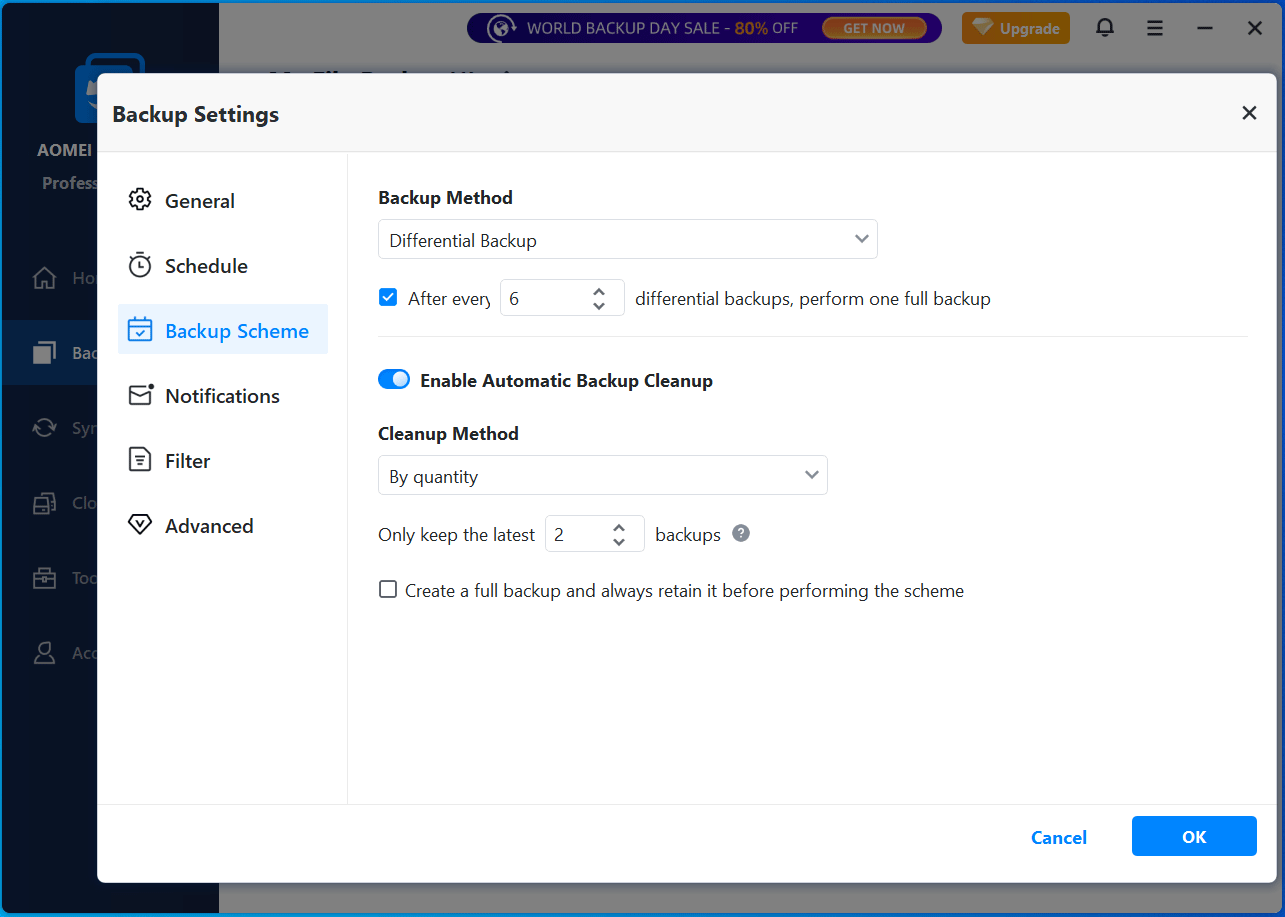
- Allows you to set a backup scheme to create a full backup after a set number of incremental or differential backups.
- Specifies an external drive, flash drive, NAS, network, or AOMEI Cloud as the backup destination.
- Creates rescue media to perform a system recovery when Windows fails to start up.
- Creates an intelligent sector backup (for the used sectors) and an exact backup (sector by sector).
Pros and Cons
| Pros | Cons |
| 1. Modern, clear, and intuitive design. 2. Comprehensive features. 3. Versatile backup options. 4. Bootable media creation. | 1. Limited free edition. 2. No third-party cloud integration. |
User Suitability
- AOMEI Backupper Standard and Professional: Engineered for home users, compatible with Windows 11/10/8/7.
- AOMEI Backupper Workstation/Server/Technician/Technician Plus: Engineered for businesses. They can work on Windows 11/10/8/7. However, only Server and Technician Plus support Windows Server 2025/2022/2019/2016/2012/SBS 2011.
Personal Experience
AOMEI Backupper provides an intuitive and stable backup environment. Its primary navigation menu presents distinct backup options, providing specialized configurations for various data protection scenarios.
The intuitive interface facilitates the efficient setup of differential backup.
Notably, the cloud-destination support of this utility is restricted to AOMEI Cloud, without native integration for mainstream platforms like Google Drive, OneDrive, or Dropbox.
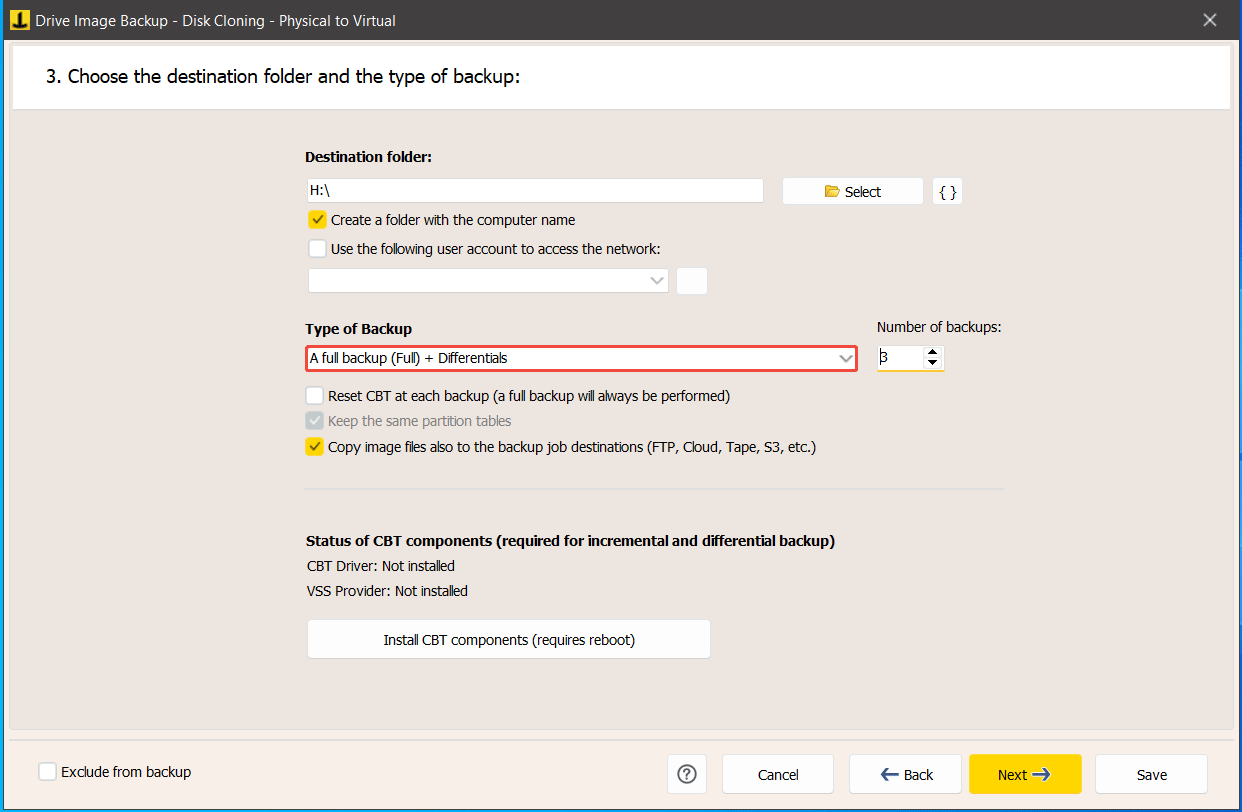
#5. Iperius Backup (Lightweight Multi-Cloud Gateway)
Iperius Backup can be a multi-cloud utility due to its lightweight nature (low resource consumption) and support for various destinations.
Additionally, it is regarded as professional differential backup software, offering a versatile and secure backup solution.
Designed for PCs, Servers, virtual machines, databases, mail servers, and Microsoft 365, Iperius Backup is a viable option for personal use and businesses.
Core Features
- Makes various types of backups, including full, incremental, and differential backups.
- Creates a full disk image in VHD/VHDX formats and performs bare metal restoration of Windows.
- Creates and manages unlimited FTP accounts for file transfers.
- Performs backups and recovery tasks of VMware ESXi, Hyper-V, and Proxmox.
- Enables automatic, hot backups for databases including SQL Server, MySQL, MariaDB, PostgreSQL, and Oracle.
- Backs up and restores Exchange Server, Exchange Online, OneDrive, SharePoint, and Teams.
- Restores individual files from ESXi, Hyper-V, Drive Image backups, or VMDK/VHD/VHDX files.
- Supports ZIP compression, automated backup scheduling, and AES 256-bit secure encryption.
- Saves backups to different destinations, such as local drives, FTP, network locations, NAS devices, and cloud services (Google Drive, OneDrive, Dropbox, Amazon S3, Microsoft Azure Storage, Google Cloud Storage, etc.).
Pros and Cons
| Pros | Cons |
| 1. One-time purchase, perpetual licenses, allowing for unlimited usage. 2. Versatile backup sources. 3. Broad destination support. 4. Lightweight and efficient. | 1. Limited free edition. 2. Dated and unfriendly user interface, and complex configuration, resulting in a steep learning curve. |
User Suitability
Iperius Backup provides several editions, including:
- Basic PC: Compatible with Windows 7/8/10/11.
- Free/Basic Server/Adv. DB/Adv. VM/Adv. 365/Full: Compatible with Windows 7/8/10/11 and Windows Server 2025/2022/2019/2016/2012/2008.
Free and Basic PC are suitable for personal use.
The remaining editions are best for small to medium-sized businesses (SMBs), IT professionals, and Managed Service Providers (MSPs).
Personal Experience
Iperius Backup is popular among SMBs and IT consultants to handle complex tasks (SQL, virtual machines, and Microsoft 365).
The software is widely adopted due to its extensive storage compatibility, supporting a diverse range of backup destinations.
While powerful, user navigation is hindered by non-intuitive design patterns, which can prolong the initial setup phase for non-technical users.
#6. Hasleo Backup Suite (Feature-Complete Freeware Alternative)
As a fully-equipped freeware alternative, Hasleo Backup Suite offers professional-grade backup, recovery, and system migration tools. It is suitable for both personal and commercial use across x86, x64, and ARM64 processors.
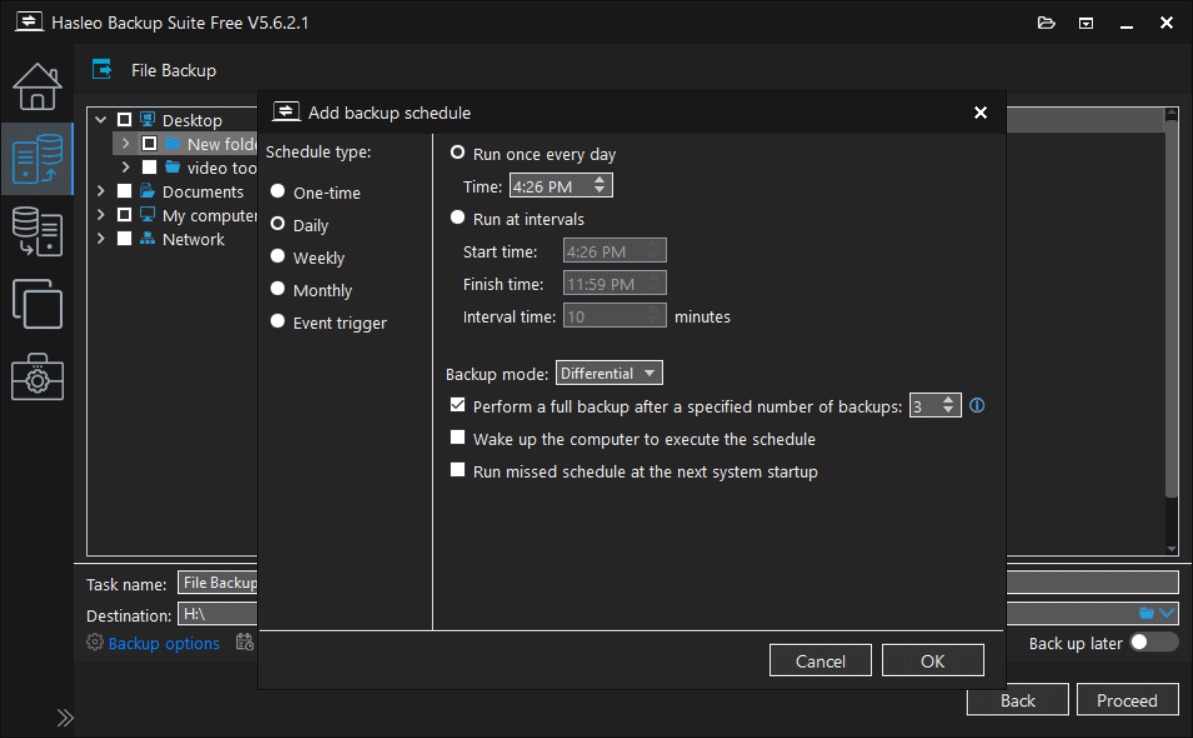
It can act as differential backup software, effectively securing the operating system and critical data by capturing only changed data to maximize storage efficiency.
Core Features
- Backs up and restores the Windows system, disks, partitions, files, and folders.
- Compresses, splits, merges, mounts, encrypts, and checks backup image files.
- Sets up a backup mode such as full, incremental, and differential, and chooses an image retention policy to automatically delete old backups.
- Restores only changed blocks to improve restore speed via Delta Restore.
- Creates bootable media for backup and restore when the system fails to boot.
- Automatically performs backup tasks every day/week/month or at system startup/shutdown, user logon/login, or when a USB drive is plugged in.
- Enables 256-bit encryption.
- Identifies and eliminates duplicate data blocks via the Deduplication feature (only available for file backups).
- Restores the system to different computers.
Pros and Cons
| Pros | Cons |
| 1. Cost-free comprehensive features. 2. Delta Restore support. 3. Rescue media builder support. 4. Intuitive navigation layout. | 1. Lack of cloud support. 2. Limited advanced features. |
User Suitability
Hasleo Backup Suite has 5 editions:
- Free/Home: Developed for home users.
- Professional: Developed for home office and businesses.
- Server/Enterprise: Developed for business users.
Free, Home, and professional are available in Windows Vista or above, while Server and Enterprise work on Windows Vista/Server 2008 or later.
Personal Experience
Hasleo Backup Suite is a fast, free, and comprehensive backup tool that serves as a viable alternative to premium paid software.
Equipped with an intuitive wizard-based interface, this software offers a step-by-step guide, simplifying the backup workflow. In my test, it successfully backed up a 95GB system partition in roughly 8 minutes.
However, backing up to a network location requires an initial configuration step: adding the path using Storage Path Management under Tools first. Once added, the location can be selected during the backup process, simplifying subsequent operations.
hasleo-alternative
#7. Paragon Backup and Recovery Community Edition (Data Preservation Specialist)
Paragon Backup and Recovery Community is a free data preservation specialist for Windows 11/10 x64 and ARM64 computers. It allows you to protect files with versatile backup methods to cater to diverse requirements.
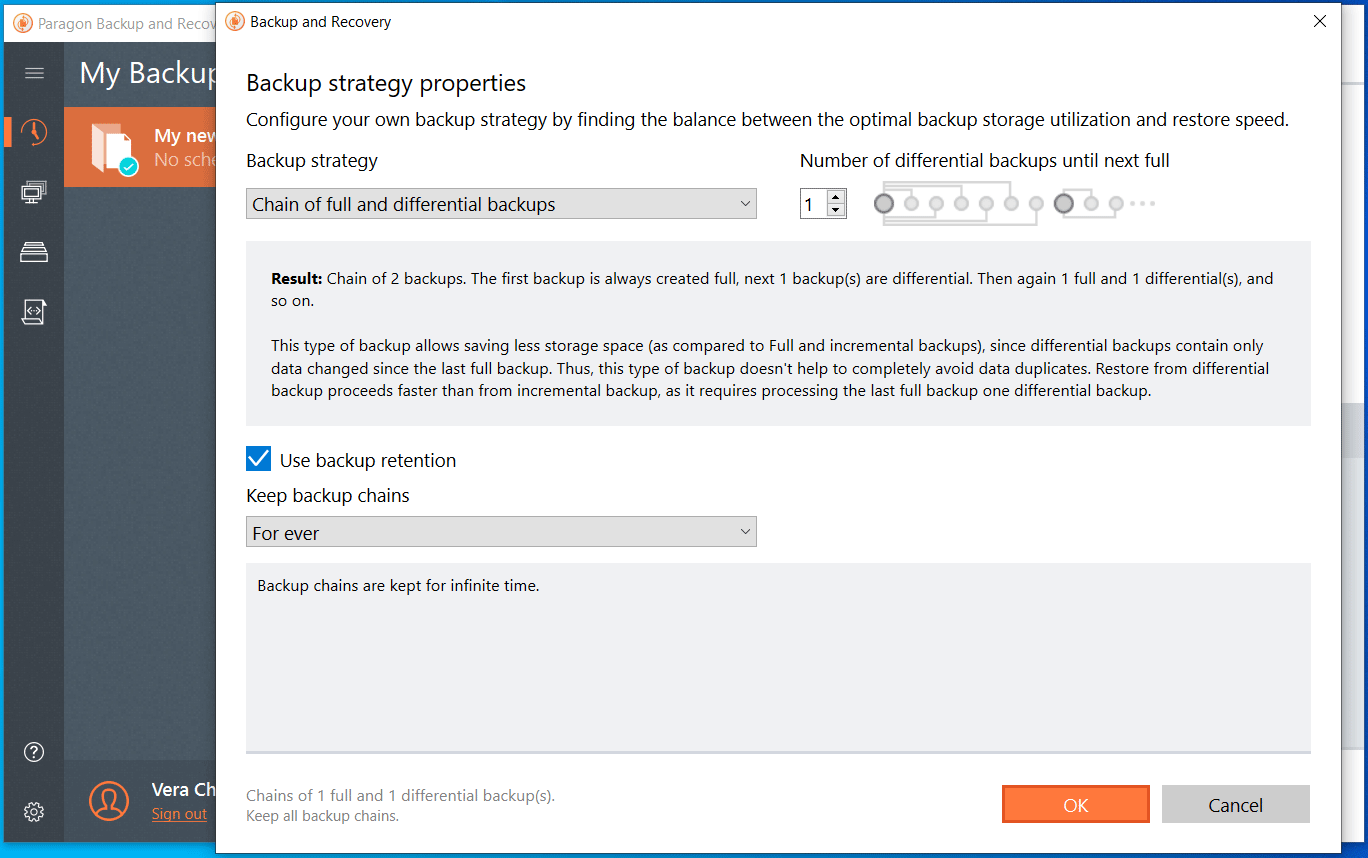
This tool can operate as reliable differential backup software because of its efficient backup technology and comprehensive backup features.
Core Features
- Backs up the entire computer, individual files/folders, and a specific partition.
- Schedules backups on a basis including daily, weekly, monthly, or on an event (system start or user logon) to run automatically to have up-to-date restore points.
- Configures a backup strategy such as full, incremental, or differential backup.
- Defines a backup retention rule to delete old backup images based on specific values, effectively managing storage space.
- Allows for a backup encryption using AES-128, AES-192, or AES-256 algorithm.
- Supports various container formats, such as .pvhd, .vmdk, .vhd, and .vhdx, providing high flexibility for data protection.
- Saves backups to a variety of locations, such as a local folder, external drives, and a network location (SMB share, Amazon S3 compatible storage, and Azure storage).
Pros and Cons
| Pros | Cons |
| 1. Comprehensive backup options. 2. Flexible scheduling and retention. 3. Robust encryption method 4. Versatile virtualization support. 5. WinPE bootable media creation. | 1. Unintuitive interface for non-technical users. 2. No cloud support. 3. Slower speed than alternatives. |
User Suitability
Paragon Backup and Recovery Community Edition is completely free:
- Designed for personal, non-commercial purposes only.
- Available in Windows 10 x64 (1809 and above), Windows 11 x64, and ARM64.
Personal Experience
Paragon Backup and Recovery is a robust solution for local backups, offering consistent performance for both file-level and full system-image differential backups. However, the execution phase requires extended durations to complete.
Initial access to this software mandates third-party authentication via Google or Microsoft accounts. Additionally, the interface is not straightforward to navigate to specific functions, especially when performing a recovery.
Bottom Line
Among the 7 differential backup software, each has its key features, pros, cons, and user suitability. Selecting the proper utility depends on your technical requirements and budget.
For an intuitive, automated experience, use EaseUS Todo Backup, AOMEI Backupper, Paragon Backup and Recovery, and MiniTool ShadowMaker. In professional environments that require high reliability and speed, consider Macrium Reflect.
If a cost is a primary concern, Hasleo Backup Suite delivers premium-grade features. For efficient cloud backup, Iperius Backup fits you.
Differential Backup Software FAQ
A full backup copies all selected data. Both an incremental backup and a differential backup copy only changed data; the former is based on the last backup, while the latter is based on the last full backup.
And a mirror backup creates an exact, real-time copy of the source. If files in the source are deleted, they are still deleted in the mirror.
In contrast, a differential backup creates a copy of the changed data since the last full backup.
About The Author

Position: Columnist
Vera has been working at the MiniTool Team for over 10 years as a technical editor and content writer. She mainly focuses on disk and partition management, data recovery, Windows backup and restore, and PC troubleshooting. Through in-depth software testing and hands-on experience, she has helped users solve a wide range of computer problems and better protect their data on Windows devices.
User Comments :