
What Is an Invalid Image File Header
A file header appears at the beginning of a file, indicating the identifying information about the file such as file size, location, and other file metadata. The file header is a verification means for many applications to identify the file. Therefore, when you get an invalid image file header, it means your device fails to decode the current file.
The invalid image file header error happens usually due to file corruption, bad sectors on the storage device, file system corruption, malware attacks, etc. JPEG or JPG file showing invalid image can be the most common situation. When this error happens, your image will become inaccessible, blurred, corrupted, or have other problems.
How to Fix an Invalid Image File Header
Way 1. Try Another Image Viewer
You can try some image editors, such as PhotoShop, Picasa, Paint 3D, etc., to see if the problematic pictures can be opened. You can right-click on the image with the invalid image file header error and choose Open with. You need to choose another image viewer to open the image.
Optionally, you can open the problematic image using a web browser, like Edge, Google, Safari, etc., to have a try.
Way 2. Convert Image Format
Sometimes, the error that the picture contains invalid image file header can be triggered by an unsupported file format. You can convert the image format to other common image formats.
You can convert image file format by using third-party image converters or manually changing the file extension.
Way 3. Run CHKDSK Command
As we explained before, bad sectors should be responsible for this error in some cases. If your situation is caused by a bad sector, you can resolve the problem by running the CHKDSK command to check and repair logical errors on your device.
If the problematic image is stored on a removable device, you need to connect the device to your computer and then begin the next steps.
Step 1. Press Win + R to launch the Run window.
Step 2. Type cmd and press Shift + Ctrl + Enter to run Command Prompt as administrator.
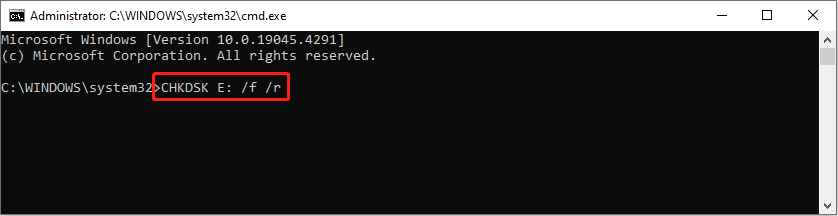
Step 3. Type CHKDSK X: /f /r and hit Enter to run the command line. You need to change the letter X to the drive letter of the target drive.
Alternatively, you can choose a reliable partition manager, like MiniTool Partition Wizard, to check and repair the disk problem professionally. In addition to checking and repairing bad sectors on your device, this partition master can also complete the format, clone, and wipe disk tasks easily. You can read this post to learn how to check partitions for errors.
MiniTool Partition Wizard FreeClick to Download100%Clean & Safe
Way 4. Use a Photo Repair Tool
The last method is to repair the corrupted images. This helps to fix an invalid image file header error on the image effectively. You can look through photo repair software and choose one that is reliable and suits your situation.
If needed, you can try Stellar Repair for Photo. This software is specifically developed for corrupted image repair tasks. It is available for both Windows and Mac operating systems. You can get one to try to repair the problematic images.
Bottom Line
After reading this post, you should know how to open an invalid image by fixing the error with the above four methods. The invalid image file header is a common issue. Hope this post resolves your problem in time.
User Comments :