
Ready to party but error code 10011 or 10009 pops up in Party Animals? Recently, some players have reported facing the Party Animals login failed error. It can be frustrating that the error occurs when players chill out by playing this new, cute game. Here’s a post from MiniTool that explains why it is happening and how to solve it.
Party Animals Login Failed
Party Animals is a fun multiplayer physics-based party game developed by Recreate Games and published by Source. In the game, players can choose their preferred animals to compete against others or engage in fierce battles by punching, kicking, and using weapons. Since its release in September 2023, the game has attracted many players.
Like other games, Party Animals is not immune to login failure issues. Some players may encounter Party Animals error codes 10011 and 10009 when logging in. The Party Animals login failed error can prevent players from connecting with friends, enjoying its features, and immersing themselves in the excitement of gameplay. We have compiled several available solutions for your consideration about how to fix Party Animals error failed to login.

Possible Causes for Party Animals Failed to Login
Experiencing error codes like 10011 and 10009 in Party Animals can be quite aggravating, particularly when you’re excited to participate in the lively chaos. If you receive Party Animals error code 10011 or Party Animals error code 10009, it indicates an issue connecting to the Party Animals server. The Party Animals login failed error may arise from a range of causes:
- Complications with the Steam verification service
- Corrupted Steam files
- Unstable network environment
- Corrupted or missing game files
- Server overload due to high player traffic
- Windows firewall blocking the game
How to Fix Party Animals Error Failed to Login
You can try the following methods to fix the Party Animals login failed error. Some of these methods need manual configuration adjustments on your computer, which may pose certain risks. Therefore, it is recommended to approach these methods with caution.
MiniTool System Booster TrialClick to Download100%Clean & Safe
Fix 1: Run Internet Connections Troubleshooter
Maintaining a reliable internet connection is crucial as we heavily rely on it for work and studying. If you encounter lags when playing Party Animals and receive Party Animals error code 10011 or 10009, you can use the internet connection troubleshooter to resolve different internet connection issues.
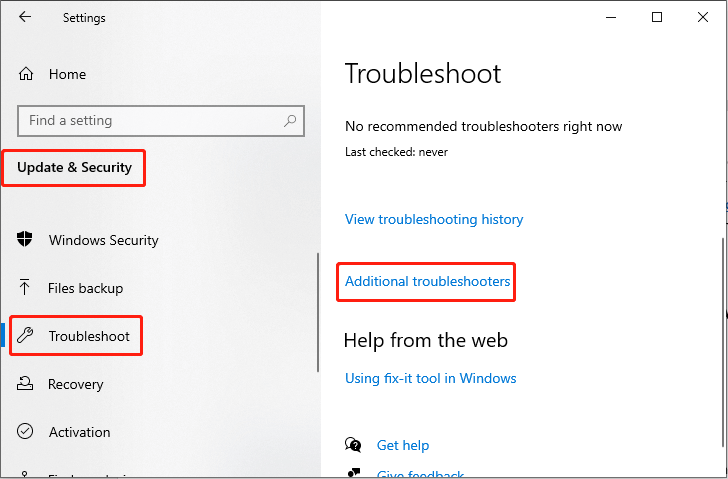
Step 1: Type Troubleshoot settings in the Windows Search box and press Enter.
Step 2: In the pop-up window, choose the Additional troubleshooters option in the right panel.
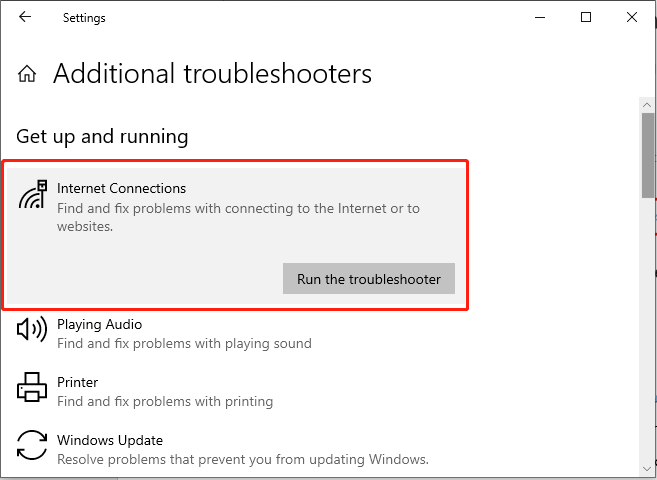
Step 3: Click Internet Connections from the list and choose the Run the troubleshooter button.
Fix 2: Allow the Game Through the Windows Firewall
Without a doubt, Windows Firewall protects your data and computer. However, to some extent, it may sometimes mistakenly intercept trusted programs and cause some inconvenience. Therefore, you can check if the firewall is blocking a port or a program such as Party Animals.
Step 1: Press the Win + I key combination to open Windows Settings.
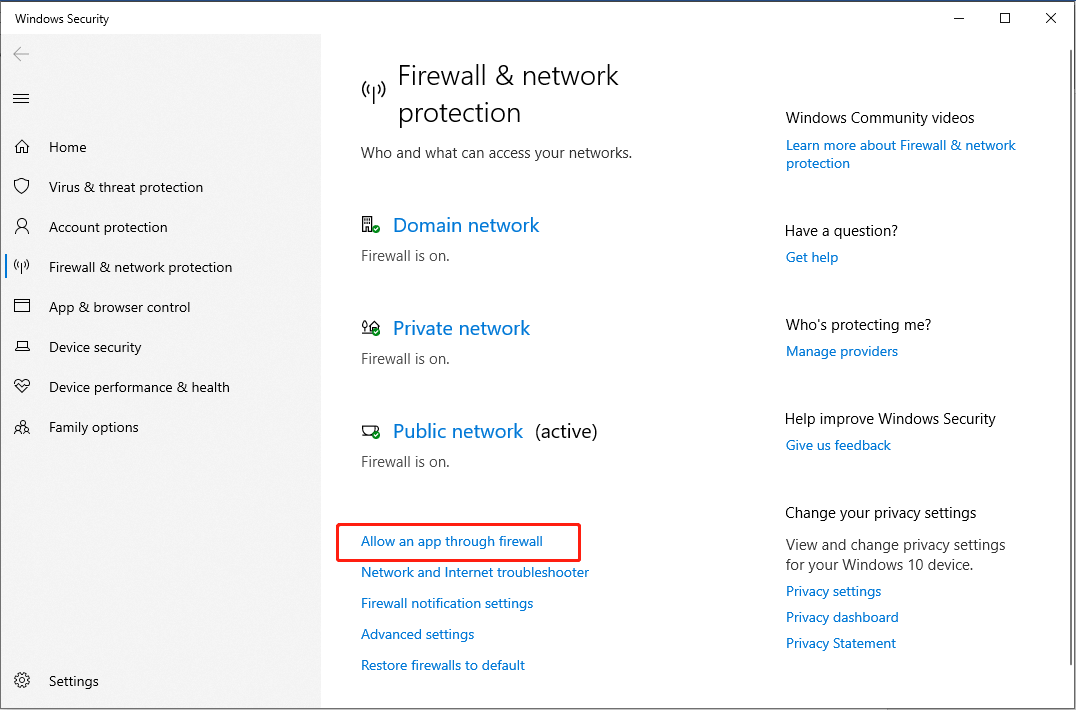
Step 2: Go to Update & Security > Windows Security > Firewall & network protection.
Step 3: In the pop-up window, click Allow an app through firewall.
Step 4: In the next interface, click the Change settings button.
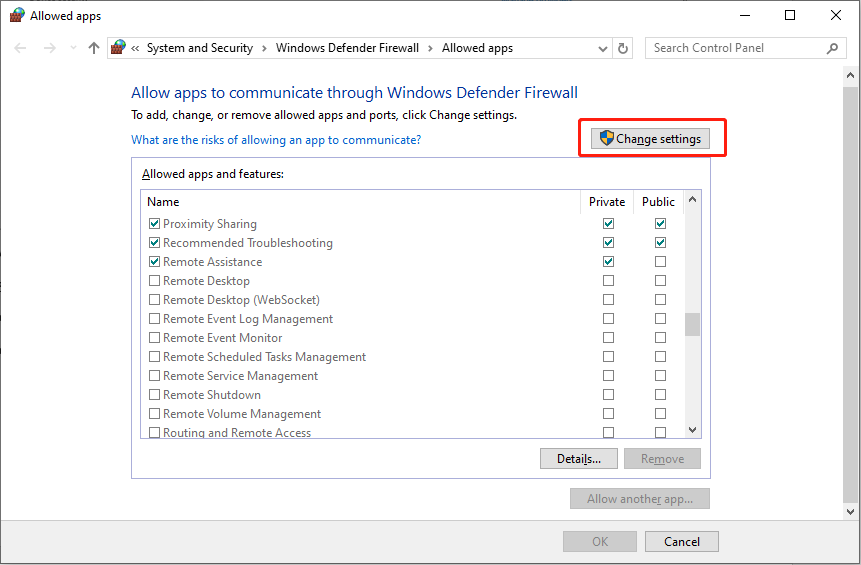
Step 5: Locate Party Animals and make sure the checkboxes under Private and Public are checked.
Relaunch the game and check if the Party Animals login failed issue is resolved.
Fix 3: Verify the Integrity of Game Files
Corrupted or missing game files can affect connectivity between games and servers. To fix the Party Animals login failed error, consider using the Steam platform’s feature ‑‑ Verify the integrity of game files. This can enhance connection stability by identifying and fixing any issues with the game installation.
Step 1: Click the Steam icon on your desktop, navigate to your Steam Library, right-click Party Animals, and select Properties.
Step 2: Next, navigate to the Installed Files tab in the left pane and click the Verify integrity of game files button in the right panel.
During this procedure, the game files will undergo a scan for any damage, and then the downloading will commence.
MiniTool Power Data Recovery FreeClick to Download100%Clean & Safe
Fix 4: Disable VPN
Users have reported encountering network problems when using a Virtual Private Network (VPN). Windows users can use a VPN to circumvent certain network limitations set by their internet service provider or to improve routing for a better connection to Party Animals’s server. If you are using a third-party VPN for your internet connection, disable the connection and re-try the game. Here to do:
Step 1: Press Win + I together to open Windows Settings and click Network & Internet.
Step 2: Navigate to the VPN tab, and choose to disconnect the connected VPN device.
Bottom Line
Now, you may know some feasible solutions to fix this annoying login failure issue. At the same time, you can also try to simply restart the router to fix the Party Animals login failed error. Hope you can continue to enjoy your gaming time.
User Comments :