
It can be frustrating if you mistakenly delete valuable video tweets on Twitter. Do you have any idea how to recover deleted Twitter videos? Is it even possible? Check out this article on MiniTool for comprehensive details.
Is It Possible to Recover Deleted Twitter Videos
Twitter, renamed X in 2023, is one of the most visited social networking service platforms. You can upload videos, text messages, or images on Twitter to record your life or share your experiences with other users. However, sometimes you may delete your precious videos due to computer lag or wrong operation.
In such a situation, how to see deleted Twitter videos? Is it possible to do that? According to online resources, deleted Twitter tweets or videos are usually permanently deleted and cannot be recovered. However, there is another saying that Twitter will retain the deleted content in the archive, and you can regain access to the deleted content by downloading the archive file.
So, you can try downloading the archive of your data and check if the deleted videos are there.
First, go to the Twitter official website and log into your account.
Next, click More > Settings and privacy > Download an archive of your data.
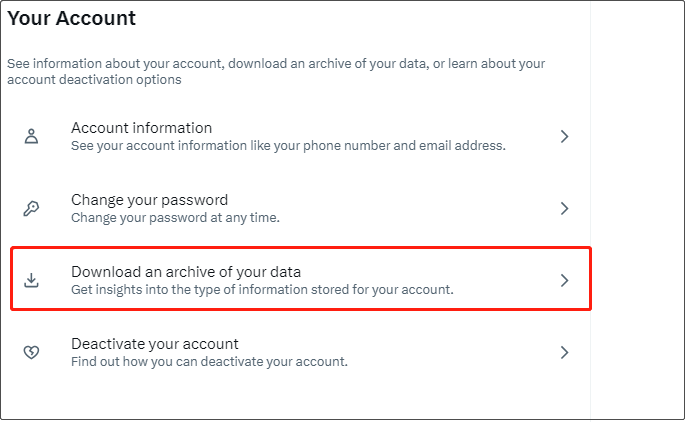
Next, verify your password, and click Request archive. It may take 24 hours or more to generate the required archive files.
If you cannot find the deleted videos from the archive data, you may consider the following ways to restore your videos.

How to Recover Deleted Twitter Videos From Local Storage
Since the videos uploaded to Twitter are locally stored on your PC hard drive or your mobile phone, you can use professional and green file recovery software to carry out video recovery. Here we introduce two reliable tools for Windows and Android phones to help you re-access deleted videos.
On Windows:
MiniTool Power Data Recovery is the best free data recovery software that is specially designed for Windows operating systems. Provided that new data hasn’t overwritten the missing or deleted files on your computer’s hard drive, this tool can locate them and enable you to save them. The software offers a wide range of file recovery capabilities, from video and photo recovery to document and email recovery.
You can download and install MiniTool Power Data Recovery Free to recover up to 1 GB of files for free.
MiniTool Power Data Recovery FreeClick to Download100%Clean & Safe
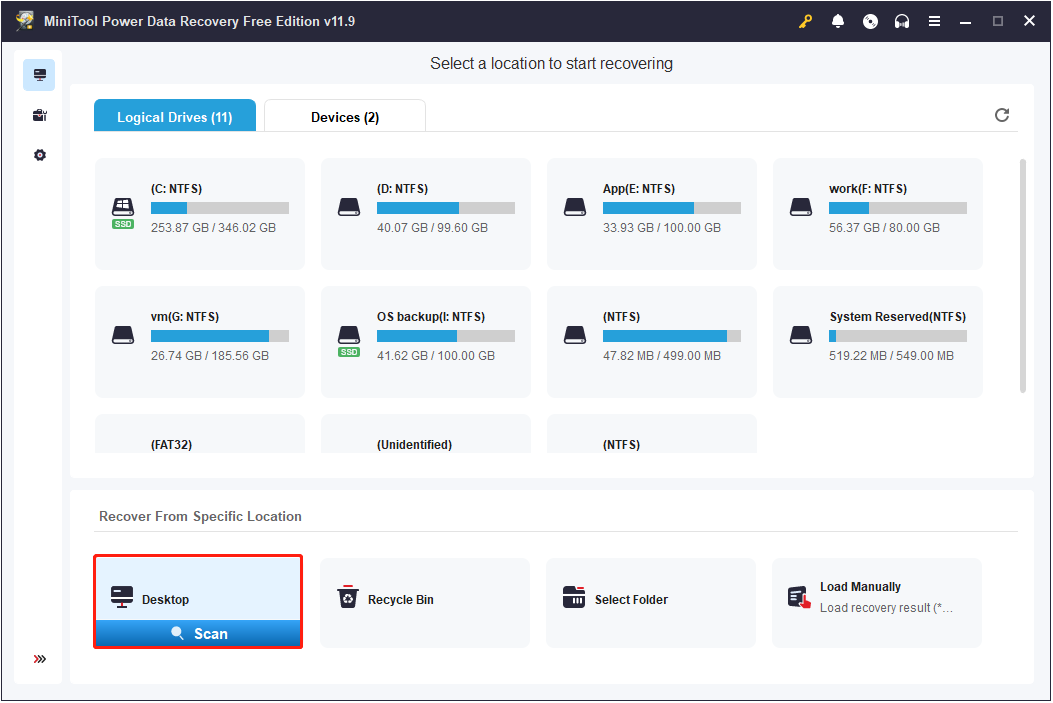
Step 1. Run MiniTool Power Data Recovery Free. On its home page, select the target partition or location from which you want to recover videos, then click the Scan button.
Step 2. Once the scan is completed, you can start locating the videos you need. Go to the Type category, expand Audio & Video, and then you can view all found videos by video format.
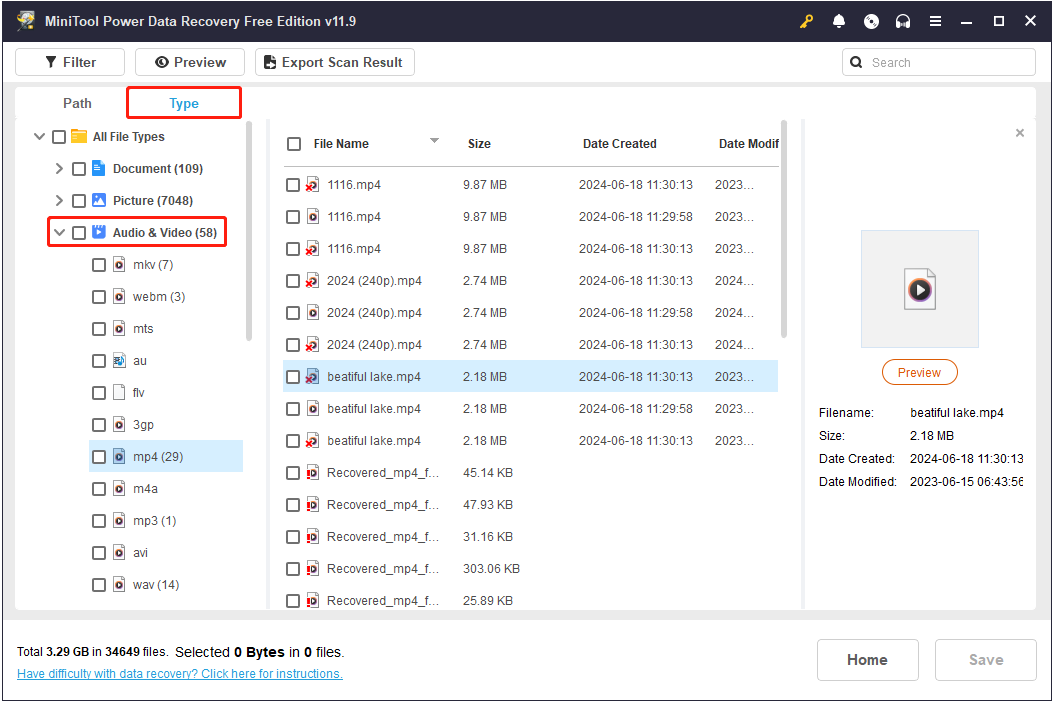
To verify the video is the wanted one, you can double-click on it to preview it. This software supports previewing videos that are not larger than 2 GB in size.
Step 3. Finally, tick the checkboxes next to all required video files, then click the Save button. In the new window, choose a safe location to save the recovered items.
On Android phones:
If you want to recover deleted videos from your Android phone, you can use MiniTool Mobile Recovery for Android, a professional file recovery tool for Android devices. You can utilize it to restore videos, photos, messages, etc. from both Android internal storage and SD card.
This tool provides you with a free recovery feature that allows you to recover 10 files of the same type for free each time.
MiniTool Android Recovery on WindowsClick to Download100%Clean & Safe
Read this post to learn how to use MiniTool Mobile Recovery for Android: How to Recover Deleted Videos on Android Phones.
Bottom Line
In a word, you can try to recover deleted Twitter videos by downloading the archive data. If that doesn’t work, then you can consider employing data recovery software as an alternative.
If you face any problems while using MiniTool Software, please reach out to the support team for assistance at [email protected].
About The Author

Position: Columnist
Shirley holds a bachelor’s degree in English and has been an editor at the MiniTool Team for many years. She specializes in IT-related content, with a focus on data recovery, file backup, disk management, and other technical topics. She is committed to delivering clear, accurate, and practical solutions to help users resolve common computer issues.
User Comments :