
What is Vprotect application? Whether can it be removed? How to remove the Vprot.exe Vprotect application? This post from MiniTool will show you the answers and solutions. In addition, you can also visit MiniTool to find more Windows solutions and tips.
What Is Vprotect Application?
Some users complain that there is the Vprotect application on their computer. Users say they do not download the Vprotect application on their computer and they do not know what it is.
The Vprotect application is an application that is developed by AVG technology. The Vprotect application is installed automatically along with the AVG antivirus or the AVG Toolbar. Hence, it has the same permission as the AVG antivirus program.
In addition, the Vprotect application is shown as the vprot.exe in the Task Manager. In general, it will not consume a lot of resources and do not harmful to the computer. But, some antivirus software says the Vprotect application is malware. To some worse situation, the Vprotect application high CPU problem will occur.
Hence, whether is the Vprotect application safe and whether can it be removed from the computer?
Is the Vprotect Application Safe on Computer?
The vprot.exe Vprotect application has the same components of the AVG antivirus programs, so it is not crucial in the overall process. However, the Vprotect application has the same permissions on computer as the Vprotect application, so it will scan your computer without your permission.
In addition, there are some error messages showing up indicating that the Vprotect Application failed to work. Or it sometimes pops up to ask users to buy a license. Hence, people think this the Vprotect application is a little suspicious.
Since the Vprotect application is able to scan your computer without your permission, it may also operate on your computer freely such as collecting your important files so as to lose privacy.
So in terms of safety, it is highly recommended to remove the vprot.exe Vprotect application on your computer.
Therefore, in the following section, we will show you how to remove the Vprotect application.
How to Remove Vprotect Application?
In order to remove the Vprotect application, the following section will list two different ways.
Way 1. Remove Vprotect Application via Task Manager
In the beginning, we will show you how to remove the vprot.exe Vprotect application from the Task Manager.
Now, here is the tutorial.
Step 1: Right-click on the taskbar and choose Task Manager from the context menu to continue.
Step 2: In the pop-up window, go to the Details tab.
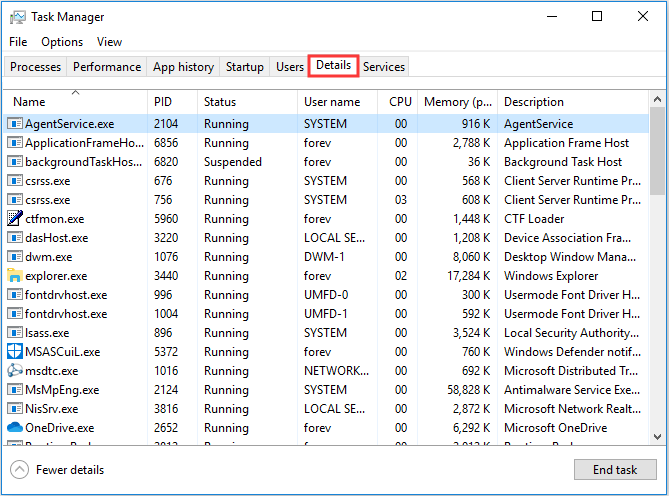
Step 3: Then scroll down to find the vprot.exe and select it. Then right-click it to choose Open file location to continue.
Step 4: In the pop-up window, the folder is the Vprotect application has been installed and select all items in this folder. (To select all items, you can press Ctrl key and A key together.)
Step 5: Then press Shift + Delete keys together to delete all files in this folder.
After you have finished all steps, you have removed the Vprotect application from your computer successfully.
Way 2. Remove Vprotect Application via Control Panel
Here, we will introduce the second way to delete the vprot.exe Vprotect application from the Control Panel.
Now, here is the tutorial.
Step 1: Type Control Panel in the search box of Windows and choose the best-matched one. Then double-click it to enter its main interface.
Step 2: In the pop-up window, choose Uninstall a program under Program section to continue.
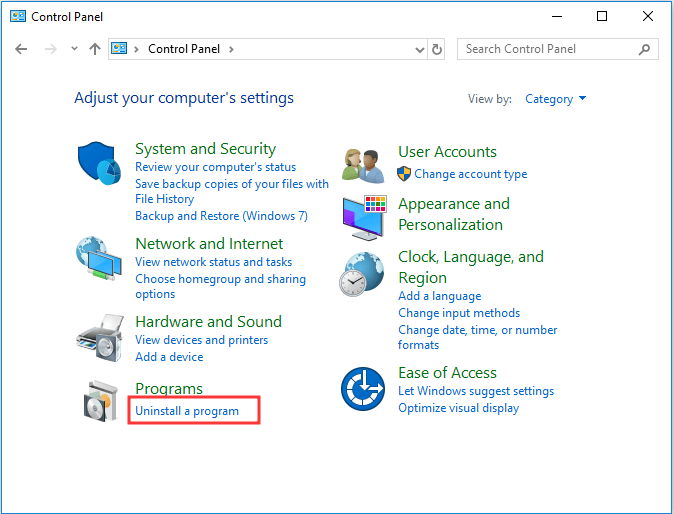
Step 3: Then select the Vprotect application and all related programs. Right-click each one and choose Uninstall to continue.
When you have completed all steps, you have successfully deleted all Vprotect applications on your computer.
Final Words
To sum up, this post has demonstrated what the Vprotect application is and whether it will cause damage to your computer. In addition, we also show 2 different ways to remove Vprotect application from your computer safely.
User Comments :