
Windows 11 KB5009566, a Patch Tuesday update for Windows 11, is available for Windows 11 users not in the Windows Insider Program. MiniTool Software will show the improvements in it and how to get it on your computer in this post.
MiniTool Power Data Recovery TrialClick to Download100%Clean & Safe

Windows 11 KB5009566 Rolls out to the Public
After the Christmas and New Year holidays, Microsoft begins its new rollout of Windows update. Windows 10 KB5009543 is a cumulative update for Windows 10 21H2, Windows 10 21H1, and Windows 10 20H2. As a new Windows version, Windows 11 also gets its new patch update: Windows 11 KB5009566.
Now, Windows 11 KB5009566 is available for Windows 11 users not in the Windows Insider Program. It is part of the Patch Tuesday cycle. If you can’t find this update in Windows Update or you are a Windows 11 Insider, you can download Windows 11 KB5009566 from Microsoft Update Catalog.
This Patch Tuesday release mainly contains some security fixes and improvements. If you missed the last release, this new release can fill in what you have missed. For example, if you are still using November 2021 Patch, you will get all the fixes in December 2021 after installing Windows 11 KB5009566.
How to Get Windows 11 KB5009566?
Way 1: Install Windows 11 KB5009566 from Windows Update
You can directly install Windows 11 KB5009566 via Windows Update. Here is a guide:
- Go to Start > Settings > Windows Update.
- Usually, the system can automatically get the available updates. However, you may not find Windows 11 KB5009566 there. If so, you can click the Check for updates button to manually get it. The full title of this release is 2022-01 Cumulative Update for Windows 11 for x64-based Systems (KB5009566).

Way 2: Download Windows 11 KB5009566 from Microsoft Update Catalog
If you have joined the Windows Insider Program, you will not see this release even you manually check for updates in Windows Update. Does this mean that you can’t get it on your computer? Not exactly! You can download an offline installer from Microsoft Update Catalog. Any user can use the offline installer to install Windows 11 KB5009566.
Here, you need to know that Windows 11 only has 64-bit versions.
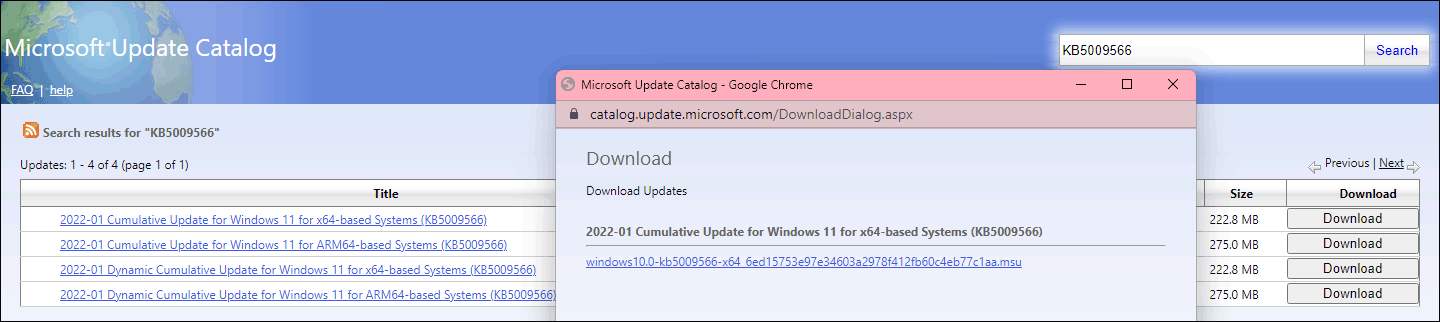
- Go to the download page for Windows 11 KB5009566 from Microsoft Update Catalog.
- Find a proper version according to your situation. Then, click the Download button next to it.
- You will see a window with a .msu download link. If you are using Edge, you can directly click it to download this Cumulative Update on your computer. If you are using another web browser, you need to copy and paste the link to the address bar for downloading.
Fixes and Improvements in Windows 11 KB5009566
Currently, the official explanation of Windows 11 KB5009566 is not very clear. It’s likely that this Windows 11 update includes some fixes to the operating system’s internal functionality. No more information is released to the public.
Latest News of Windows 11
Microsoft has released the first update for Windows 11 insiders. It is Windows 11 Insider Preview Build 22526. Besides, a new Media Player for Windows 11 has been rolled out to replace Groove Music.
About The Author

Position: Columnist
Stella has been working in MiniTool Software as an English Editor for more than 8 years. Her articles mainly cover the fields of data recovery including storage media data recovery, phone data recovery, and photo recovery, videos download, partition management, and video & audio format conversions.
User Comments :