
What is the wnaspi32.dll? What is wnaspi32.dll used for? What does the error wnaspi32.dll error missing mean? How to fix the error that wnaspi32.dll is missing from your computer? This post from MiniTool will show you the solutions.
What Is Wnaspi32.dll?
Wnaspi32.dll is a Dynamic Link Library file that is an essential system file of the Windows operating system. The wnaspi32.dll usually contains a set of procedures and driver functions.
The wnaspi32.dll is commonly associated with wnaspi32 applications and it is an essential component of Windows operating system because it ensures that Windows programs run normally.
So, if the wnaspi32.dll file is missing from your computer, the program will fail to launch.
And the error wnapi32.dll missing may be caused by multiple reasons, such as Windows registry issues, malicious software, faulty applications and so on.
How to Fix Wnaspi32.dll Missing Windows 10
As we have mentioned in the above part, the error loading wnaspi32.dll may cause the Windows programs running improperly. So, it is necessary to fix the error wnaspi32.dll missing.
So, in the following section, we will show you how to solve the error that wnaspi32.dll is missing from your computer.
Way 1. Reinstall the Program
If you encounter the error wnaspi32.dll missing when running a program, you can fix the error loading wnaspi32.dll by reinstalling it.
Just uninstall the program first and download it again from its official site. Then install it on your computer and check whether the error that wanspi32.dll is missing from your computer is solved.
If reinstalling the computer cannot fix the wnaspi32.dll missing, try other solutions.
Way 2. Download the Wnaspi32.dll File
In order to fix the error that wnaspi32.dll is missing from your computer, you can try downloading the wnaspi32.dll file.
Now, here is the tutorial.
1. Click here to download the wnaspi32.dll file. Pay attention to its languages and whether it’s a 32-bit or 64-bit file.

2. The put the wnaspi32.dll file into the application installation folder. Alternatively, you can also put the wnaspi32.dll file into the Windows system directory.
3. After that, restart the program and check whether the error wnaspi32.dll missing is solved.
If this solution does not work, try other ways.
Way 3. Run System File Checker
If there are corrupt system files on your computer, when running the program, you may also encounter the error that wnaspi32.dll is missing from your computer. Hence, you can run System File Checker to check and repair corrupt system files on your computer.
Now, here is the tutorial.
- Open Command Prompt as administrator.
- In the command line window, type the command sfc /scannow and hit Enter to continue.
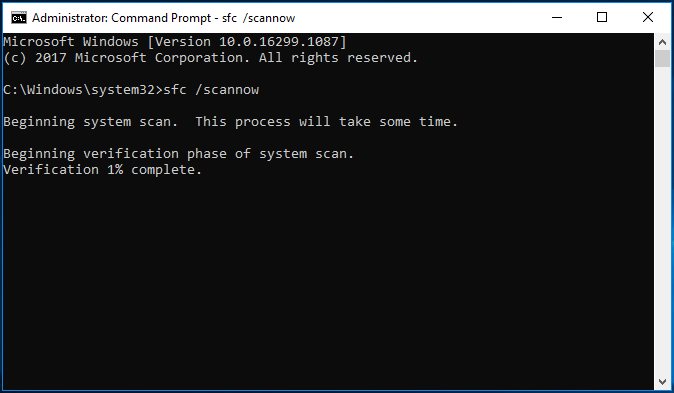
The process will take some time, so please do not close the command line window until you see the message verification 100 completed.
When it is finished, reboot your computer and check whether the error wnaspi32.dll missing is solved.
Way 4. Update Driver for Hardware Device
The error that wnaspi32.dll is missing from your computer may occur when you play a 3D video game. So, in order to fix the wnaspi32.dll missing error, you can choose to update driver for hardware device.
Now, here is the tutorial.
- Press Windows key and R key together to open Run dialog.
- Then type devmgmt.msc in the box and click OK to continue.
- In the Device Manager window, expand the Sound, video and game controller and select your video device.
- Then right-click it to choose Update driver to continue.
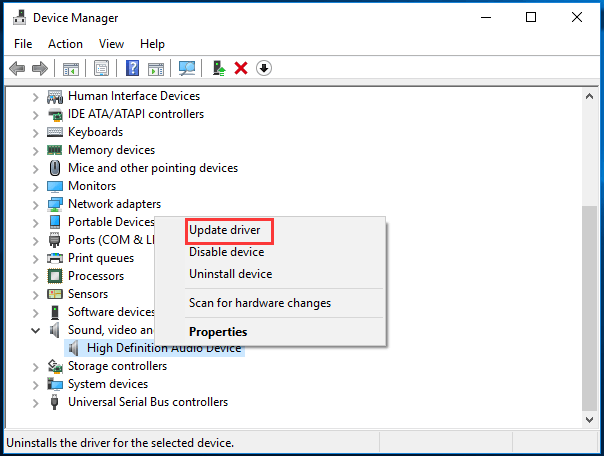
Then you can follow the on-screen wizard to continue. When it is finished, reboot your computer and check whether the wnaspi32.dll loading error is solved.
>Way 5. Scan Virus on Your Computer
If there is virus or malware on your computer, you may also encounter the error that wnaspi32.dll is missing from your computer. So, in order to fix this error, you can choose to scan and remove the virus on your computer.
Now, here is the tutorial.
- Press Windows key and I key together to open Settings.
- Then click Update & Security.
- Go to Windows Defender tab, and click Windows Defender Security Center.
- Click Virus & threat protection.
- Then click Quick scan to scan your computer.
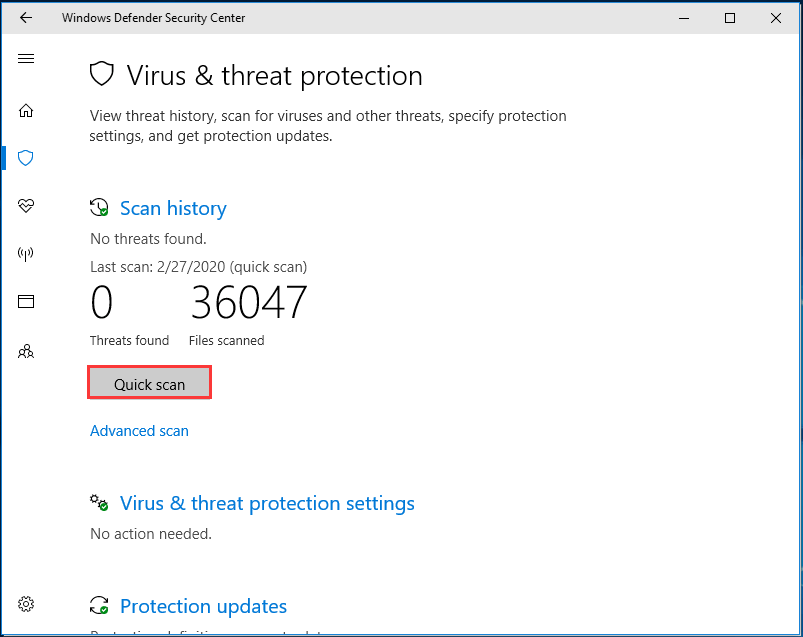
If there is virus or malware on your computer, Windows Defender will remove it. When the process is finished, reboot your computer and check whether the error wnaspi32.dll missing is solved.
Final Words
To sum up, this post has introduced 5 ways to fix the error that wnaspi32.dll is missing from your computer. If you have any better solution to fix this error, please share it in the comment zone.
User Comments :