
Delta Force: Hawk Ops is an FPS game where you can enjoy an intense game experience across various multiplayer modes. You can get the test version on your PC and play this game in advance. But you may get troubles such as Delta Force: Hawk Ops stuck on loading. Relax! Here are some possible solutions for you to troubleshoot this problem.
Fix 1. Restart the Computer/Game
The temporary issues on your computer or the software may prevent you from loading the game properly. You can simply restart the game or your computer to repair those glitches during the reboot process.
You can also restart your router or reconnect the network on your computer for a stable network connection. Afterward, check if the Delta Force: Hawk Ops not loading problem is resolved. If not, please move on to the next solution.
MiniTool System Booster TrialClick to Download100%Clean & Safe
Fix 2. Close Background Programs
If you have run a bunch of applications in the background, you may find your computer becomes lagging. Additionally, those programs may interfere with the performance of other programs. You can close unnecessary programs on your computer to free up system resources and discern whether there are conflicts between different programs.
Step 1. Right-click on the Windows icon and choose Task Manager.
Step 2. Browse the Processes list to find unnecessary apps. Right-click on it and choose End task to close it.
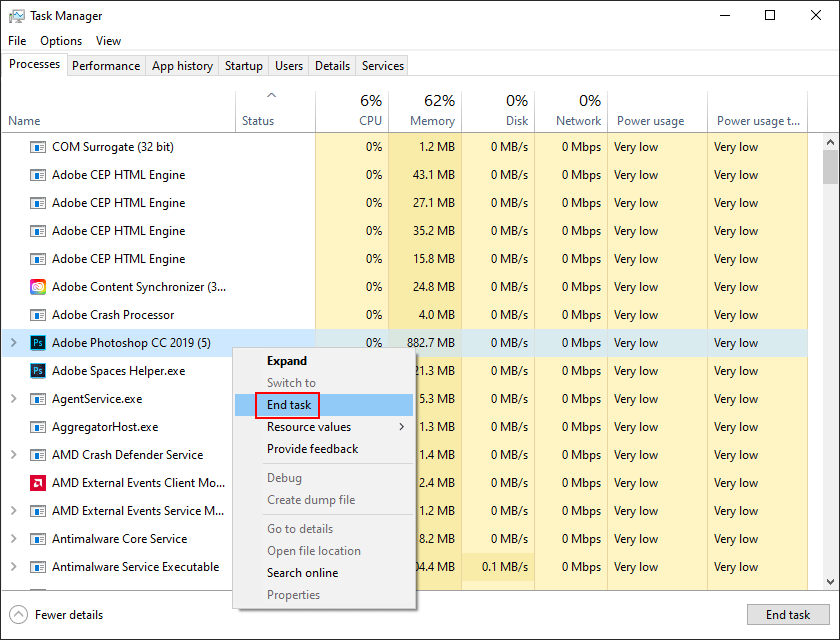
After completing the operations, you can relaunch Delta Force: Hawk Ops to verify if its loading issue is fixed.
Fix 3. Verify Game File Integrity
The Delta Force: Hawk Ops stuck on loading issue blocks you from accessing the game. In addition to the above solutions, you can verify the game file integrity to rule out problems caused by corrupted or missing game files.
On the Steam game platform, you can open the Library to find Delta Force: Hawk Ops and right-click on it to open the Properties window. Then, change to the Installed Files tab and click Verify integrity of game files. Steam takes a few minutes to complete the check and repair process.
Apart from relying on the embedded feature of a game platform, you can also replace the corrupted or missing game files by yourself with previous backups. To back up game files in time, using data backup software assists you the most. MiniTool ShadowMaker is highly recommended with its periodical backup feature and wide compatibility of different types of files and data storage devices. You can get this tool to experience its backup features for free within 30 days.
MiniTool ShadowMaker TrialClick to Download100%Clean & Safe

Fix 4. Disable In-Game Overlay
Game platforms, such as Steam and Discord, contain the overlay feature that allows other information layers to display on the top of the current page. However, this feature might cause the Delta Force: Hawk Ops loading resources stuck at 100% issue. You can disable this feature to see if that helps.
Step 1. Open Steam and go to the Settings interface.
Step 2. Change to the In Game tab and turn off the Enable the Steam Overlay while in-game option.
In some cases, Delta Force: Hawk Ops stuck on loading is triggered by the overload of the game server. You can go to check the server status by visiting the official website of Delta Force: Hawk Ops.
Final Words
It is annoying to experience Delta Force: Hawk Ops stuck on loading stuck on loading. If you are stuck on this page, read and try the solutions mentioned in this post. Hope one of them can help you out in time.
User Comments :