
Can’t install Steam because of the “Destination folder must be empty” error? This is not a new problem but it always troubles people. If you also get this issue, this MiniTool post may give you some inspiration.
Steam Destination Folder Must Be Empty
You may encounter the “Destination folder must be empty” error when installing Steam on the computer. This error occurs when you reinstall Steam without clearing the previous folder or add a new library. As the error message explains clearly, you should clear the installation folder to let Steam install properly.
I have been using whisky to run steam on mac for a while now just today it stopped opening saying "Steam Webhelper Not responding" I assumed that this meant Steam wasn't updating correctly so I uninstalled steam with the hope to have it work when I reinstalled it again. Now when I try to install steam The error "Destination folder must be empty" appears, I tried to delete the steam file when browsing files to install steam in an this didn't work either.reddit.com
Preliminary Step: End All the Steam Processes via Task Manager
To manage Steam files, you should first terminate all the Steam-related tasks on the background; otherwise, you will find some files cannot be removed. Here is how to do it.
Step 1. Press Shift + Ctrl + Esc to open Task Manager directly.
Step 2. Change to the Detailed tab to find the Steam-related and right-click on them to choose End process tree one by one.
After closing all those processes, it’s time to start the following methods to resolve the “Destination folder must be empty” error.
Way 1. Create a New Steam Folder
When you uninstall Steam and can’t install Steam back due to this error, you can simply create a new folder to install this program.
Step 1. Press Win + E to open File Explorer.
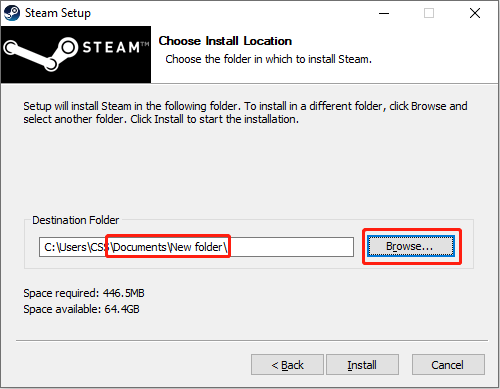
Step 2. Head to the Documents folder to create a new folder. You shouldn’t save any data into the newly created folder.
Step 3. Double-click on the setup file of Steam to start the installation process, but you should choose the newly created folder as the installation destination before clicking the Install button.
Way 2. Clear the Previous Folder
If the first method doesn’t work for your case, you need to clear the previous game folder to complete the Steam installation process. However, before deleting the Steam folder on your computer, you can back it up; thus, there is no need to reinstall your games after Steam installed.
Step 1. Back Up the Steam Folder
MiniTool ShadowMaker can help you back up files and folders conveniently. This backup tool embeds automatic file backup and periodic file backup features so that you don’t need to perform manual backup every time. Furthermore, here are three backup types to avoid duplicated backup files. You can get this free tool to experience its versatile backup features for free within 30 days.
MiniTool ShadowMaker TrialClick to Download100%Clean & Safe
1. Launch the software and change to the Backup tab.
2. Select SOURCE to choose the Steam folder and then click DESTINATION to choose a file path for the backup.
3. Click Back Up Now to start the process. If you want to set the backup interval, click Options > Schedule Settings to create backup files on a daily, weekly, monthly, or event basis.

Step 2. Install Steam
After backing up files, you can delete the Steam folder. Now, download Steam from the official website and follow the instruction to complete the installation process. After this, you can open the backup folder and find the steamapps folder. Copy and paste the steamapps folder to the newly created Steam folder.
Closing
This is all about how to fix the Steam destination folder must be empty error. To sum up, you just need to ensure the Steam installation folder doesn’t save any data. Here are two options and hope one of them help you resolve your problem.
User Comments :