
Some of you might want to install cracked software on a computer, but you might be concerned that the software will be detected and blocked by Windows 10 or Windows 11. Does Windows 11 detect pirated software? Does Windows 10 block crack software? MiniTool Software can provide the information you are looking for.
What Is Pirated Software?
Pirated software encompasses cracked, altered, or otherwise manipulated software that enables its utilization without the payment of the mandated licensing fees. However, criminals will use cracked software to implant viruses.
The Windows operating system has a relatively complete security mechanism to protect your computer from viruses. You might ask these questions:
- Does Windows 10 detect pirated software?
- Does Windows 11 detect pirated software?
- Does Windows 10 detect cracked software?
- Does Windows 11 detect cracked software?
- Does Windows 11 block cracked software?
- Can I run cracked software on Windows 11?
These are the issues that many people are concerned about. We will talk about them in the next part.
Tips: Protect your computer and data on it
If your files get lost due to virus attacks, you can use MiniTool Power Data Recovery to get them back. This is the best free data recovery software that can work on all versions of Windows.
MiniTool Power Data Recovery FreeClick to Download100%Clean & Safe
To safeguard your computer, you can use MiniTool ShadowMaker to back up your computer regularly. This Windows backup software has a trial edition that enables you to use it for free within 30 days.
MiniTool ShadowMaker TrialClick to Download100%Clean & Safe
Can Windows 10/11 Detect Pirated Software?
A Windows 10 or Windows 11 computer will not detect pirated software in most cases. However, a cracked software might contain malware, viruses, or spyware. If so, Windows defender will block it to protect your computer.
However, if you trust the software, you can whitelist it and make it run on your computer. Here, we wil show you how to whitelist a cracked software on Windows 10/11.
How to Whitelist Software on Windows 10/11?
The steps to whitelist software on a Windows 10 and Windows 11 computer are the same. Here is a universal guide:
Step 1: Click the search icon from the taskbar and search for Windows Security.
Step 2: Select Windows Security from the search result to open it.
Step 3: Switch to Virus & threat protection from the left menu, then click Manage Settings under Virus & threat protection settings to continue.
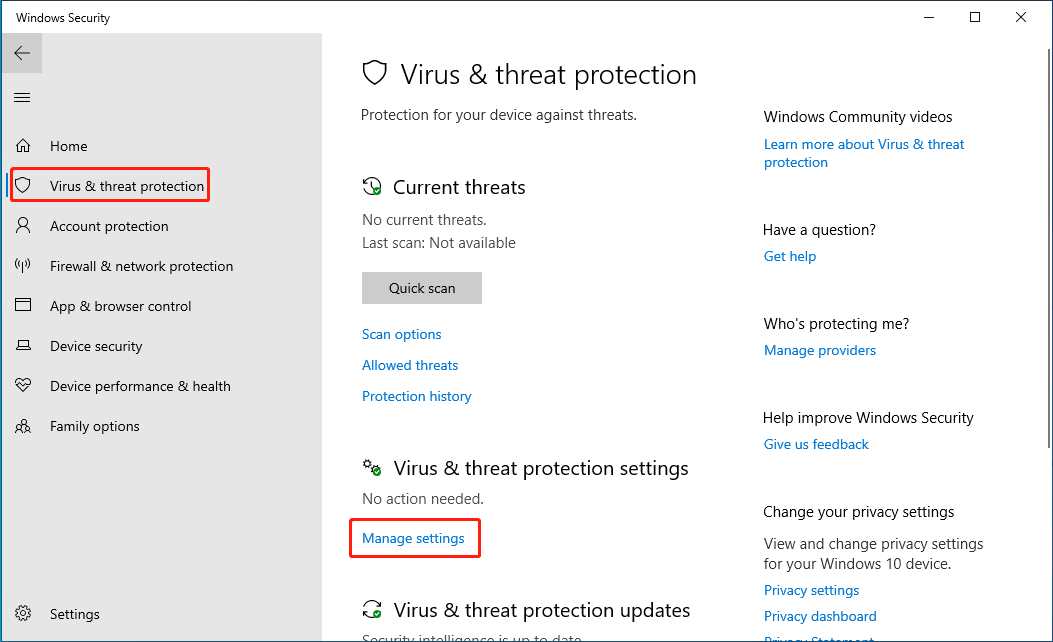
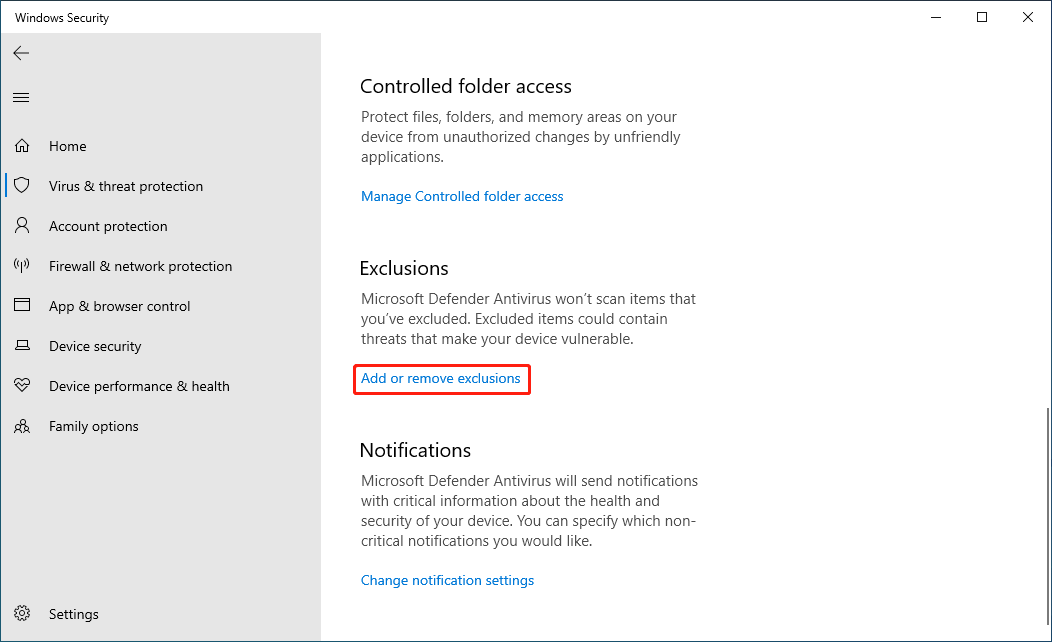
Step 4: On the next page, scroll down and click Add or remove exclusions under Exclusions.
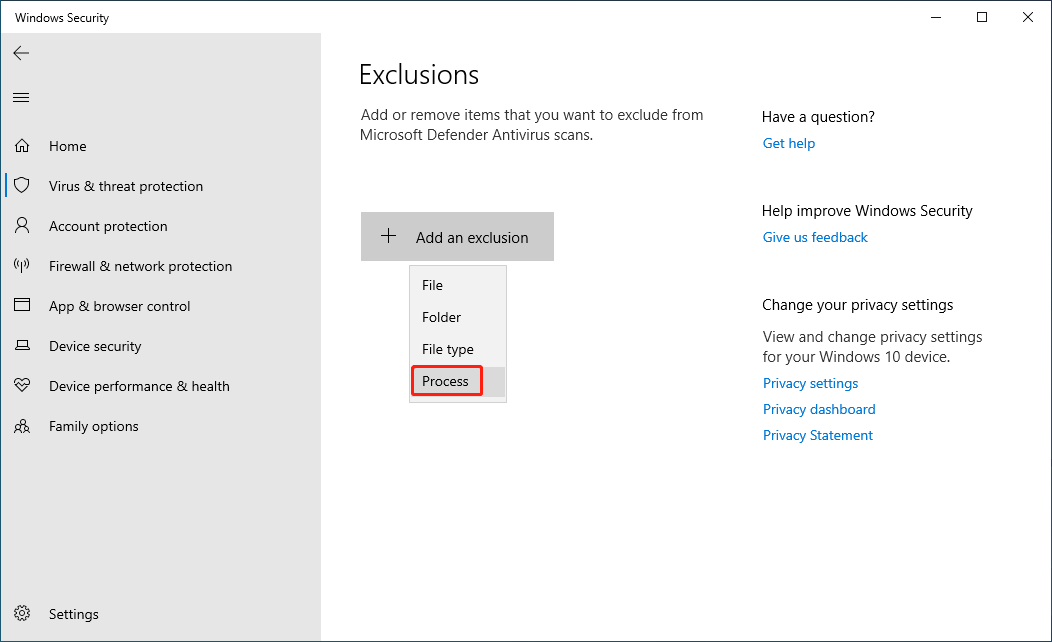
Step 5: Click Add an exclusion and select Process from the drop-down menu.
Step 6: Enter the process name and click Add to put the software to the whitelist.
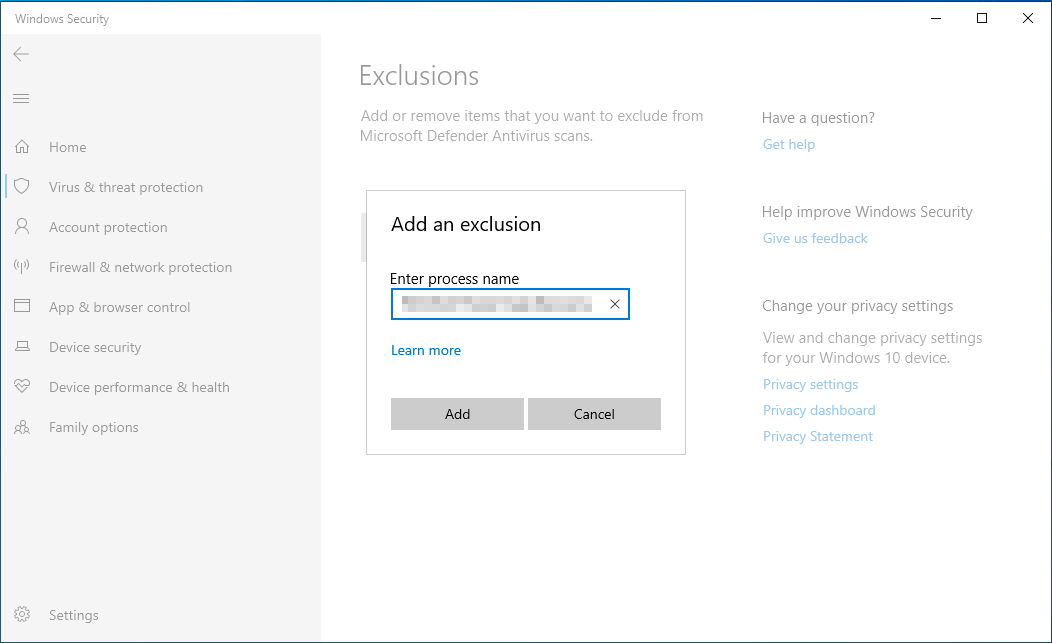
After these steps, Windows Security will not block the running of the added software.
What are the Consequences of Running Cracked Software or Games?
Windows allows you to run cracked software and games, but you will not receive updates from the official releases.
If cracked versions of software or games are infected with viruses and you install and run them anyway, your computer and your personal information will be at risk. So, we think you’d better not use pirated software and games.
Bottom Line
Now, you know Windows 10 or Windows 11 will not detect pirated software, but Windows Security will block it if it finds threats. However, you can whitelist the software using the guide in this post.
About The Author

Position: Columnist
Stella has been working in MiniTool Software as an English Editor for more than 8 years. Her articles mainly cover the fields of data recovery including storage media data recovery, phone data recovery, and photo recovery, videos download, partition management, and video & audio format conversions.
User Comments :