
Google has made Google Play Games available in more countries including the United States, Canada, Mexico, Brazil, and more. Currently, this service is available on Windows PCs and Android devices. In this post, MiniTool will introduce how to download Google Play Games for PC and Android mobile.
What Is Google Play Games?
Google Play Games is a service designed and developed by Google. It supplies a multi-platform gaming experience across PCs, Chromebooks, and mobile.
Google Play Games contains many Android games. It is a stand-alone software. If you install it on your device, you will be able to play Android games without Microsoft’s Android Subsystem for Windows.
Google Play Games Is Available in More Countries
At first, this service is only available on Android devices like mobile phones and tablets. Then, Google made it available on Windows PCs in Korea, Hong Kong, Taiwan, Thailand, and Australia. In November 2022, Google Play Games (Beta) for PC spreads to more countries including the United States, Canada, Mexico, Brazil, Indonesia, Philippines, Malaysia, and Singapore.
Google Play Games beta for PC and Google Play Games mobile app are different. Currently, over 40 games are available in the beta version of Google Play Games for PC. The Google Play Games mobile app is mainly focused on the instant game’s experience where you can jump directly into casual games.
Now, we will talk about Google Play Games download for PC and mobile.
How to Download Google Play Games for PC?
Minimum System Requirements for Running Google Play Games on a Windows PC
Since Google Play Games is still in test, you can only download the beta version from the official site of Google Play Games. If you want to use Google lay Games, your Windows PC should meet the following basic system requirements:
- OS: Windows 10 (version 2004) or later.
- Storage: Solid state drive (SSD) with 10 GB of available storage space.
- Graphics: IntelⓇ UHD Graphics 630 GPU or comparable.
- Processor: 4 CPU physical cores.
- Memory: 8 GB of RAM.
- Account: Windows admin account.
- Hardware virtualization must be turned on.
Google Play Games Download and Install for PC
If your computer meets the above requirements, you can use these steps to free download Google Play Games on your Windows computer.
Step 1: Go to Google Play Games download page.
Step 2: Click the Download beta button to download this app on your device.
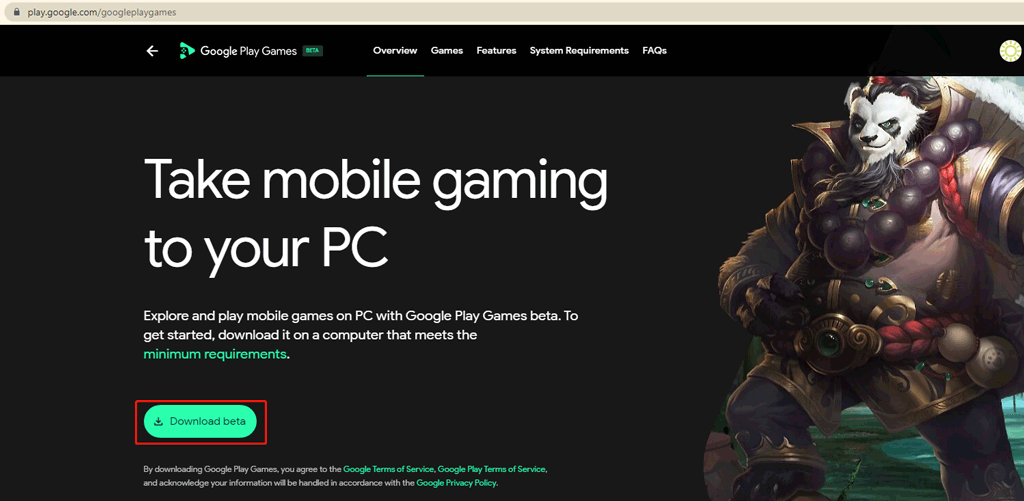
Step 3: Run the downloaded Google Play Games setup file and follow the on-screen guides to install it on your PC.
After installing this software on your device, you can open it and use it to play Android games.
How to Download Google Play Games for Mobile?
Google Play Games is available in Google Play on your Android phone or tablet. You can open the Google Play app on your device, search for Google Play Games using the search bar, and then click the Install button to download and install this app on your Android device. After that, you can open it to play games.
![[FIXED] Windows 10 22H2 Is Not Showing up or Installing](https://images.minitool.com/minitool.com/images/uploads/2022/10/windows-10-22h2-not-showing-up-installing-fixed-thumbnail.png)
How to Download Google Play Games for Mac?
Currently, Google Play Games is only available on PCs and Android devices. If you are using a Mac computer, you are not allowed to download and install this app on your machine. Likewise, Google Play Games is also not available on iPhones and iPads.
Bottom Line
Here are the ways to download Google Play Games for PC and Android mobile devices. If you are interested in this app, you can try it now. Should you have other related issues, you can let us know in the comments.
About The Author

Position: Columnist
Stella has been working in MiniTool Software as an English Editor for more than 8 years. Her articles mainly cover the fields of data recovery including storage media data recovery, phone data recovery, and photo recovery, videos download, partition management, and video & audio format conversions.
User Comments :