
What Is the Apple Numbers App?
The Numbers app is a spreadsheet application that is developed by Apple Inc. You can use it to create beautiful spreadsheets. With real-time collaboration, you can work with your team together, whether they’re using a Mac, iPad, iPhone, or Windows PC.
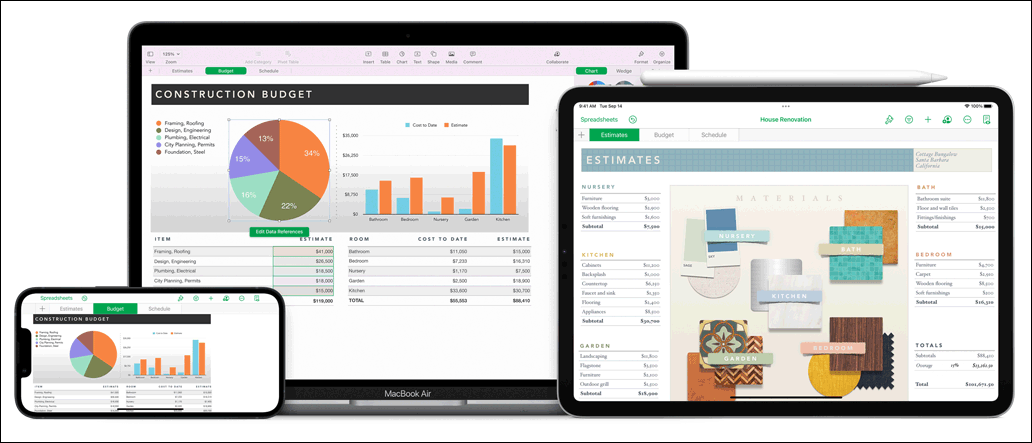
Image source: Apple
In theory, Numbers is available for iOS and macOS. But can you also download the Apple Numbers app on your Windows device and Android phone/tablet? In this post, we will show you how to download Numbers on different platforms. You can also know how to open a Numbers file on your Windows computer.
Apple Numbers App Download for PC
The Numbers app is not available in Microsoft Store. We also search for this app on the internet but only find that there is no reliable download source for Windows. Does this mean that you can’t use the Apple Numbers app on your Windows device?
Of course not. You can still open, create, edit, and share spreadsheets on iCloud.com (>> how to use Numbers on iCloud.com). You can also convert the Numbers file to an Excel-compatible file format and use it on your Windows computer.
Exclusive 50% OFF Revo Uninstaller Pro
Tip: Rescue your lost and deleted files on Windows 11/10
When you use your computer, you may delete some of your important files like your worksheets by mistake. To get them back, you can try MiniTool Power Data Recovery, a free file recovery tool.
MiniTool Power Data Recovery TrialClick to Download100%Clean & Safe
Apple Numbers App Download for Mac
The Numbers app is preinstalled on your Mac computer. If you can’t find it and want to download it again on your machine, you can go to the App Store to download and install it again. You can also go to the Apple download page for Numbers, then click the Download button on the top, and download it on the next page.
The Numbers app can run on macOS 11.0 or later. It is free on Mac App Store. It supports many languages like English, Arabic, Dutch, French, German, Greek, Italian, Japanese, Korean, Malay, Norwegian Bokmål, Polish, Portuguese, Romanian, Russian, Simplified Chinese, and more. The size of this app is about 253 MB. So, you need to make sure your Mac machine has enough free space to download and install the Numbers app.
Apple Numbers App Download for Android
The Numbers app is also not available on an Android phone or tablet. But you can convert it to a readable format and then transfer files to your Android device for use.
Apple Numbers App Download for iPhone/iPad
The Numbers app is available for free downloading in the App Store on your iPhone or iPad. It is compatible with iPhones that are running iOS 14.0 or later, iPads that are running iPadOS 14.0 or later, and iPods that are running iOS 14.0 or later.
You can open the App Store and search for Numbers in it. Then you can tap Numbers to go to the download page to get it on your iPhone or iPad.
Bottom Line
Want to download the Apple Numbers app for your device? It is not difficult to do this. This post shows you the things you can do. Should you have other related issues, you can let us know in the comments.
About The Author

Position: Columnist
Stella has been working in MiniTool Software as an English Editor for more than 8 years. Her articles mainly cover the fields of data recovery including storage media data recovery, phone data recovery, and photo recovery, videos download, partition management, and video & audio format conversions.
User Comments :