
MOM.exe is an integral part of AMD’s Catalyst Control Center, which is a utility that can come bundled with AMD video card drivers. You may wonder if it’s a virus and how to fix the error with it. Now, this post from MiniTool gives you the answers to these questions.
What Is MOM.exe
MOM.exe is part of the Catalyst Control Center, which is a component of the AMD Catalyst software engine that provides video and display customization options. So this is a legal process, located in C:\Program Files (x86)\ATI Technologies\folder.
MOM.exe is not a core file of the Windows operating system, but it is part of the device driver and software for AMD graphics cards. If you are using an ATI Video Graphics card, you may realize that the Catalyst Control Center is part of it, and it is the monitoring program for CCC.
How to Get It on Your Computer?
In most cases, MOM.exe gets installed alongside AMD’s Catalyst Control Center. If your computer came with an AMD or ATI video card, then it probably came with Catalyst Control Center preinstalled, along with CCC.exe, MOM.exe, and other associated files.
When you upgrade your video card, and your new card is an AMD, at that time Catalyst Control Center will often be installed as well. While it is possible to install just the video card driver, it’s more common to install the driver together with the Catalyst Control Center. When that happens, MOM.exe is also installed.
Is MOM.exe a Virus
The legit MOM.exe process is located in the C:\Program Files (x86)\ATI Technologies\folder. it could be malware as a virus can have any name if it is located elsewhere. Some viruses will pretend to be MOM.exe and stay in the Windows or the System32 folder.
Also see: What Happens if You Delete the System32 Folder on Windows?
One way to confirm if it is a virus would be to right-click the file and choose its Properties. If in doubt, scan the file with an online malware scanner that uses multiple antivirus engines. You could also run your antivirus software to check it.
How to Fix the MOM.exe Error
Sometimes, the MOM.exe process will stop working and you will be annoyed by the pop-up error messages.
You may see an error message – MOM.exe could not start or that it had to shut down, and the message box may offer you the additional information that looks like complicated nonsense to most people.
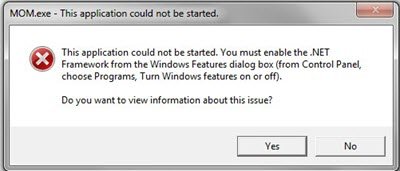
When you get the MOM.exe error, there are three things that you can try to fix it:
1. Make sure that all of your Display Drivers are up-to-date.
2. Make sure that you have the latest version of the ATI Catalyst Control Center installed on your computer. You could update it or uninstall the ATI Catalyst Software and install the latest version. To uninstall it, open the Control Panel application and uninstall ATI Catalyst Install Manager.
3. Make sure that you have the latest version of .NET Framework installed on your computer.
Final Words
To sum up, you have known “what is MOM.exe” and how to get it on your computer. In addition, you have learned how to fix the MOM.exe process error from this post.
User Comments :