
Does your computer spend more time restarting after MSI Dragon Center BIOS update black screen? What can you do to resolve this problem? Refer to this post on MiniTool to get some useful tips.
Please read the text thoroughly first before trying the following methods to resolve MSI Dragon Center BIOS update black screen.
How to Fix MSI Dragon Center BIOS Update Black Screen
Solution 1. Wait a Moment
When your system appears a black screen while updating your MSI Dragon Center BIOS, you could wait at least 5 minutes. If the system still has no response, then give it a force shutdown by pressing and holding the Power button for 10 seconds.
After the restart, check if your device works fine. If not, go on with the following solutions.
Solution 2. Reset CMOS
# Via CMOS battery
Step 1. Power off your computer and unplug the power cable.
Step 2. Open the PC case of desktops or the back panel of laptops.
Step 3. Find the CMOS battery and carefully remove it. After waiting for 5-10 minutes put it back in and turn on your device to check if it works.
# Via CMOS jumper
This way is fit for desktop PC. To do that:
Step 1. Refer to your motherboard manual to find the CMOS jumper on the motherboard.
Step 2. After locating, move the jumper to the clear position for 5-10 seconds and then put it back to the original position.
Once done, reboot your computer to do some checks for the black screen error.
Also read: How to Update BIOS Windows 10 | How to Check BIOS Version
Solution 3. Modify the BIOS Settings
If the screen stays black but the system is tuning on, you can try resetting the BIOS settings to default to fix black screen after MSI Dragon Center BIOS update. Here’s how to do it:
Step 1. Shut down the computer and then turn it on.
Step 2. During setup, press the Del or F2 key repeatedly to boot into the BIOS screen.
Step 3. Reset the BIOS settings to default and save the changes.
Restart your PC and see if the black screen caused by MSI Dragon Center BIOS update is fixed.
Solution 4. Refresh BIOS with USB
BIOS update black screen might arise from the corrupted update. In this case, you need to manually reflash the BIOS using a USB drive. Take the steps below to complete the move.
Step 1. Go to the MSI support website to download the latest BIOS file for your motherboard or laptop model on another working PC.
Step 2. Extract the BIOS file and rename it to MSI.ROM.
Step 3. Insert an empty USB drive and then copy the MSI.ROM file to the root directory of the USB drive.
Step 4. Power off your faulty PC and connect the USB drive to the BIOS Flashback port.
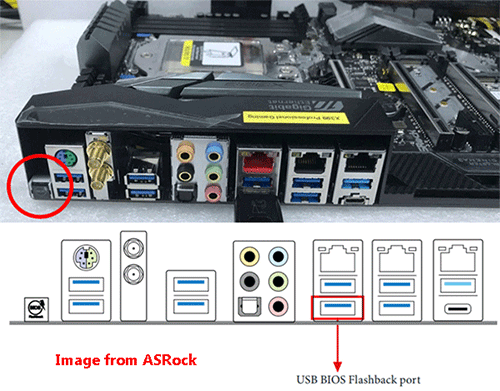
Step 5. Press and hold the BIOS Flashback button for 3-5 seconds. Then, it should begin flashing, which will last for 5-10 minutes.
When the whole process is completed, restart your computer and see if it works properly.
Solution 5. Check Display Connection
Go to check if the monitor is connected to the motherboard or GPU correctly. Then you should try to change to another display port (HDMI, DisplayPort).
If you have a dedicated GPU, then you can try connecting the monitor to the motherboard’s HDMI port and check if the BIOS works.
If none of the solutions works, then maybe the last resort is to seek help from MSI support assistance before things get worse.
MiniTool ShadowMaker TrialClick to Download100%Clean & Safe
Final Words
This guide introduces 5 effective ways to fix MSI Dragon Center BIOS update black screen. You can try them one by one until find the one that works for you. Appreciate your reading.
User Comments :