
What Is Nexiq USB-Link 2
USB-Link 2 is a hardware device from Nexiq that has arrived. Compared to its predecessor, it is five times faster and has sixteen times more random access memory. Heavier bus loads on simultaneous channels are supported by USB-Link 2.
After interfacing the USB-Link 2 with your PC, you can use specific PC apps to retrieve vehicle information and perform vehicle diagnostics. This vehicle communication interface adapter offers two options for you to communicate with your PC, including a wireless connection using Bluetooth and a wired connection using a USB cable.
To use Nexiq USB-Link 2, it is necessary to install Nexiq USB-Link 2 drivers and Nexiq Device Tester on your PC or laptop. Well then, what should you do for the installation? Move to the next parts to know more information.
Nexiq USB-Link 2 Driver Installation
See the guide on Nexiq USB-Link 2 driver download & install
Step 1: Go to visit Nexiq’s official website and scroll down to click Download A Driver.
Step 2: Click USB-Link 2 Drivers Version 2.8.0.4 based on a connection method to continue.
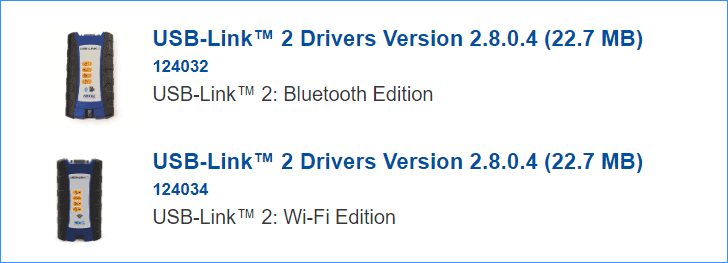
Step 3: Click the Download button to get this driver. It is compatible with Windows 7, 8, and 10 32-bit and 64-bit.
Step 4: After downloading, double-click on the .exe file and click Yes in the User Account Control window.
Step 5: Accept the license agreement by clicking I Agree.
Step 6: Select components to install and click Install. Then, follow the on-screen wizards to finish installing USB-Link 2 drivers.
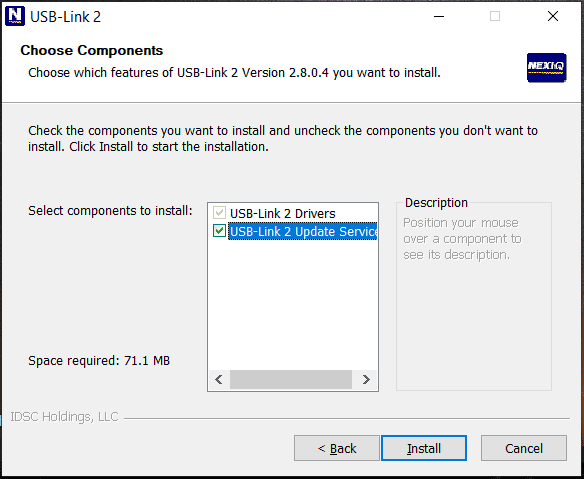
After installation, Device Tester is also installed on your PC. For me, it is the case. If it is not installed on your computer, you can manually install it. Then, you can use USB-Link 2. To know much information, refer to the installation setup manual.
Based on the USB-Link driver edition you download and install, it is required to manually update or install other drivers:
1. For USB-Link 2 driver Bluetooth edition, update your Bluetooth adapter driver. Follow the guide – How to Install Bluetooth Driver Windows 10? 3 Ways for You.
2. For USB-Link 2 driver Wi-Fi edition, update the wireless network adapter driver.
Update Nexiq USB-Link 2 Driver Automatically
It is complicated and time-consuming to download and install Nexiq USB-Link 2 drivers manually. Luckily, you can try an easy way for this work – asking a driver update tool for help. Driver Booster, AVG Driver Updater, DriverMax, Driver Easy, etc. are the best driver update software, download one and install it on your PC.
Then, launch this driver update program. It will start detecting your Windows and find proper drivers for USB-Link 2 and other devices. Update them by following the on-screen instructions.
In addition, you can update the driver via Device Manager. Just open this app, find the Nexiq device, right-click on it and choose Update driver. Click the first option and Windows will install a new version of the driver automatically.
Final Words
What is Nexiq USB-Link 2? How to download and install the Nexiq USB-Link driver to use this hardware device in Windows 10? After reading this post, you know much. Just choose one way for the Nexiq software downloading and installation.
About The Author

Position: Columnist
Vera has been working at the MiniTool Team for over 10 years as a technical editor and content writer. She mainly focuses on disk and partition management, data recovery, Windows backup and restore, and PC troubleshooting. Through in-depth software testing and hands-on experience, she has helped users solve a wide range of computer problems and better protect their data on Windows devices.
User Comments :