
What causes the error that operating system loader has no signature? How to fix this boot failure problem? This post written from MiniTool will show you how to fix the error that operating system loader has no signature.
What Causes the Error That Operating System Loader Has No Signature?
If you encounter the error that the operating system loader has no signature, your computer will fail to boot. The error that dell operating system loader has no signature may be caused by the bad boot image file which cannot be recognized by the operating system. This error also occurs when the Windows is installed in the BIOS mode.
After learning what causes the error operating system load signature not found, do you know how to fix this boot failure problem?
Hence, in the following section, we will show you how to fix this error that operating system loader has no signature.
4 Solutions to Operating System Loader Has No Signature
In this section, we will list 4 ways to solve the error that operating system loader failed signature verification tampered.
Solution 1. Perform a Hard Reset
To solve the error that operating system loader has no signature, you can perform a hard reset.
Now, here is the tutorial.
For Desktop: Turn off your computer, remove all peripherals, remove the power cable, and press and hold on the power button for 15-20 seconds. After that, your computer will perform the hard reset and reset your computer to the factory reset setting.
For laptop: Turn off your laptop, remove AC cable and the battery, press and hold on the power button for 15-20 seconds. Then the hard reset process will begin.
After that, you can check if the error that the operating system loader has no signature is solved.
Solution 2. Reset the BIOS
To solve the error that the operating system loader has no signature, you can try resetting the BIOS.
Now, here is the tutorial.
Step 1: Turn off your computer. Then turn on it and press the setup key continuously to enter the BIOS.
Step 2: Then go to the Exit tab and highlight the Load Setup Default. Then press F10 to confirm and save the changes.

When it is finished, reboot your computer and check whether the issue of operating system load signature not found is solved.
Solution 3. Change Boot Sequence
If the above solutions do not work, you can try changing the boot sequence. In this solution, you can try changing boot sequence.
Now, here is the tutorial.
Step 1: Press power button and the setup key continuously to enter the BIOS.
Step 2: In the pop-up window, go to the Boot section.
Step 3: Then select the Legacy mode to continue and disable the Security Boot.
When all steps are finished, reboot your computer and check whether the issue that the operating system loader has no signature is solved.
Solution 4. Reset Windows
To solve the dell operating system loader has no signature, you can try resetting the Windows. In general, resetting Windows all solve most system-related problems.
Now, here is the tutorial.
Step 1: Since your computer can’t boot normally, a recovery drive is required. If you already have one, just connect it to the computer and boot from it. If you don’t have, click here to create one.
Step 2: Then boot your computer from it and click Repair your computer to enter Windows Recovery Environment.
Step 3: In the pop-up window, click Troubleshoot > Reset this PC to continue.
Step 4: On the next screen, you will see the Keep my files or Remove Everything. It is recommended to choose Keep my files.
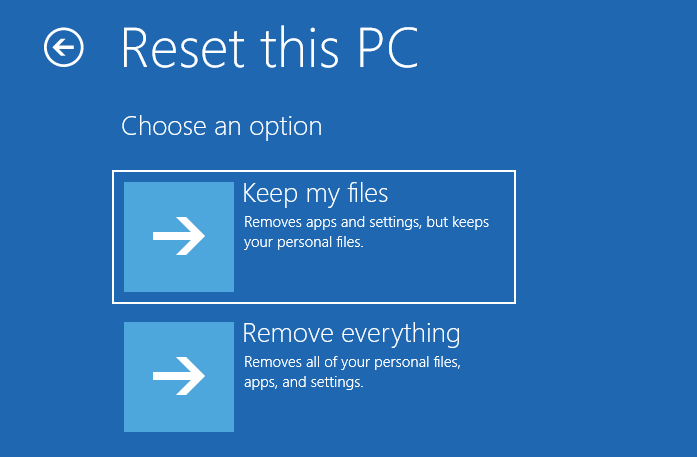
Then you can follow the wizard to continue. When the whole process is finished, reboot your computer to check if the error that the operating system loader has no signature is solved.
Final Words
To sum up, this post has introduced 4 ways to fix the error that dell operating system loader has no signature. If you encounter the same issue, try these solutions to help out.
User Comments :