
The Quick Pad is a free note taking app that keeps your notes on top of all of your apps in Windows. This allows you to access your notes directly, without having to switch between different apps on a Windows computer. In this way, you are able to take & manage notes easier than before.
Quick Pad – UWP Notepad Is Free
It’s necessary to take notes while working, studying or doing other things. Microsoft has noticed this, so it released Quick Pad as a replacement of NotePad. By using the Quick Pad app, you are able to take notes much easier and faster than before. The root reason is the compact overlay which helps to keep this note taking app on top of other opening windows. Therefore, you don’t need to spend time switching between different apps. You can now go to get this note taking app free on Windows 10, HoloLens, Surface Hub, and Windows 10 Mobile.
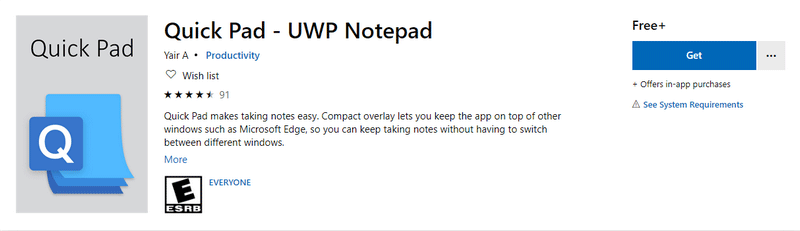
The Quick Pad – UWP Notepad app is free at least for now. How do you get it for free?
Method 1:
- Open a web browser on your computer.
- Type the website of Microsoft (www.microsoft.com) into the address bar of your web browser and press Enter.
- Click the search icon located in the upper right corner.
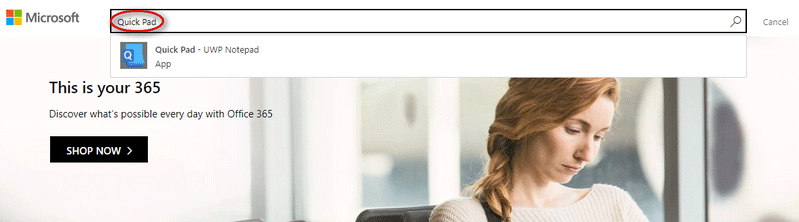
- Type Quick Pad into the search textbox.
- Select Quick Pad – UWP Notepad from the result list.
- Click Get and choose Open Microsoft Store.
- Click on the Get button again in Microsoft Store window.
- Wait for the downloading process to complete.
Method 2:
- Open Microsoft Store to find the UWP app and download it.
- Open the UWP app and click on the Remove Ads button (which locates at the bottom of the app).
- The Microsoft Store purchase window will pop up. Please find the Get button.
- Click on the Get button to remove ads. After that, you’ll find the price of app shows as free.
- Right now, get the Quick Pad – UWP Notepad app for free.
Basic Merits of Quick Pad
- The auto save feature is integrated into Quick Pad to ensure that your work is saved automatically and where you want it.
- If you prefer to add more individuation to your notes, Quick Pad is a good choice since it can help you change font colors, insert emoji, change the content to Rich Text and do other things easily.
- The Compact Overlay API of Microsoft is embedded in Quick Pad, so it gives support for an Always On Top mode. This is also one of the main selling points of this note taking app for Windows.
How To Use Emoji In File Names On Windows 10: Look Here!
All in all, this note taking tool provides a good place for anyone to write down a reminder.
The Best Note Taking App for Students
Why Quick Pad is a better choice than other note taking tools? The following content can prove it.
Clean Interface
After opening Quick Pad, you can easily find it provides you with a clean interface for notes. There is a blank canvas with Fluent Design. All of the core text-editing features are included: italics, bold, strikethrough, as well as some structural formatting features (center text, align text left, align text right, etc.). In this basic interface, you can take notes down easily (don’t need to jump through tabs and pages).
You can use the app in a window whose size can be changed. It works well in Compact Overlay mode, which is able to save time and clicks. If you are reading articles online you can take notes directly by moving cursor on top of the opening windows.
User Comments :