
What Are AAC Audio Files
AAC (Advanced Audio Coding) is a widely used audio coding format, popular for its high sound quality and low bit rate. It provides higher sound quality than MP3 and is the successor of MP3. AAC has been standardized by ISO and IEC as part of the MPEG-2 and MPEG-4 specifications. However, AAC files may sometimes be damaged due to various reasons, failing to play properly. This article will introduce several common methods to repair AAC audio files.
Possible Causes for AAC File Corruption
Can I repair damaged AAC files? Let’s leave this question aside first. Now I will introduce why AAC files get corrupted to you. You need to understand them to avoid file corruption in the future.
- The file gets corrupted while transferring it between two sources or downloading it from an internet source.
- The media player does not support the codec and you may not be able to operate the AAC file format.
- If the player forcefully edits the file, this can corrupt the entire audio file.
- If the drive used to save the AAC file format gets severely damaged, that can also make the AAC file unusable.
MiniTool Power Data Recovery FreeClick to Download100%Clean & Safe
How to Repair Corrupted AAC Files
After knowing the possible causes for AAC file corruption, you should learn how to repair them with the effective ways below.
Method 1: Use VLC Media Player to play AAC File
The inability of a media player to open the file can give the illusion that the file is corrupt. In this case, you can switch to another media player. I recommend the VLC media player that supports a wide variety of formats and can play nearly any audio or video format including AAC, without the need for additional codecs. Work with the following steps.
Step 1: Download the VLC media player, and then launch it by double-clicking on the icon.
Step 2: Click on the Media tab and select the Open File option.
Step 3: Find and select the corrupted file you want to repair and click on Open.
Method 2: Update Your Windows System
If the Windows system is outdated, it may be incompatible with the file, causing the file to be corrupted. To cope with this situation, you are expected to update your Windows, which can not only solve the problem of file corruption but also improve computer performance. Refer to the instructions below.
Step 1: Right-click on the Start button and choose Settings to open it.
Step 2: Click on Update & Security > Windows Update.
Step 3: Hit the Check for updates button to search for an available update.
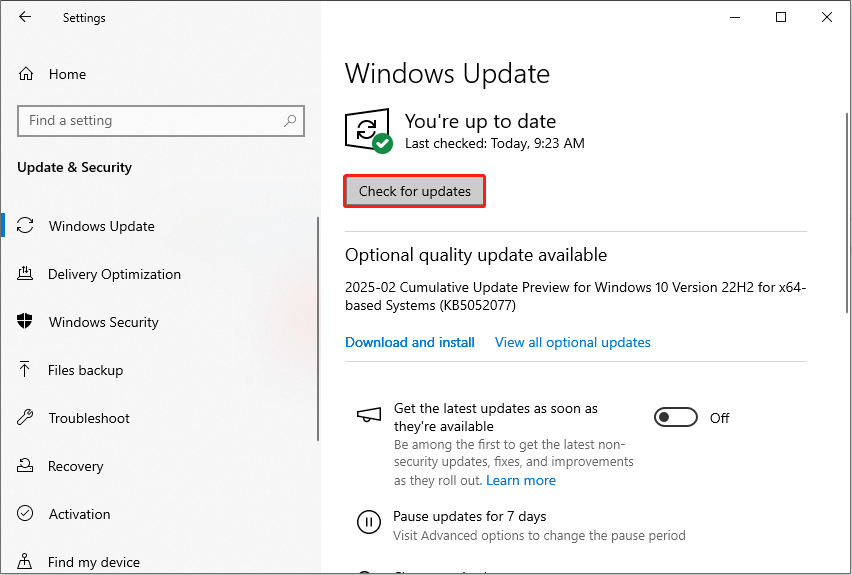
Step 4: When the update is detected, click on Download & install to get it.
Method 3: Convert AAC Files to Another Format
Converting the corrupted files to another format is also a widely used way. After converting to a different format, the minor errors that affect the file can be fixed. Here are the steps to convert corrupted AAC files.
Step 1: Go to this site and click on Choose Files to add the corrupted file you want to convert.
Step 2: Click on the Output box to choose the format you want to convert to from the list.
Step 3: Click on Convert to start converting. When the process ends, hit the Download button to download the file.
Method 4: Use Online Repair Tools
Using the repair tool can fix any problems on the file, but it takes longer and always requires an Internet connection. You can choose this option if you are still having problems after trying the above ways.
Bottom Line
Repairing corrupted AAC audio files may require some patience and technical knowledge, but most problems can be solved by using the right tools and methods. If you are not sure how to proceed, it is recommended to try the ways listed in this article. If the problem persists, consider seeking professional help.
About The Author

Position: Columnist
Chelsea graduated from university with a major in English. She has a strong interest in English writing. It is this passion for writing that led her to become an English editor. Her articles mainly focus on data recovery and other computer industry news. As an energetic and outgoing girl, Chelsea enjoys listening to music, singing, riding bikes, and eating in her spare time.
User Comments :