
You might ever wish to reset Steam achievement of a favorite game so that you could replay it freshly. How to achieve that? Well, referring to this MiniTool guide could help you make it and rekindle the excitement that you’ve ever had.
About Steam Achievements
Steam achievements consist of a ton of outstanding performances of yours, marking milestones above and beyond just winning a match or clearing a certain level. Your achievements and game progress are stored in the cloud, and transferring the titles from one PC to another or moving them to a different storage device won’t reset things.
Without any obvious way to wipe the slate clean, how can you get a fresh start for a game on Steam after reaching the limit of? In the following text, we will walk you through how to reset Steam achievement.
MiniTool ShadowMaker TrialClick to Download100%Clean & Safe
How to Reset Game Achievements on Steam
Solution 1. Reset Game Achievements via Steam Console
Step 1. Get the game’s App ID and Achievement name
First of all, you have to find the game’s App ID and its Achievement API name. Every game has an App ID assigned to them to give them a unique identity.
You can locate the App ID of a game from the URL of the game’s store page. Alternatively, you can also find the App IDs of any game along with their Achievement API names on the SteamDB site.
1. Browse to the SteamDB website.
2. Enter the game in the address bar and click on the search icon and note down the App ID.
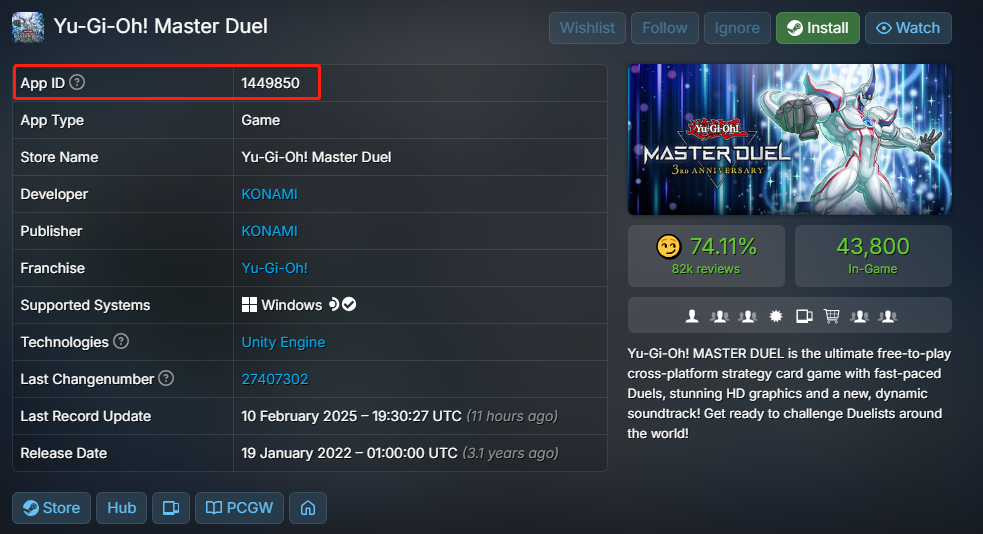
3. Then scroll down to the Achievement tab and copy down the API name of the achievement you want to reset.
Step 2. Open the Steam console menu
Since the Steam console menu is disabled by default in the client application, you need to open it by running a command line.
- Press Win + R to fire up the Run window.
- Type steam://open/console and hit OK. Steam will then launch automatically and go to the console menu.
- Now, you can input the following command and press Enter to reset the achievements.
achievement_clear “App ID” “API name” (without quotation marks)
Related article: Best Fixes for Steam Remote Play Not Working on Windows
Solution 2. Reset Steam Achievements via Steam Achievement Manager
Steam Achievement Manager is an unofficial application that allows you to manage your achievements of any games on your Steam account, such as viewing, locking, or unlocking.
Tip: Steam Achievement Manager is safe to use, and you will not be banned for using it, while you should avoid running it on online VAC-enabled games.
Step 1. Go to the Steam Achievement Manager website to download the installation package.
Step 2. Extract the file and run SAM.Picker.exe. Then, you’ll see the Steam Achievement Manager window detecting and displaying all games on your Steam.
Step 3. Double-click on the game to open the achievement menu.
Step 4. Uncheck the achievement that you wish to clear or click on the Reset option to remove them all as per your needs.
Bottom Line
There are two feasible solutions in this guide that you can use to reset Steam achievements, including running Steam console and Steam Achievement Manager. By the way, don’t forget to back up Steam achievements beforehand if necessary. Appreciate your support!
User Comments :