
What is the rgss102e.dll? How to solve the error rgss102e.dll could not be found? This post from MiniTool will show you solutions. In addition, you can visit MiniTool to find more Windows solutions and tips.
What Is RGSS102E.DLL?
The rgss102e.dll file is an essential file of Windows operating system. It usually contains a set of procedures and driver functions, which may be applied by Windows.
The rgss102e.dll file plays an important role in launching the program, which means that the rgss102e.dll file enables the program to be work normally.
Hence, if the rgss102e.dll is missing or corrupted, the program may fail to work. In addition, if the rgss102e is also not found, the program will fail to work, too.
Hence, if you encounter the error rgss102e.dll not found, please keep on your reading. The following part will show you how to fix the rgss102e.could not be found error.
4 Solutions to Fix RGSS102e.DLL Not Found
In this section, we will show you how to fix the error rgss102e.dll not found.
Solution 1. Reinstall the Program
If rgss102e.dll on your computer is not found, you will receive the warning message when opening the program which tells you to reinstall the program to fix the error rgss102e.dll not found.
So, if you come across the rgss102e.dll could not be found error, try to reinstall the program. After reinstalling, run the program again and check whether the error rgss102e.dll missing is solved.
If reinstalling the program does not take effect, try the following solutions.
Solution 2. Download the RGSS102E.DLL File Manually
In order to fix the error rgss102e.dll could not be found, you can download the rgss102e.dll file manually.
Now, here is the tutorial.
- Click here to download the rgss102e.dll file.
- Put the downloaded rgss102e.dll file into the application folder.
- Restart your computer and check whether the error rgss102e.dll not found is solved.
If this method is still not effective, you can try the following solutions.
Solution 3. Run System File Checker
If there are corrupted system files on your computer, you may also encounter the error rgss102e.dll not found error.
Therefore, to fix the rgss102e.dll missing error, you can run System File Checker to scan and repair corrupted system files.
Now, here is the tutorial.
- Open Command Prompt and run it as administrator.
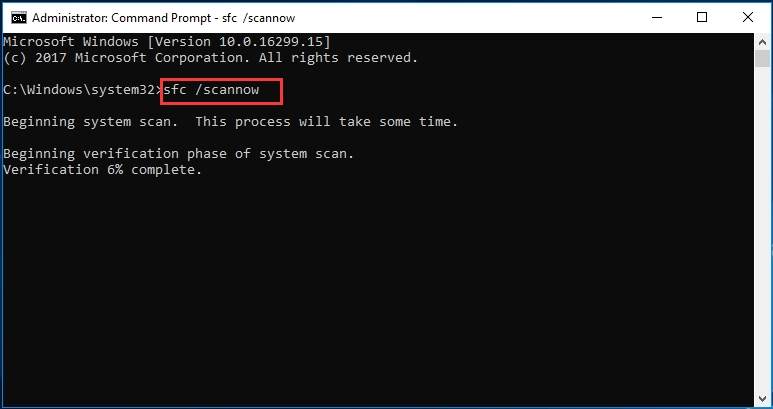
- Type the command sfc /scannow and hit Enter to continue.
- Wait for the scanning process to be finished. Please do not close the command line window until you see the message verification 100% complete.
When the process is finished, reboot the computer and check whether the error rgss102e.dll missing is solved. If the System File Checker fails to work, click here to find solutions.
Method 4. Perform Virus Scan
If there is a virus on your computer, you may also encounter the error rgss102e.dll not found error. Hence, to fix this rgss102e.dll missing problem, try to scan whether this virus on your computer and remove them.
Now, here is the tutorial.
- Press Windows key and I key together to open Settings, then choose Update and Security to continue.
- In the pop-up window, go to Windows Defender tab, and click Open Windows Defender Security Center to continue.
- Next, click Virus & threat protection.
- In the pop-up window, click Quick Scan to continue.
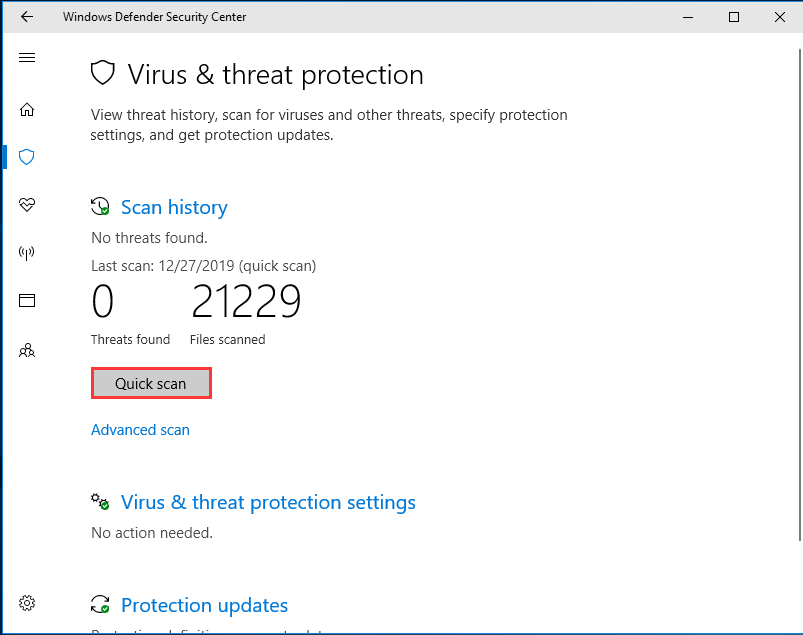
If there are viruses on your computer, Windows Defender will remove them. When all steps are finished, reboot your computer and check whether the issue of rgss102e.dll not found is solved.
This is another available way for you to fix the error rgss102e.dll not found. If you have created a system restore point before, when encountering this rgss102e.dll error, you can try restoring your computer to an earlier date. If there is no restore point on your computer, you can only resort to other ways.
Final Words
To sum up, this post has introduced 4 ways to fix the error rgss102e.dll not found. If you have come across the same error, try these solutions. If you have any better solution to fix the rgss102e.dll missing error, you can share it in the comment zone.
User Comments :