
Tainted Grail The Fall of Avalon is a dark fantasy first-person open world RPG inspired by the legend of King Arthur. The game was developed by Questline Studios and officially launched version 1.0 on May 23, 2025.
Saved games are essential when exploring Tainted Grail The Fall of Avalon. Not only do they preserve your progress, but they also ensure that you don’t lose all your efforts if you accidentally lose them. If you don’t know what the save is for, you can read the following content to have a better understanding.
- Manual backup and restore: If you want to protect your game progress, knowing the save location allows you to manually copy the save to prevent data loss.
- Cross-device migration: If you want to continue the game on a new computer, you can copy the save directly to the new device after finding it, saving time.
- Fix the save corruption problem: If the game save is corrupted, manually finding the save file may help restore or troubleshoot the problem.
- Support cloud save: Some games support cloud save, but the local save still exists. Knowing the location can easily confirm whether the save is synchronized.
Where Is Tainted Grail The Fall of Avalon Save Game
You can find Tainted Grail The Fall of Avalon save file location in the following path on your PC:
C:\Users\[YourUsername]AppData\LocalLow\QuestlineFall of Avalon\[SomeNumbers]\Saved
If you’re moving your save files between devices or backing them up, this is the folder you’ll need. After coming to this place, what if this folder is gone? Don’t worry. Keep reading to get the solution.
How to Recover Tainted Grail The Fall of Avalon Saved Files
If you want to recover lost save files, MiniTool Power Data Recovery is a recommended tool with the following key advantages:
First of all, it can recover lost save files from hard drives, SSDs, USBs, SD cards and other devices. Secondly, even if the save files are accidentally deleted or lost due to system failure, the software can perform a deep scan to find files that may be recovered. Finally, game save files are usually files in a specific format, and MiniTool Power Data Recovery can identify and recover these files.
I believe you have had a better understanding of this robust tool. I have to tell you that you can use this free file recovery software to retrieve 1 GB of files without any cent. Download and install it to start recovering saved files.
MiniTool Power Data Recovery FreeClick to Download100%Clean & Safe
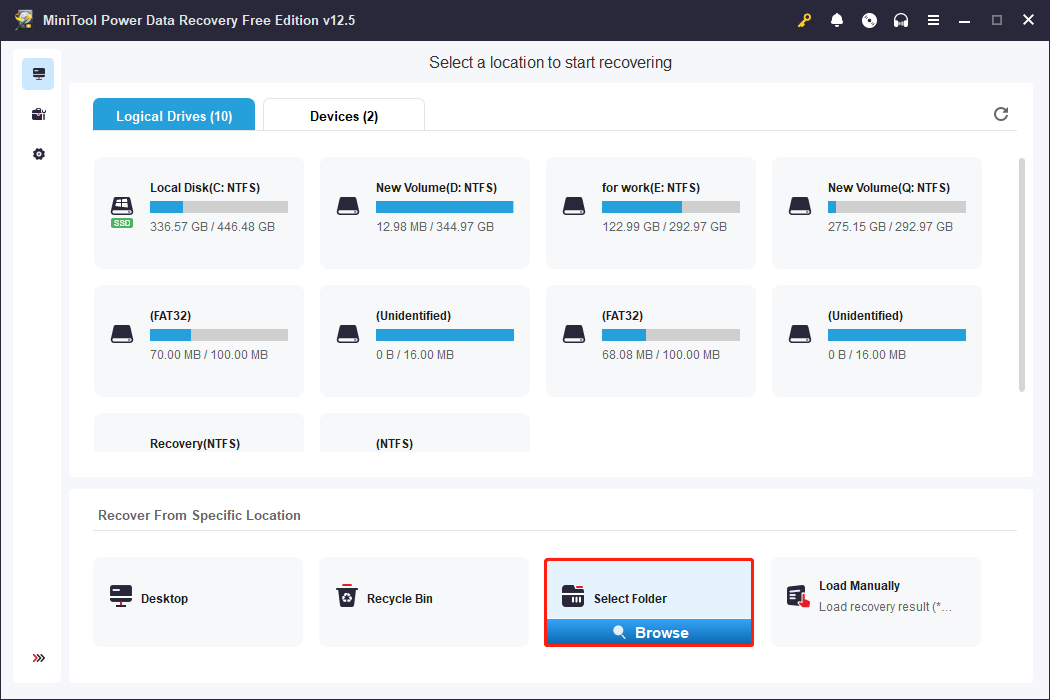
Step 1: When the installation ends, double-click the icon to launch MiniTool Power Data Recovery. When you enter the main interface, click Select Folder to choose the folder where your lost files are stored and click the Select Folder button to start scanning.
Step 2: This scan process may take some time. It is best to wait patiently for it to complete for the best scan results. When it ends, files are listed under the Path tab. To find files more quickly, you can use the following features.
You can change to the Type tab to find files by formats. The Filter feature can filter files by file type, size, date, and category. You can also type file name in the search box and press Enter to filter out unnecessary files.
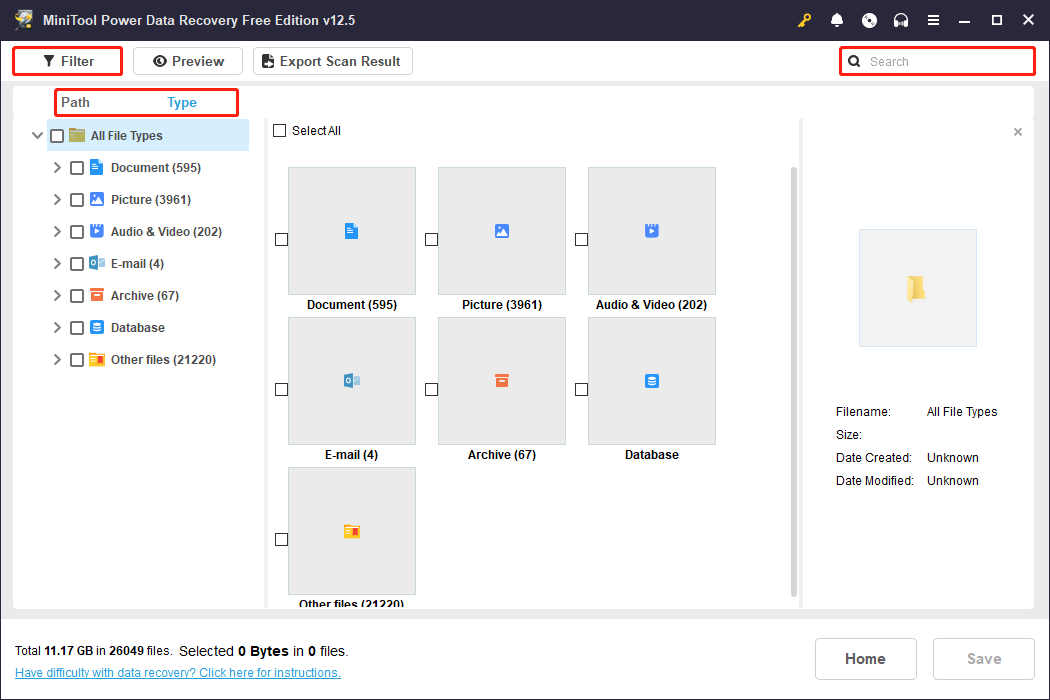
Step 3: When you find the target files, select the file and click the Preview button or double-click it to check its content. When you make sure they are correct, tick them all and click the Save button.
There is a pop-up window prompting you to choose a location to store the recovered saved files. I It is best to choose a new location to prevent file from being overwritten. After selecting a location, click the OK button to start recovering.
Now the game saves are recovered to the new location. Find the place and check if they are complete.
Wrapping Things Up
Knowing Tainted Grail The Fall of Avalon save file location is not only helpful for backing up and restoring, but also for modifying or optimizing them when needed. I hope this guide will help you manage your saves in this game and make your adventure smoother!
User Comments :