
Does Windows 10 show an error to you saying “the username or password is incorrect” when you log in to Windows 10 after an update? If so, take it easy! This is not a serious problem since you can fix it. In this article from MiniTool, some solutions to incorrect username or password are told to you.
Windows 10 Incorrect Username or Password
Some users reported that they always got an error message – “the username or password is incorrect” on the screen every time they started their PC whether after restart or sleep. Although the correct username was already in the login box, they had to re-enter it to continue.
Are you also bothered by the issue? If so, you usually will be taken to the desktop after you enter the user credentials for the second time.
What’s the main reason for this? To be specific, the error is caused by a feature in Windows 10 – Improved Boot Up Experience, allowing you to set up your sign-in information to apply settings after every update or restart. After installing the update and restarting your machine, this feature will automatically finish setting the Windows 10 device.
How to fix this Windows 10 incorrect password bug? Follow these ways below.
Solutions to Incorrect Username or Password
Method 1: Disable Automatic Device Setup Feature
Step 1: Go to the Start button and choose Settings. Alternatively, you can press two keys – Windows logo and I to enter the Windows Settings interface.
Step 2: Click Accounts and choose Sign-in options. Then, scroll down to the Privacy section and turn off this option Use my sign-in info to automatically finish setting up my device after an update or restart by clicking the switch.
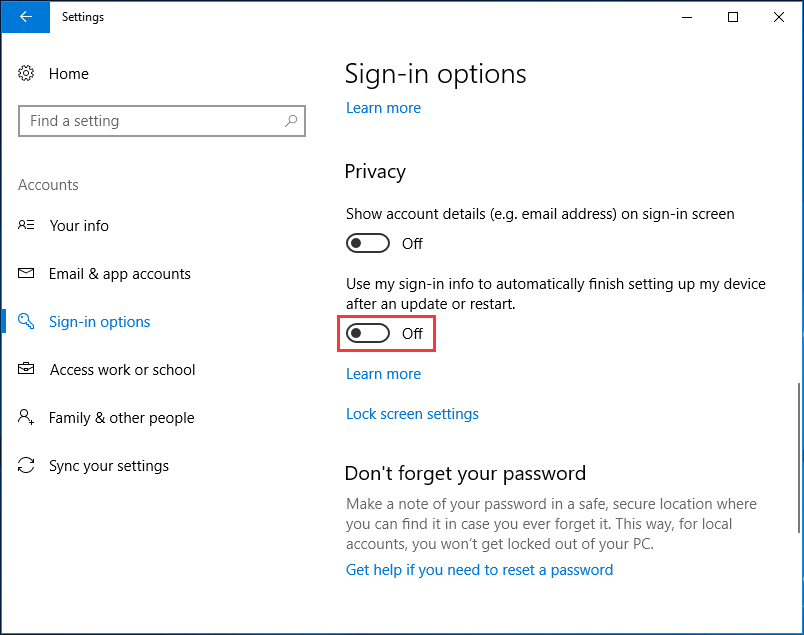
Step 3: Reboot your machine and the issue of Windows 10 password incorrect after update will be solved.
Method 2: Reboot PC Several Times
If automatic device setup feature isn’t able to succeed in setting up your machine for the first time, Windows 10 password not working will happen. So, you can restart your machine and try to sign in. Repeat this process several times and perhaps you can log in to the desktop.
Method 3: Reset Microsoft Password
Sometimes not every Windows user receives the error “the username or password is incorrect” after Windows 10 update. If you type a wrong password, this issue will appear on the computer screen; especially you are using Microsoft account in Windows 10.
When using Microsoft’s other services, if you have changed the password for the Microsoft account, you are required to input the new password when you log into Windows 10.
If you forget the password, go to this website and follow the given instructions to reset it.
The End
Have you received the error message “the username or password is incorrect” while signing in to Windows 10? Now, just follow these methods mentioned above to fix this issue. Hope this post could be helpful for you.
About The Author

Position: Columnist
Vera has been working at the MiniTool Team for over 10 years as a technical editor and content writer. She mainly focuses on disk and partition management, data recovery, Windows backup and restore, and PC troubleshooting. Through in-depth software testing and hands-on experience, she has helped users solve a wide range of computer problems and better protect their data on Windows devices.
User Comments :