
Having trouble rebooting your Windows 10 PC after restoring it to a previous version of Windows? Actually, you are not the only one. It is reported that a Windows 10 bug is bricking some PCs that use System Restore to revert to a point created prior to the latest Windows 10 May 2019 Patch Tuesday Update. Here is a fix.
Windows 10 Won’t Boot When Using System Restore after Update
There is bad news for Windows 10 users. Microsoft has admitted that users may encounter blue screen after installing the May 2019 Patch Tuesday Update when they use System Restore.
Related article: Windows 10 Blue Screen of Death – You Can Quickly Fix It
According to the report from Bleeping Computer, this blue screen issue has an influence on all PCs where System Protection is turned on and a system restore point has been created before installing Windows 10 updates.
When trying to restore the system after completing Windows update installation, the Windows system won’t be restored, but instead, it will show a notice saying “the computer experiences a Stop error (0xc000021a)”. Serious is that the system will fail to return to the Windows desktop after restarting the computer.

It is not the first time that Patch Tuesday has inadvertently caused serious problems for Windows 10 users. Last month, Microsoft’s April patch updates caused Windows to freeze and slow down.
Ironically, this fiasco is not caused by the release of the Windows 10 security patch. Instead, users are required to deal with a system breakdown, which Microsoft has blamed on drivers conflict and ensuing malfunction.
According to a Microsoft’s support page, the issue – cannot restore the system to a restore point after Windows 10 update is a known Windows 10 problem. And this company has explained the reason:
Windows temporarily performs the restoration of in-use files during the System Restore process. Then, it saves the information in the registry and it finishes the staged operation when the PC restarts.
“In this situation, Windows restores the catalog files and stages the driver .sys files to be restored when the computer restarts. However, when the computer restarts, Windows loads the existing drivers before it restores the later versions of the drivers. Because the driver versions do not match the versions of the restored catalog files, the restart process stops.”Microsoft
A Fix: Windows 10 Bug Freezes Computers after System Restore
Recover from Failed Restarts
If Windows 10 won’t boot when using System Restore after update, try to restart the computer and then go to the Windows Recovery Environment (WinRE). To be able to avoid the restart failures caused by this known issue, users may have to use a hardware restart switch and restart two times.
Follow these steps in WinRE:
- Go to Troubleshoot > Advanced options > More recovery options > Startup settings > Restart now.
- Choose the option Disable driver signature enforcement in the list of startup settings by pressing the F7 key.
- Allow the startup process to go on. When Windows restarts, the process of System Restore should resume and complete.
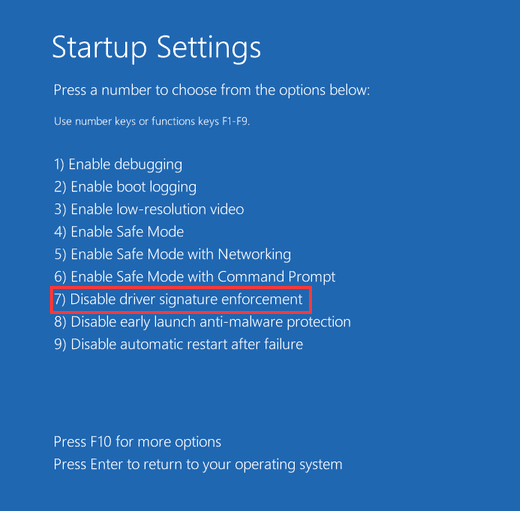
By following these steps, users can restore the computer to the restore point chosen before triggering the Stop error 0xc000021a.
Avoid Failed Restarts
In order to start the System Restore operation on computers that are impacted by the issue, users should use WinRE rather than the Settings dialog box. Follow these steps to start this process from the Windows desktop:
- Navigate to Start> Settings > Update & Security > Recovery.
- Choose Restart now under Advanced options.
- Select Troubleshoot > Advanced options > System restore in WinRE.
- Enter the recovery key as it is shown on the screen, and then follow the instructions to finish the restoration operation.
About The Author

Position: Columnist
Vera has been working at the MiniTool Team for over 10 years as a technical editor and content writer. She mainly focuses on disk and partition management, data recovery, Windows backup and restore, and PC troubleshooting. Through in-depth software testing and hands-on experience, she has helped users solve a wide range of computer problems and better protect their data on Windows devices.
User Comments :