
Some people find the system backup error codes 0x807800A1 & 0X800423F3 when they attempt to create a system backup. These codes will prevent you from doing any backup tasks. Don’t worry! This article on MiniTool Website will teach you how to fix the 0x807800A1.
System Backup Error 0x807800A1 & 0X800423F3
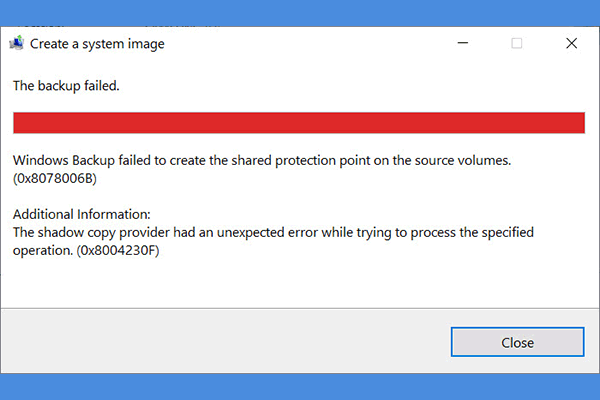
To better avoid data loss or system crashes, many Windows users will choose to create a system image. During this process, some users reported that they received the “The backup failed” error message. The full backup error message shows below:
The backup failed.
A Volume Shadow Copy Service operation failed. Please check “VSS” and “SPP” application event logs for more information. (0x807800A1)
Additional Information:
The writer experienced a transient error. If the backup process is retried, the error may not reoccur. (0x800423F3)
As you can see, the system backup error 0x807800A1 occurs accompanied by the 0X800423F3 and multiple reasons can trigger 0x807800A1 & 0X800423F3. For example, your Volume Shadow Copy Service may be stopped or Windows Firewall or antivirus interferes with the backup services.
In the next part, you can find a way to resolve these issues.
Fix 0x807800A1 & 0X800423F3
Fix 1: Check Volume Shadow Copy Service and Software Protection Services
To check Volume Shadow Copy Service and Software Protection Service, you can do as follows.
Step 1: Open Run by pressing Win + R and input services.msc to enter.
Step 2: Locate and double-click on Volume Shadow Copy and choose Startup type as Automatic.
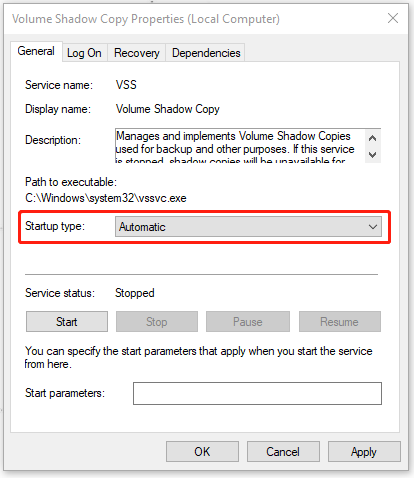
Step 3: Click Start if the Service status is not running. Then choose Apply and OK to save the changes.
Step 4: Then please repeat step 2 and 3 to check the Software Protection and Workstation services.
After that, you can restart your PC and check if the 0x807800A1 & 0X800423F3 have been gone.
Fix 2: Uninstall Third-Party Antivirus Software
If you have installed any third-party antivirus software, you can uninstall them first to check if the program cause software conflicts with the backup services.
Step 1: Input Control Panel in Search and open it.
Step 2: Choose Uninstall a program under Programs and right-click on the related program to choose Uninstall.
After you finish the uninstallation by following the on-screen steps, you can restart your PC to try your backup again.
Fix 3: Uninstall Microsoft Office Starter 2010
Some users reported that the system backup error 0X800423F3 can be fixed after they uninstall Microsoft Office Starter 2010. It is worth trying! If that’s not the culprit, you can reinstall the program.
Step 1: Open Run by pressing Win + R and input appwiz.cpl to enter.
Step 2: Locate Microsoft Office Starter 2010 and choose to uninstall it.
Then you can check if your issue has been resolved.
Fix 4: Use Third-Party Backup Software
If the above methods are proven to be useless, you can try another third-party backup software. As for that, you can try this free and multi-functional backup software – MiniTool ShadowMaker.
MiniTool ShadowMaker allows you to back up systems, files, folders, partitions, and disks. Besides, you can also perform a remote backup and NAS backup. More related services wait for your exploration and you can click the button to get the program for a 30-day free trial.
MiniTool ShadowMaker TrialClick to Download100%Clean & Safe
Bottom Line:
Now, after reading this article, your concerns about 0x807800A1 may have been resolved. If you have any other questions, you can leave messages.
User Comments :