
Just when you are about to activate Windows 10 or 11, the error code 0xC004F074 appears on the computer screen. This stops you from proceeding with the activation process. How to fix the activation error code 0xC004F074 to use the PC with full features? Find possible methods from this MiniTool post to solve your issue.
Windows 10/Windows 11 Activation Error 0xC004F074
When trying to activate your Windows 10/11, the error code 0xC004F074 pops up, impacting your user experience and forcing you to use the PC with limited features. The activation error code 0xC004F074 typically occurs when there is an issue with KMS (Key Management Service), a technology for Microsoft to activate Windows and Office.
Specifically, the error 0xC004F074 stems from a time difference between the KMS client and KMS host machine, and a version mismatch between the KMS client and host. Besides, network issues and older versions of Windows such as Windows Server 2008 R2 or Windows 7 (having compatibility issues with newer KMS configurations) can lead to 0xC004F074 error.
In different cases, the error messages on your computer screen are different:
- We can’t activate Windows on this device as we can’t connect to your organization’s activation server… Error code: 0xC004F074
- Error: 0xC004F074 The Software Licensing Service reported that the computer could not be activated. No Key Management Service (KMS) could be contacted.
Although handling this error seems to be confusing and complex, there are several troubleshooting tips for you.

Use the Slmgr Command
After viewing some articles, forums, and YouTube videos, using slmgr (Software Licensing Management Tool) in Command Prompt effectively addresses activation error code 0xC004F074 in Windows 10/11. Next, let’s take a look at how you run the slmgr command.
Step 1: Type cmd into Windows Search and click Run as administrator > Yes to open Command Prompt with admin rights.
Step 2: Type slmgr.vbs /upk and press Enter to uninstall the existing key.
Step 3: Execute this command slmgr.vbs /ipk < KMS Product Key> to install the key. Replace < KMS Product Key> with yours.
Step 4: After the installation, run slmgr.vbs /ato to activate the key online.
Some users use other different commands to successfully solve Windows 11/Windows 10 activation error 0xC004F074. In Command Prompt, execute these two commands:
slmgr /skms kms8.msguide.com
slmgr /ato
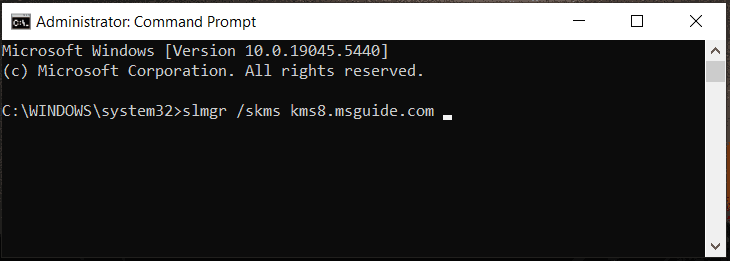
Try them if needed.
Run Activation Troubleshooter
Windows 11 and 10 come with an activation troubleshooter to tackle the most common activation issues including we can’t activate Windows on this device along with error code 0xC004F074.
Step 1: First, go to Settings and click Update & Security > Activation or access System > Activation.
Step 2: Next, click Troubleshoot and conduct the fixing process.
Check Time Sync Settings
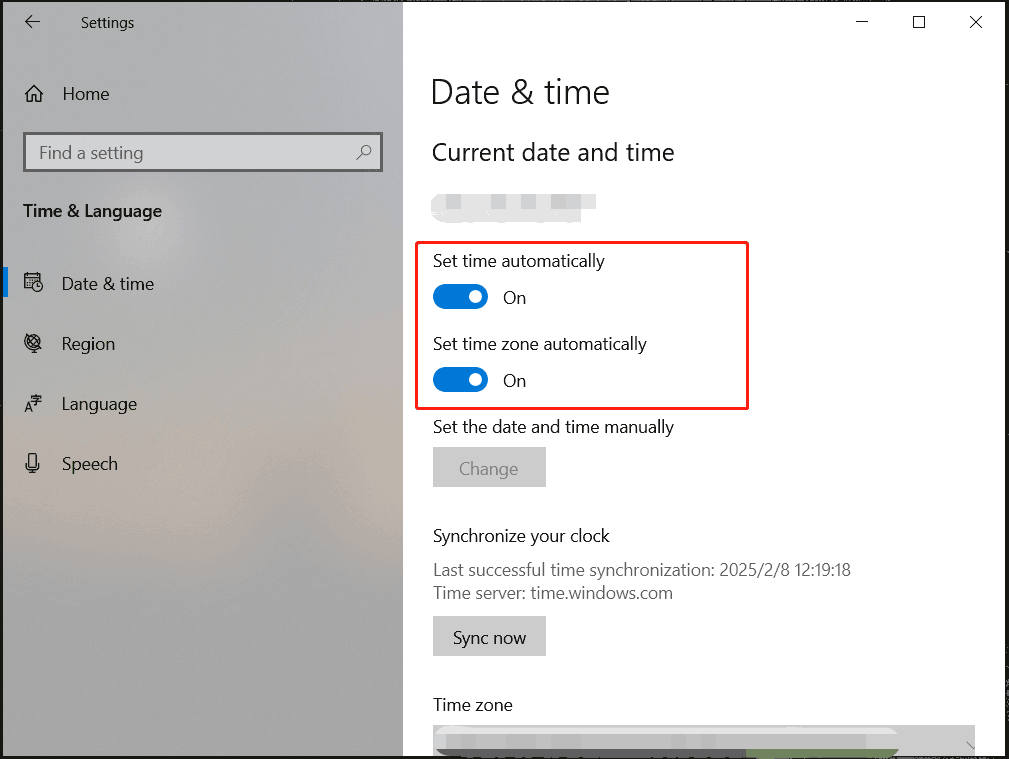
If your PC has the wrong date and time settings, you may face error code 0xC004F074 when activating the system. Make sure they are correct.
Step 1: Navigate to Settings > Time & Language.
Step 2: Under Date & time, ensure you enable the options for Set time automatically and Set time zone automatically.
Repair Corrupt System Files
Sometimes the Windows activation error code 0xC004F074 is attributed to corruption in system files. Given this case, use System File Checker to repair the damaged system files.
Step 1: Launch Command Prompt as an administrator.
Step 2: Type sfc /scannow and press Enter.
Step 3: In addition, execute this command after the SFC scan: DISM /Online /Cleanup-Image /RestoreHealth.
Update Windows
Outdated operating systems may encounter activation errors like 0xC004F074, thus, it is essential to keep the OS updated to gain the latest patches and features.
Beforehand, don’t forget to use the backup software – MiniTool ShadowMaker, to back up your files or system for safety. In case of data loss or system crashes caused by update issues, backups come in handy.
MiniTool ShadowMaker TrialClick to Download100%Clean & Safe
Then, go to check for available updates and install them via Windows Update under Settings.
Final Words
These methods above usually help you solve activation error code 0xC004F074. In addition, you can try reconfiguring DNS settings using the ipconfig /flushdns command and disabling your firewall temporarily. If nothing works, the last resort is to call in the cavalry – contacting the Microsoft support team.
About The Author

Position: Columnist
Vera has been working at the MiniTool Team for over 10 years as a technical editor and content writer. She mainly focuses on disk and partition management, data recovery, Windows backup and restore, and PC troubleshooting. Through in-depth software testing and hands-on experience, she has helped users solve a wide range of computer problems and better protect their data on Windows devices.
User Comments :