
You may encounter this situation: after launching Assassin’s Creed Shadows, a window pops up with an error message that you are running an unsupported video driver. As the error message indicates, the problem is most likely to be caused by the graphics driver. To resolve the Assassin’s Creed Shadows unsupported video driver error, try the next suggestions.
Update the Graphics Driver
Firstly, you can do a quick graphics driver update via Device Manager, which will detect and update the graphics driver automatically on your computer. You can learn how to do it with the following steps.
Step 1. Press Win + X to open Windows Settings.
Step 2. Choose Device Manager from the WinX menu and find and select Display adapters.
Step 3. Locate the graphics driver and right-click on it to choose Update driver.
Step 4. Select the Search automatically for drivers in the prompt window.
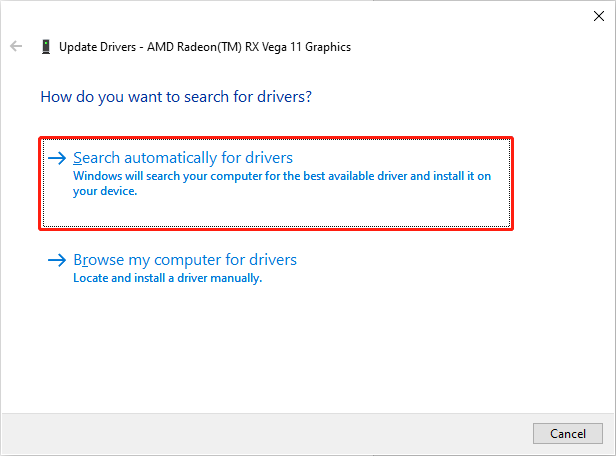
Wait for your computer to install the latest compatible driver automatically. Afterward, you can launch the game to see if the Assassin’s Creed Shadows hardware warning error still appears. If yes, keep reading to try the clean installation of the graphics driver.
Clean Install the Graphics Driver
To manually install the graphics driver, you should figure out the exact model of the graphics card. Here is how to find detailed information:
Step 1. Press Win + R to launch the Run window.
Step 2. Type dxdiag into the box and press Enter.
Step 3. Change to the Display tab, and then you can find the information about your graphics driver.
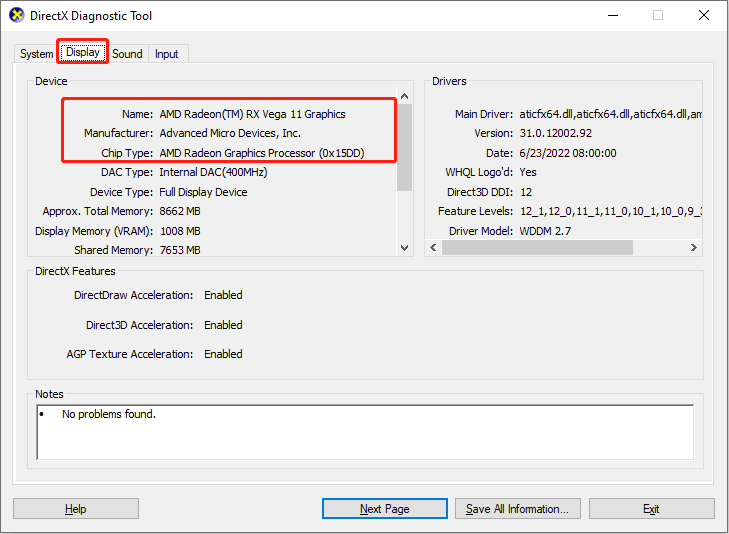
After knowing the model of the graphics card, you should visit the corresponding official website to find the latest version of the graphics driver. For instance, my computer runs with the AMD card, so I should go to the AMD support page to find a suitable driver. For NVIDIA cards, go to the NVIDIA page.
On the current interface, you need to search for the driver in accordance with your graphics card model and the computer operating system. After downloading, follow the on-screen instructions to install the driver.
Please remember to tick the clean install option during the setup process. Performing a clean install will remove the old installation files that may cause compatibility issues, such as the Assassin’s Creed Shadows unsupported video driver issue.
When the installation process is complete, you need to restart your computer to fully apply the change. Then, launch Assassin’s Creed Shadows to see if you can access the game properly.

Other Tips to Fix Assassin’s Creed Shadows Video Driver Error
If you are still confronted with the Assassin’s Creed Shadows unsupported video driver error after trying the above methods, you can attempt to carry out the additional methods listed below:
- Update Windows: Sometimes, running with an outdated Windows operating system can cause incompatible issues with the latest graphics driver. You should check the Windows operating system and update it if necessary.
- Close unnecessary background programs: Another possible reason for Assassin’s Creed Shadows unsupported video driver is the interference of background programs. In this case, open Task Manager on your computer and right-click on the unnecessary programs to choose End task.
- Update Assassin’s Creed Shadows: You need to check game updates to get the latest patches. Game developers often release new patches to fix game issues and improve game compatibility and performance.
You can run MiniTool System Booster to check computer performance. This comprehensive computer tune-up utility allows you to detect and fix computer issues, disable unwanted startup programs, clear junk files, speed up the internet, and complete other tasks. You get this software by clicking the download button, and then start testing your computer right now.
MiniTool System Booster TrialClick to Download100%Clean & Safe
Final Words
This is all about how to fix Assassin’s Creed Shadows unsupported video driver on a computer. The main cause should be an outdated graphics driver. You can get the latest one by either automatic upgrading or manual download. Hope this post gives you some useful information.
User Comments :