
The antivirus software Avast provides a Web Shield Protection feature to help users to browse the Internet safely. If you meet Avast web shield won’t turn on Windows 10 error, the 4 solutions in this tutorial might help. If you suffer data loss because of malware or virus infection, system error, etc. you can try MiniTool Power Data Recovery to recover lost data from PC.
Avast antivirus software provides a Web Shield Protection feature to protect your computer from downloading any malware which is harmful to your computer when you surf on the Internet. To keep your computer in a safe status, Avast web shield should be turned on. However, some users may meet this error: Avast web shield won’t turn on.
This tutorial tries to help you troubleshoot and fix Avast web shield won’t turn on error on Windows 10. 4 solutions are provided.
Possible Causes of Avast Web Shield Won’t Turn on Problem
There are some possible causes that may lead to this problem: the conflict with other antivirus software, the latest version of Avast antivirus software is not compatible with your computer system, there are some corrupted or missing system files in your Windows 10 computer, etc.
We don’t know for sure the causes. But you can try the 4 methods to see if they can help you fix this problem.
![[SOLVED] How to Revive Windows 10 With Recovery Drive | Easy Fix](https://images.minitool.com/minitool.com/images/uploads/2019/05/windows-10-repair-recovery-disk-thumbnail.png)
Fix 1. Restart Avast Antivirus Software
Step 1. Open Windows Services screen. You can press Windows + R key at the same time, type services.msc in Run box, and press Enter to open Services.
Step 2. Scroll down to find Avast Antivirus Service, right-click it and select Properties.
Step 3. Make sure the startup type is Automatic. Check the Avast Service status. If it is running, you can click Stop button. After a while, you can click Start button to start the Avast antivirus service again.
Step 4. Finally click Apply button and click OK to continue finishing the restart process of Avast service.
If restarting Avast doesn’t help in fixing Avast web shield won’t turn on issue, then continue to check solutions below.
Fix 2. Manually Update Avast to the Latest Version
Avast antivirus software should always be up-to-date. If the program is outdated or corrupted, it may cause Avast web shield won’t turn on issue. You can follow the steps to manually update Avast software to the latest version.
Step 1. Open Avast antivirus software by clicking its icon at the toolbar. You can also click Start menu and click its icon to open Avast software.
Step 2. Click Update tab. Click the Update icons on both Virus Definitions and Program to completely update Avast free antivirus software.
Step 3. After the update process is finished, you can restart your computer to check if the Avast web shield won’t turn on issue has been solved on Windows 10.
Fix 3. Run Avast Repair
Avast antivirus software equips a built-in Avast Repair feature which can help you troubleshoot problems of this program. This method may be able to fix Avast web shield won’t turn on Windows 10.
Step 1. Open Control Panel Windows 10. You can press Windows + R, type control panel, and hit Enter to open it.
Step 2. Click Uninstall a program link under Programs in Control Panel window. Find Avast antivirus software and right-click it to choose Change.
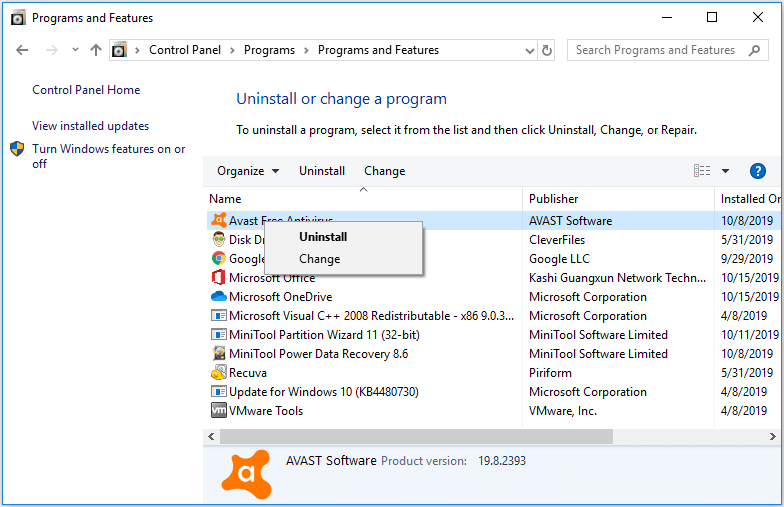
Step 3. Click Repair button in Avast Setup window to start the Avast repair process.
Fix 4. Do a Clean Install of Avast
You can completely uninstall Avast antivirus software from your computer, download and install its latest version from Avast official website. This should fix Avast web shield won’t turn on error on Windows 10.
Step 1. To completely remove the old version of Avast antivirus software, you can disconnect the Internet connection and start Windows 10 in Safe Mode.
Step 2. After you get into Windows Safe Mode, you can click Start, type control panel, and click Control Panel to open it. Then click Programs and locate Avast antivirus software to right-click it. choose Uninstall to remove Avast from your computer.
Step 3. After the uninstallation process is finished, you can restart your computer to normal mode, and connect the network. Go to Avast official website to download and install the latest version of Avast antivirus software.
Final Words
Hope you can fix Avast web shield won’t turn on problem on Windows 10 with one of the 4 solutions in this post. If you have better ways to fix this issue, you can share with us.
To tackle data loss on Windows 10 computer due to malware/virus attack, system crash, power outage, mistakenly deletion, hard drive failure, etc. you can try MiniTool Power Data Recovery. Its free version allows you to recover up to 1GB data totally for free.
![How to Recover My Files/Data for Free in 3 Steps [23 FAQs]](https://images.minitool.com/minitool.com/images/uploads/2019/06/recover-my-files-data-for-free-thumbnail.png)
User Comments :