
Black Myth Wukong Out of Video Memory
Recently, Black Myth Wukong has really been a hit. Rooted in Chinese mythology and based on Journey to the West, this action RPG attracts attentions from PC games all over the world. However, like any new game with its first debut, you might run into many problems while trying to play it. Black Myth Wukong out of video memory is one of the most annoying ones you might encounter.
If you are on the same boat, don’t worry! This problem is not difficult to iron out. By following these solutions and tips below, you can get rid of it with ease.
MiniTool System Booster TrialClick to Download100%Clean & Safe
How to Fix Black Myth Wukong Out of Video Memory on Windows 10/11?
Preparation: Check System Requirements
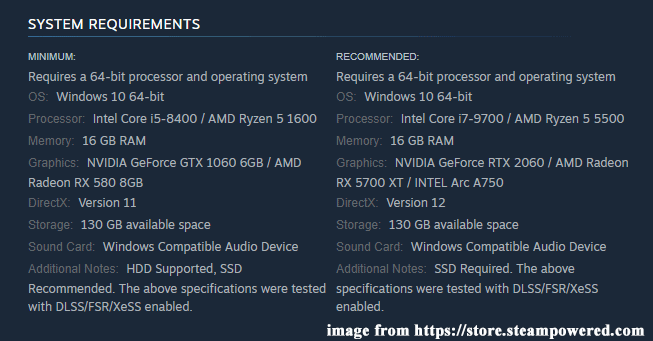
At first, you should check if your game meets the minimum system requirements of the game. Here, you can view the minimum and recommended system requirements of Black Myth Wukong from the picture below:
If you don’t know how to check your PC specifications, follow these steps:
Step 1. Press Win +R to open the Run box.
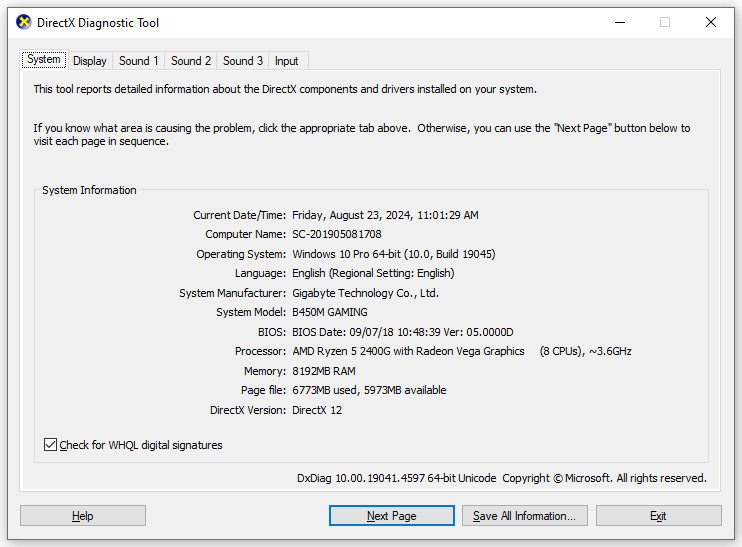
Step 2. Type dxdiag and hit OK to launch DirectX Diagnostics Tool.
Step 3. Then, you can go to the System tab and the Display tab to see detailed information about your PC specs.
Fix 1: Update BIOS
If out of video memory Black Myth Wukong is still there, it’s a good idea to update the BIOS. Quite a few people said that performing a BIOS update saved their day.
Also see:
- How to Update BIOS Windows 10 HP? See a Detailed Guide
- How to Update Acer BIOS [2 Ways]
- 2 Ways to Update American Megatrends BIOS
- How to Update BIOS MSI
- Perform ASUS BIOS Update with 4 Methods
Fix 2: Underclock the CPU
It is reported that users with specific processors like Intel 13th and 14th gen are more likely to receive Black Myth Wukong not enough video RAM. If this is the case, you had better utilize tools like Intel Extreme Tuning Utility to reduce the CPU voltage and underclock the CPU. Meanwhile, the game developers also advise you to skip the shader compilation.
Fix 3: Terminate Resource-Hogging Processes
Since Black Myth Wukong is a resource-demanding game, you need to make sure there are no other resource-hogging processes running in the background. If yes, follow these steps to terminate them:
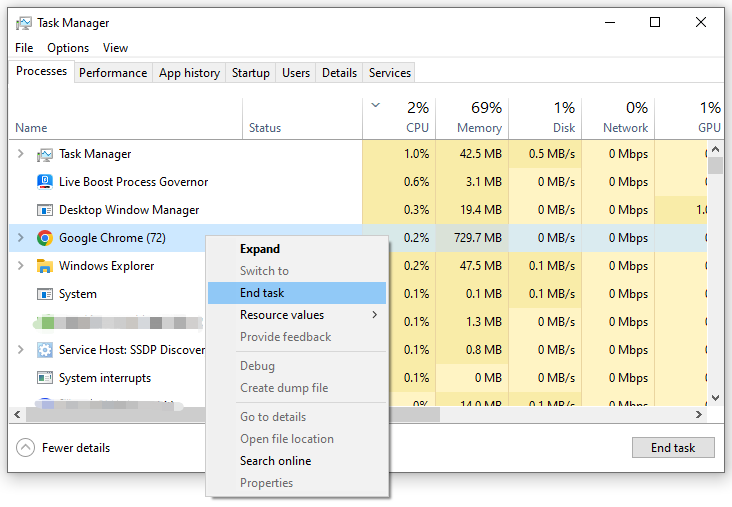
Step 1. Right-click on the taskbar and select Task Manager.
Step 2. In the Processes tab, you can view a list of processes running on your computer. Right-click on resource-hogging processes one by one and select End task.
Also see: 5 Ways – How to Turn off Background Apps on Windows 10/11
Fix 4: Increase Virtual Memory
To address Black Myth Wukong out of video memory, you can also consider allocating more virtual memory. Follow these steps:
Step 1. Press Win + R to open the Run box.
Step 2. Type sysdm.cpl and hit Enter to launch System Properties.
Step 3. Go to the Advanced tab and click on Settings under Performance.
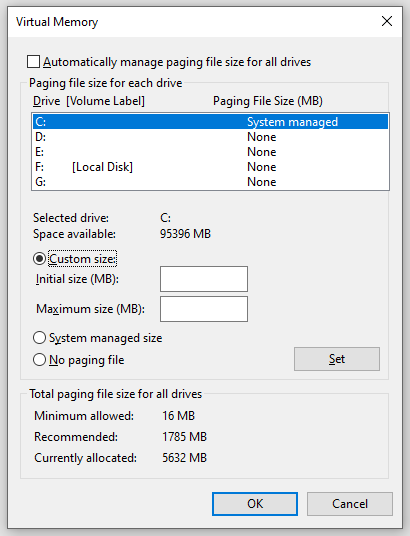
Step 4. In the Advanced tab, tap on Change under Virtual memory.
Step 5. Uncheck Automatically manage paging file size for all drives > tick Custom size > input Initial size and Maximum size > hit Set & OK.
Fix 5: Lower In-Game Graphics Settings
Lowering in-game graphics settings can also help to bypass the memory limit of your system. To do so, you can go to the Graphics section to adjust the following settings to medium or low:
- Resolutions
- Anti-Aliasing
- Quality of Shadows
- Texture Quality Settings
Fix 6: Update Graphics Driver
Outdated or incompatible graphics driver is also responsible for Black Myth Wukong out of video memory. Therefore, please make sure to install the latest graphics driver on your computer. To do so:
Step 1. Right-click on Start menu in the lower left corner and select Device Manager.
Step 2. Expand the Display adapters category and right-click on it to choose Update driver.
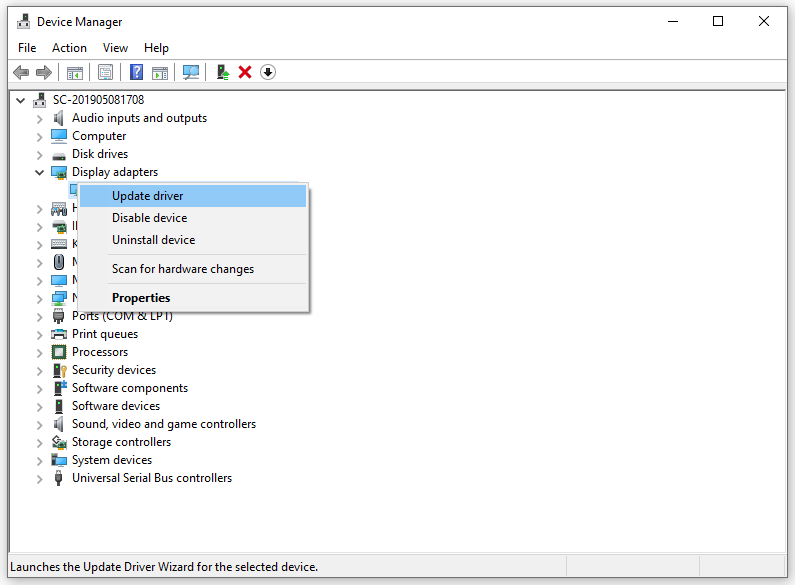
Step 3. Select Automatically search for drivers and follow the instructions on the screen to complete the rest process.

Fix 7: Verify Integrity of Game Files
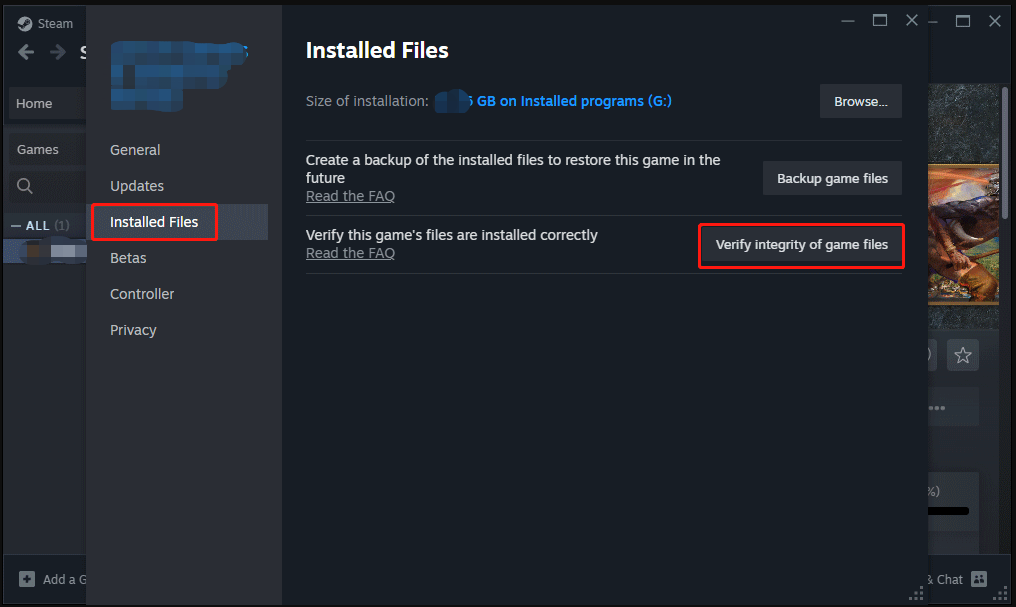
When some of the game files are corrupted or missing, Black Myth Wukong out of memory might also appear. In this condition, you need to run the file verification feature in Steam to repair them. Here’s how to verify the integrity of game files in Steam:
Step 1. Launch Steam and go to Library.
Step 2. Find Black Myth Wukong and right-click on it to choose Properties.
Step 3. In the Installed files tab, click on Verify integrity of game files.
Final Words
That’s all you can do for Black Myth Wukong out of VRAM. After applying one of these solutions, you must be free from this nuisance and have fun playing this game on your computer.
User Comments :