
This post focuses on the topic of “Chromebooks vs Windows”. Chromebooks vs Windows 10 laptops, which one to buy? What are the pros and cons of Chromebook or Windows 10 laptops? Check the differences of Chromebook and Windows 10 laptop in this post. If you need a professional drive partition manager or data recovery software, you can visit MiniTool official site.
Chromebooks vs Windows 10 laptops, in regards to cost, performance, functions, convenience, etc. which one is better?
Windows laptops run with Microsoft Windows OS while Chromebooks run a Chrome OS. If you are weighing the cost and performance of Chromebooks and Windows 10 laptops, and want to choose the most suitable one, the brief comparisons and analysis below may give you some references.
Chromebooks vs Windows 10 Laptops – Interface
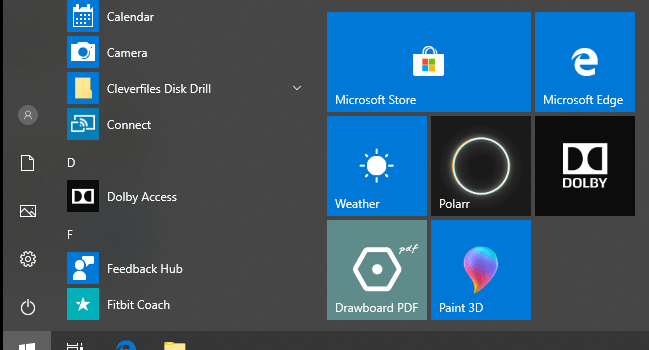
Windows 10 OS interface equips a Start menu filled with your most used programs and recently installed apps on the left. Windows 10 taskbar includes a Cortana search icon next to Start button, and shows small icons of opened programs. At the lower-bottom corner, Windows 10 has a notification icon. It brings you to the new Action Center when you click it, and displays alerts from apps which are active or inactive.
As for the interface of Chrome OS, it shows icons for currently running apps and shortcuts to popular Google apps at the taskbar. At the right-bottom of taskbar, it displays basic settings like Wi-Fi, Time.
Chrome OS is the first Web-based operating system. Generally apps will run in a Chrome browser window, the same with apps that can run offline.
As for multitasking, Windows 10 is better. But the interface of Chrome OS is more straightforward.
Chromebooks vs Windows – Performance
Chrome OS is a scaled down OS. It is built around the Google Chrome web browser. The Internet plays an important role in Chromebook’s performance, and allows a low-cost Chromebook to perform as well as an expensive Windows laptop.
Windows is designed for the enterprise and it doesn’t scale down. It will require more hard drive space, more RAM, and more updated and high-end hardware if you want a Windows laptop to performance better.
![[SOLVED] How to Revive Windows 10 With Recovery Drive | Easy Fix](https://images.minitool.com/minitool.com/images/uploads/2019/05/windows-10-repair-recovery-disk-thumbnail.png)
Chromebooks vs Windows 10 Laptops – Hardware
The display of Chromebooks are generally smaller than Windows laptops. Chromebooks often have a 10.5-12-inch display. But you can still buy a 15-inch Chromebook. Windows laptops’ displays are often 12-15 inches. Some top Windows laptops may equip a 17-inch display.
As for screen resolution, Chromebooks usually have a lower screen resolution than a Windows laptop.
Talking about storage capacity, you won’t get much storage if you buy a Chromebook, and you don’t need it as much since Chromebooks are designed to be powered by the web. Normally a Chromebook comes with a 32GB storage. Some high-end models may have 64GB or 128GB.
The storage of Windows laptops often start at 64GB. Some high-end Windows laptops may have 1TB HDD/SSD. Windows 10 OS own needs about 20GB of storage, while Chrome OS own only needs 4-5GB. If you want to install more apps on Windows 10, they will occupy much more storage spaces.

Chromebooks vs Windows 10 Laptops – Battery Life
Averagely, Windows 10 laptops have a longer battery life than a Chromebook. It may have a 12 hours battery life. Some top Windows laptops in market claim to have a 20 hours battery life. However, the battery life of a laptop depends on how you use it, namely, how the CPU and GPU are working. Chromebooks generally have an 8 hours battery life or so.
Chromebooks vs Windows 10 Laptops – Apps and Software
Windows supports more apps and software. A functional Windows laptop often needs photo/video editing programs, video/music playback programs, a browser, productivity programs, etc. Besides, Windows laptops supports most games.
However, Chrome OS only allows you to run a program or play a game in Chrome browser. Things is continuing changing. Many Chromebooks offer Android apps now. If your Chromebook is on the list of those with Android apps, then you can use them.
Chromebooks vs Windows 10 Laptops – Web Browsing
Chrome OS only has a Google Chrome browser. Google Chrome is easy-to use and performances well. But the Chrome browser on Chrome OS doesn’t support Flash or some other plugins like Java. Therefore, you may encounter incompatibility issues when you visit some websites.
On the contrary, Windows 10 laptops supports Google Chrome, Firefox, Edge, and many other browsers.
Chromebooks vs Windows 10 Laptops – Photo and Video Editing
Windows 10 supports a lot of photo/video editing programs like Photoshop, Adobe’s Creative Suite, Photos app, and more, while Chrome OS don’t provides an option for popular photo/video editing programs like Adobe Photoshop. Some Chromebooks which support Android apps may support Photoshop Express.
So, for those who need to edit photos or videos frequently, Windows 10 is the option.
Chromebooks vs Windows 10 Laptops – Cost
Despite that some high-end Chromebooks are with a price tag of around $1000, most Chromebooks cost about $200-$350 which is very cheap. And for schools and companies that want to buy in bulk, it’s a good choice.
Windows laptops have higher prices than Chromebooks. The cheapest ones will compete with a Chromebook.
For more comparisons of Chromebooks and Windows 10 laptops, you can visit: Chromebooks vs. Windows 10 Laptops: What Should You Buy?
User Comments :