
After installing the Windows 11/10 update or creating a new user account, you may see the “Let’s finish setting up your device” message. It’s annoying. This post from MiniTool provides ways for you to disable let's finish setting your device on Windows 11/10.
The “Let’s Finish Setting Up Your Device” message generally appears after you install an update and restart your computer. It shows a message reminding you to “Finish Setting Up Your Device.” Continue to read to find solutions.
How to Disable “Let’s Finish Setting up Your Device” on Windows 11
Way 1: Via Settings
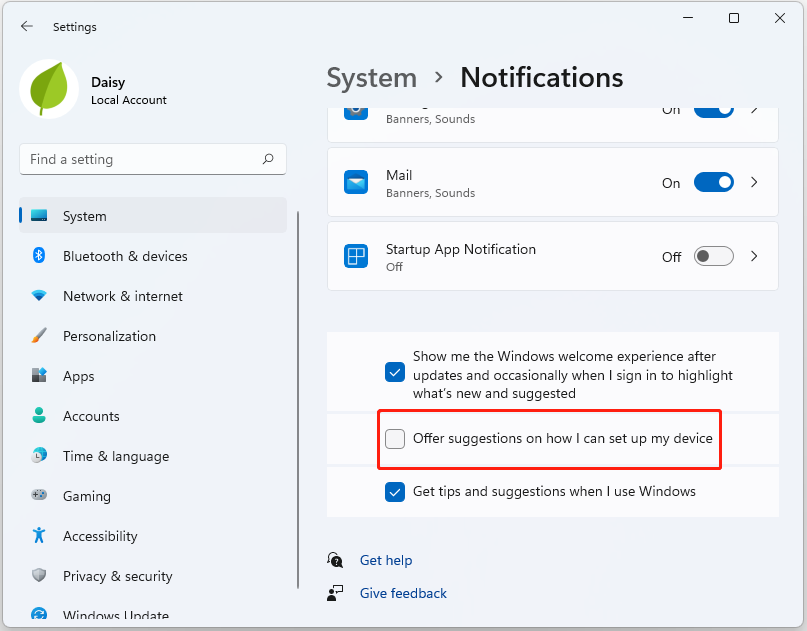
To turn off “let’s finish setting your device” on Windows 11, you can go to Settings to do that:
Step 1: Open the Settings app by pressing the Windows + I keys together.
Step 2: Select the System option and click Notifications on the sidebar.
Step 3: Uncheck the Offer suggestions on how I can set up my device option.
Way 2: Via Registry Editor
The second method for you to disable let’s finish setting your device on Windows 11 is via Registry Editor. Here are the steps:
Step 1: Press Win + R to open the Run dialog. Type regedit and click OK to open the Registry Editor. Click Yes to confirm the action.
Step 2: Go to the following path:
HKEY_CURRENT_USER\Software\Microsoft\Windows\CurrentVersion\ContentDeliveryManager
Step 3: Right-click on ContentDeliveryManger and select New > DWORD (32-bit) Value.
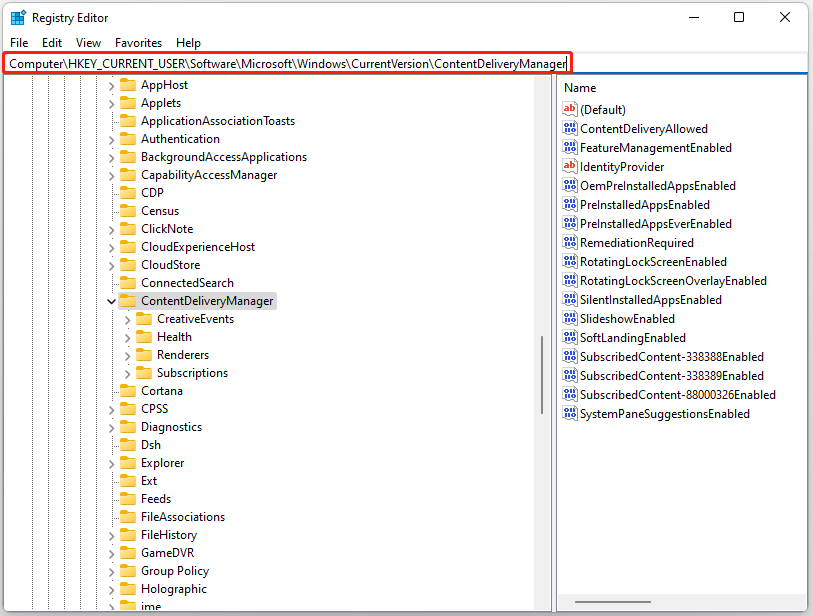
Step 4: Create a new value as SubscribedContent-310093Enabled. Right-click the SubscribedContent-310093Enabled value and select Modify.
Step 5: Type 0 in the Value data field and click OK to save the changes. Close Registry Editor.
Tip: This solution is also suitable for Windows 10.
How to Disable “Let’s Finish Setting up Your Device” on Windows 10
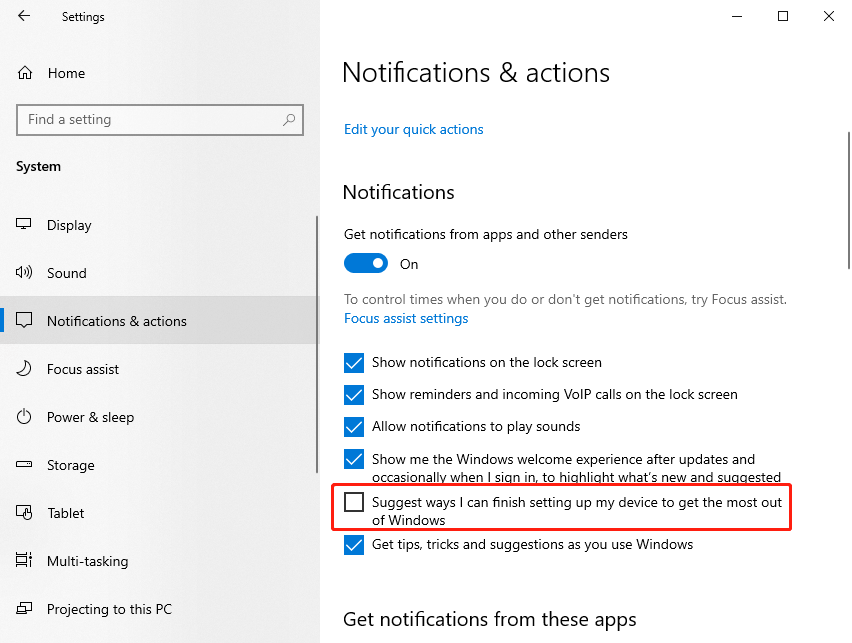
How to disable “let’s finish setting your device” on Windows 10? You just need to go to the Settings application.
Step 1: Open the Settings app by pressing the Windows + I keys together.
Step 2: Select the System option and click Notifications & actions on the sidebar.
Step 3: Uncheck the Suggest ways I can finish setting up my device to get the most out of Windows option.
![How to Fix Windows 11 Not Detecting Second Monitor [4 Ways]](https://images.minitool.com/minitool.com/images/uploads/2021/08/windows-11-not-detecting-second-monitor-thumbnail.jpg)
Final Words
To sum up, this post has shown ways to disable “let’s finish setting your device” on Windows 11/10. If you come across the same error, try these solutions. If you have any better solution, you can share it in the comment zone.
User Comments :