
Driver Outdated error is a common issue on Minecraft. If you encounter this issue on your PC, how can you get rid of this situation? This post is written for you and you can find some effective solutions given by MiniTool Solution here.
Drivers Outdated Error Minecraft
Minecraft is a great video game that has two main modes including Survival and Creative. It supports multiple platforms – PCs, Macs, Xbox 360, iPhone, iPad, Kindle Fire, and Android smartphones.
Like other games, Minecraft also has some bugs and errors, making it difficult to play this game, for example, failed to download file, can’t connect to Minecraft outdated server, Minecraft not responding, etc. Today in this post, we will show you another common error – Minecraft Drivers Outdated.
On your screen, you can see the error message “Your computer’s graphics drivers have a new update available. Wolds may have some issues or bugs without the update”.
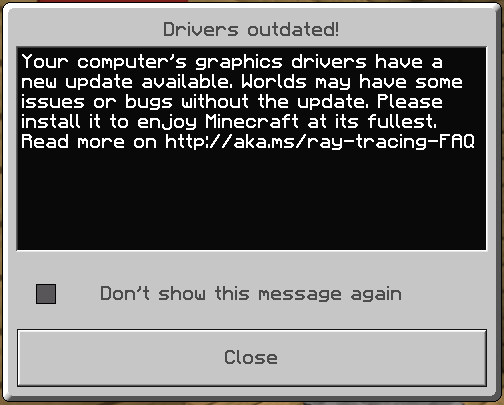
The pop-up window indicates there is a problem with your graphics driver. That is not always the case for all players. Besides, there are some other possible reasons, for example, Windows is not updated, Minecraft is not the latest version, GPU settings is not configured correctly, etc.
If you are having this error, don’t worry and you can go to the next part to look for and try some useful solutions.
How to Fix Drivers Outdated Error on Minecraft
Check Minecraft Version
Installing an old version of Minecraft may lead to the Drivers Outdated error. So the first thing you can do is check the Minecraft version and make sure it is the latest one. This can ensure the smooth and optimal performance of the game.
Bedrock edition
Step 1: Go to the search box, type Microsoft Store, and click the app to open it.
Step 2: Click on the three-horizontal-dot menu button on the top-right corner and choose Downloads and updates.
Step 3: Click Get updates to check for available updates. If there is an update of Minecraft, install it on your PC.
Java edition
Step 1: Open the Minecraft launcher.
Step 2: Click on the arrow button next to the left of the Play button.
Step 3: Choose Latest release to use the latest version of this game.
Update Windows
If you still get the Drivers Outdated error on Minecraft, you can try to update the Windows system to download and install the new patches. This may be helpful to fix this issue.
Step 1: Press Win and I to get the Settings app.
Step 2: Go to Update & Security (Windows 10) or Windows Update (Windows 11) and check for updates.
If some available updates are detected, download and install them on your PC. Your PC will restart several times. Later, check if the issue has been removed.
Upgrade Graphics Card Driver
When getting Minecraft Drivers Outdated error, make sure your graphics card driver is the latest version for the best performance.
There are various ways for you to update the graphics card driver to the latest version, for example, via Device Manager, the manufacturer’s website, a driver update tool, and Windows Update. To know more information, you can see this post – How to Update Graphics Card Drivers (NVIDIA/AMD/Intel).
Change CPU Settings
If the error isn’t fixed, try this way. Of course, this is quite useful if you are using dual graphics cards on your system.
Step 1: Right-click on the empty space on the desktop and choose Display settings.
Step 2: Click Graphics settings.
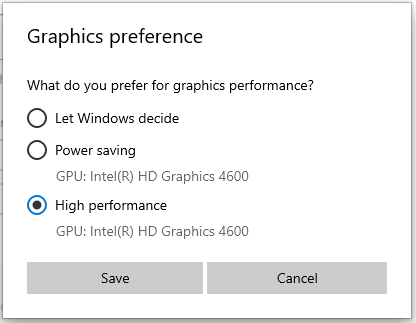
Step 3: Under the Graphics performance preference section, choose an app type – select Desktop app for Java Edition and choose Microsoft Store app for Bedrock edition. Then, choose Minecraft and click Add.
Step 4: Click Options and choose High performance. Then, click Save.
These are all the useful solutions to fix the Minecraft Driver Outdated error on your PC. If you are bothered by this issue now, try these methods and you can easily get rid of the trouble.
About The Author

Position: Columnist
Vera has been working at the MiniTool Team for over 10 years as a technical editor and content writer. She mainly focuses on disk and partition management, data recovery, Windows backup and restore, and PC troubleshooting. Through in-depth software testing and hands-on experience, she has helped users solve a wide range of computer problems and better protect their data on Windows devices.
User Comments :