
Elden Ring Nightreign is a cooperative survival action role-playing game developed by FromSoftware and released on May 30, 2025. It is a derivative work of Elden Ring and incorporates Roguelike elements.
Elden Ring Nightreign Fatal Error
Elden Ring Nightreign fatal error is a crash issue that players have experienced on PC, usually during loading screens or intense boss fights. This error can be related to high CPU load, memory bottlenecks, or the game engine failing to process certain lighting effects. It will lead to the game crashing and a black screen on Elden Ring Nightreign. Let’s look at its possible reasons in more detail:
- Memory allocation issues. The game may run out of available RAM when loading high-quality resources, causing a crash.
- Excessive CPU load. Too many computing tasks (such as complex lighting and physics effects) may cause CPU overload to trigger a fatal error.
- GPU compatibility. Some graphics card drivers may not be optimized for Nightreign, resulting in a black screen or crash issues.
- DirectX version. The game may require the latest DirectX version, and errors may also occur if the library files in the system are damaged or outdated.
- Game file corruption. Important Nightreign files are missing or damaged, the game may not load correctly, resulting in a fatal error.

The first thing you need to make sure when this problem occurs is that you have the latest version of the game. Developer FromSoftware has released a day one patch that fixes some core issues. If it is, read the following part.
How to Fix Elden Ring Nightreign Fatal Error
Here are some Elden Ring Nightreign fatal error and black screen issues possible fixes. Keep reading to get rid of it!
Fix 1: Run the Game as an Administrator
Some game files may require higher system permissions to execute correctly. If the game does not have sufficient permissions, it may crash or fail to launch. Here are the steps.
Step 1: Type Elden Ring Nightreign in the Windows search box, right-click the best match, and choose Open file location.
Step 2: Right-click the .exe file and select Properties at the bottom.
Step 3: Switch to the Compatibility tab and tick the box for Run this program as an administrator.
Step 4: Finally, click Apply > OK.
Once you have completed these operations, check if this error is fixed.

Fix 2: Verify the Integrity of Game Files
This error is often related to corrupted or missing game files, which may have been corrupted during the download, installation, or update process. Verify Integrity can detect and replace these files. If you encounter a fatal error, it is recommended to try this method first. If the problem persists, there are other methods to consider.
Step 1: Launch Steam and go to the Library tab.
Step 2: Find and right-click the game, and then choose Properties from the drop-down box.
Step 3: Switch to the Installed Files section and click Verify integrity of game files.
When the process ends, check if this error persists.
Fix 3: Download Microsoft Visual C++ Redistributable
Elden Ring Nightreign Fatal Error may be related to missing or corrupted Microsoft Visual C++ Redistributable, as this component contains critical library files required for the game to run. The game relies on dynamic link libraries (DLLs) provided by Microsoft Visual C++ Redistributable, and if these files are missing or corrupted, the game may not run properly.
Step 1: Go to the official Microsoft download page, where the latest supported versions of Visual C++ Redistributable are available.
Step 2: Choose the appropriate version among x64 (for 64-bit systems), x86 (for 32-bit systems), and ARM64 (for ARM devices).
Step 3: After downloading, double-click the .exe file to run the installer.
Step 4: Follow the on-screen instructions to complete the installation.
Step 5: After the installation is complete, it is recommended to restart the computer to ensure that the changes take effect.
Fix 4: Turn off Memory Integrity
Some players have found that turning off Memory Integrity can reduce CPU load and reduce game lag and crash issues. So you can try this method.
Step 1: Type Windows Security in the Windows search bar and press Enter to open the app.
Step 2: Click Device Security > Core Isolation Details.
Step 3: Find the Memory Integrity option and turn it off.
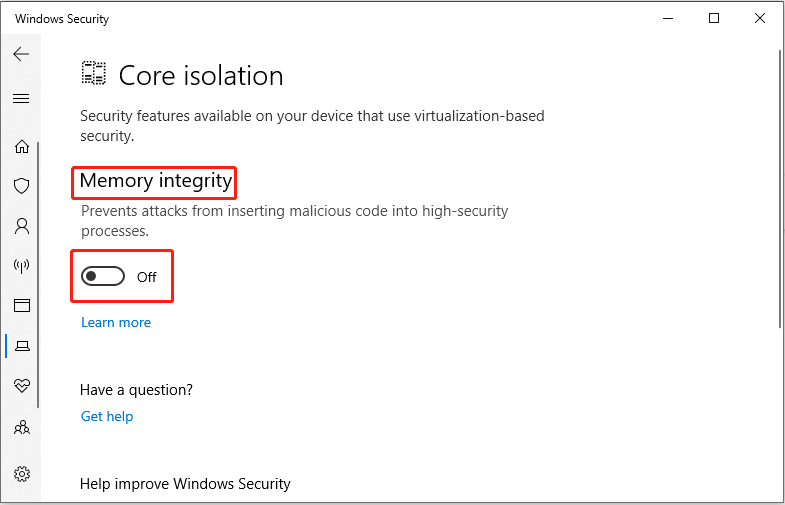
After turning it off, restart your computer to apply the changes.

MiniTool Power Data Recovery FreeClick to Download100%Clean & Safe
Bottom Line
While these methods can help reduce crashes and a black screen in Elden Ring Nightreign, they are not guaranteed to completely solve all errors.
If the problem persists, it is recommended to pay attention to official updates or wait for the development team to release a patch. I hope these suggestions can help you experience this wonderful game smoothly!
User Comments :