
There are indeed a lot of issues found in Windows 10 and have affected numerous users. In the last month, Microsoft finally released fixes for two known issues: the Windows 10 update issue and Intel driver battery drain.
MiniTool provides some programs to help you solve computer problems.
Windows 10 is talked by many people not only because its advanced features & improvements, but also due to its issues. It is undeniable that Windows 10 has many bugs and caused lots of problems on PC.
Two Famous Windows 10 Update Issues
The two famous issues acknowledged over six months ago are:
- The update installation is failed; users can’ install the new update on their PC.
- The Intel driver battery drain is higher than the normal battery drain.
Microsoft has finally released official solutions to fix Windows 10 update issue & battery drain problem properly on a Windows PC. They were fixed on the same day Windows 10 November 2019 Update started rolling out. In addition, there are some feature improvements.
Update Installation Failure
According to search, this failure has affected Windows 10, version 1903 and Windows 10, version 1809 client platforms. When the users running these versions try to install Windows 10 version 1903 cumulative updates through Windows Update feature, they will see the following error message on Windows Update dialog or within Update history:
Updates Failed. There were problems installing some updates, but we’ll try again later.
The most common error codes are:
- 0x80073701
- 0x800f0982
- 0x800f0988
- 0x800f0845
- 0x8024200d
- 0x800f081f
- …
Last month, Microsoft finally worked out a solution for the issue; it changes the tag to Resolved and said the error has been solved for most users.
How to settle down the update installation failure?
Users who still receive the error message should try to check for updates again. If this doesn’t work, please try the following steps.
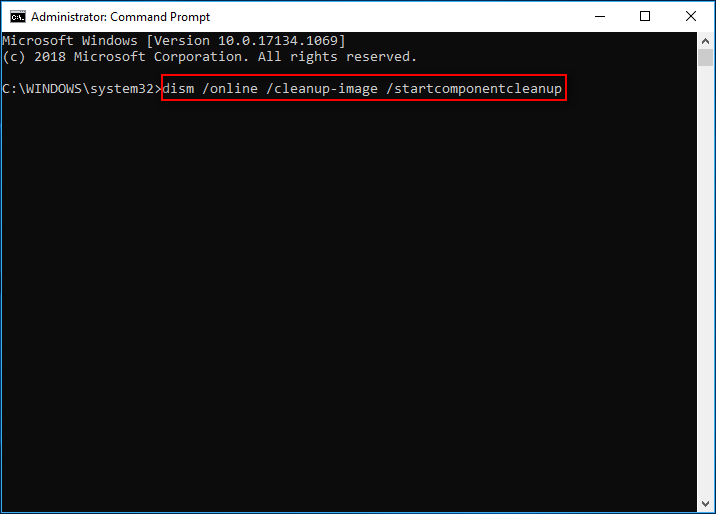
- Open Windows search and type cmd into the textbox.
- Right click on Command Prompt and choose Run as administrator.
- Click on the Yes button when system asks Do you want to allow this app to make changes to your device in the User Account Control window. (Please skip this step when you don’t see the UAC dialog.)
- Type dism /online /cleanup-image /startcomponentcleanup. (You can also copy & paste this command into the Command Prompt window.)
- Press the Enter button on the keyboard.
- Wait for the command to finish.
- Restart PC and try update again.
How To Recover Files Using CMD: Ultimate User Guide?
High Intel Drive Battery Drain
The Intel drive battery drain issue has an impact on both client and server Windows 10, version 1809 and 1903 platforms. A series of Intel Display Audio device drivers (versions 10.25.0.3 through 10.25.0.8) are discovered to experience an unexpected battery drain on a series of devices (the battery drain of them is higher than normal).
Microsoft and Intel have identified a compatibility issue with a range of Intel Display Audio device drivers that may result in excessive processor demand and reduced battery life. As a result, the update process to Windows 10 October 2018 Update, version 1809, will fail. If you see a What needs your attention notification when you run the October Update, you have an Intel Display Audio device driver, intcdaud.sys, versions 10.25.0.3 – 10.25.0.8, installed in your system– according to Microsoft’s Windows 10 Health Dashboard in May

How to deal with high Intel driver battery drain?
After noticing the issue, Microsoft set a new compatibility hold to stop Windows 10 May 2019 Update until the updated device drivers are installed. This is a measure to prevent any possible problems caused by the incompatible Intel Display Audio device drivers.
The abnormal battery drain can be fixed completely by updating drivers from Intel or the devices’ manufacturers (OEMs). Since then, the safeguard hold has been removed, so users can update to the latest Windows 10 version directly through Windows Update feature.
[SOLVED] How To Recover Lost Files After Windows Update.
That’s all I want to say about how to solve the Windows 10 update issue in 2 different cases.
User Comments :