
This comprehensive guide from MiniTool will break down the PNY microSD Express U3 V30 A1 microSD flash memory card’s essential information, standout features, and key specifications. We also provide recovery and backup methods for your PNY microSD Express card.
Slow read and write speeds for microSD cards will cause delayed game launches, stuttering 4K video recording, and annoyingly lengthy file transfers.
As advanced devices like the Nintendo Switch 2 and high-end action cameras require ultra-fast, high-capacity storage, traditional microSD cards may not meet the needs.
The PNY microSD Express U3 V30 A1 is a high-performance storage solution designed to satisfy the demanding needs of gaming, content creation, and mobile multitasking.
Read on to get more detailed information about the PNY microSD Express U3 V30 A1 microSD flash memory card.
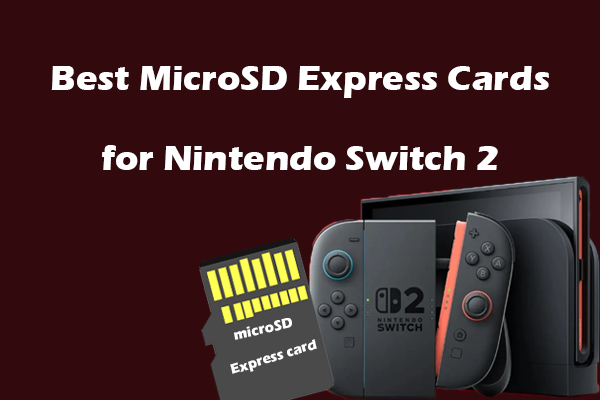
About PNY microSD Express U3 V30 A1 microSD Flash Memory Card
Before discussing the PNY microSD Express card, you should know what microSD Express is.
MicroSD Express is a new high-performance flash memory card launched by the SD Association that uses PCIe and NVMe protocols for faster data transfer rates.
MicroSD Express offers not only superior speed but also backward compatibility with devices using UHS-III, UHS-II, or UHS-I interfaces.
The PNY microSD Express U3 V30 A1 is a high-performance and next-generation memory card designed for gaming, especially for devices such as the Nintendo Switch 2.
Now, proceed to the next part to learn the key features of this card.
Key Features of PNY microSD Express U3 V30 A1
The PNY microSD Express U3 V30 A1 microSDXC not only embraces the microSD Express standard but also sets a new bar for performance and reliability.
Here’s the breakdown of its key features.
Blazing Fast Transfer/Download Speed
This card features V30 (Video Speed Class 30), which is perfect for recording 4K videos.
Moreover, it is compatible with U3, which provides high-speed performance that is up to 4.4 times faster than conventional UHS-I microSD cards.
Ultimate Gaming Experience
The card is designed with PCIe Gen3 x1 microSD technology, offering read speeds up to 890MB/s and write speeds up to 850MB/s.
Additionally, it can expand your gaming device’s internal storage with up to 1TB of additional 3A game space.
Due to these performances, it will reduce load times for even the most demanding games, allowing you to quickly dive into stunning high-resolution worlds.
Next-Gen Gaming Ready
The card is fully compatible with microSD Express host devices, including the latest portable gaming device, Nintendo Switch 2, achieving fast speeds for seamless gameplay.
In addition, it is compatible with UHS-I and UHS-II host devices, allowing them to operate at UHS-I/UHS-II speeds.
A1 App Performance
The A1 Application Performance rating allows you to run gaming applications directly from the PNY microSD Express card. This delivers quicker app launches and improved performance.
Excellent Thermal Management
The PNY microSD Express U3 V30 A1 features unique heat dissipation and built-in thermal monitoring and adaptive technology designs for optimal cooling.
Robust Durability
The PNY microSD Express card is shockproof, temperature-proof, waterproof, drop-proof, X-ray proof, wearout-proof, and humidity-proof.
Meanwhile, it comes with a lifetime limited warranty, assuring that your vast gaming collection is protected with PNY microSD Express.
Specifications of PNY microSD Express U3 V30 A1
After learning the key features of the PNY microSD Express card, below are some main specifications:
- Capacities: 128GB, 256GB, 512GB, and 1TB
- Format: microSDXC
- Interface: PCIe Gen3x1 and UHS-I
- Speed Class: Class 10, U3
- Video Speed Class: V30
- Read Speed: Up to 890MB/s
- Write Speed: Up to 750MB/s (256GB), 550MB/s (128GB)
- App Performance: A1
- Compatibility: Designed for microSD Express host devices, including Nintendo Switch 2. Backwards compatible with microSD UHS-I/UHS-II devices.
- Warranty: Lifetime Limited.
How to Recover Data From a PNY microSD Express U3 V30 A1 Flash Memory Card
Even with the PNY microSD Express card’s robust durability, data loss risks still loom for you, such as accidental deletion, formatting, or virus infection.
Whether you lost 4k footage or Nintendo Switch 2’s saved game screenshots, MiniTool Power Data Recovery is the best tool to recover your valuable data on the PNY card.
This data recovery tool is good at recovering data from a microSD Express card under various common data loss scenarios.
It supports recovering many file types, including RAW photos, 4K videos, and game data. Additionally, the user-friendly interface helps you perform data recovery easily.
This free data recovery software allows you to recover 1GB of files for free. Download and install it on your PC to carry out PNY card recovery.
MiniTool Power Data Recovery FreeClick to Download100%Clean & Safe
3 steps to recover PNY microSD Express card data:
Step 1. Launch MiniTool Power Data Recovery to enter its home interface. Under the Logical Drives tab, select your PNY microSD Express card with a USB icon, and then click Scan.
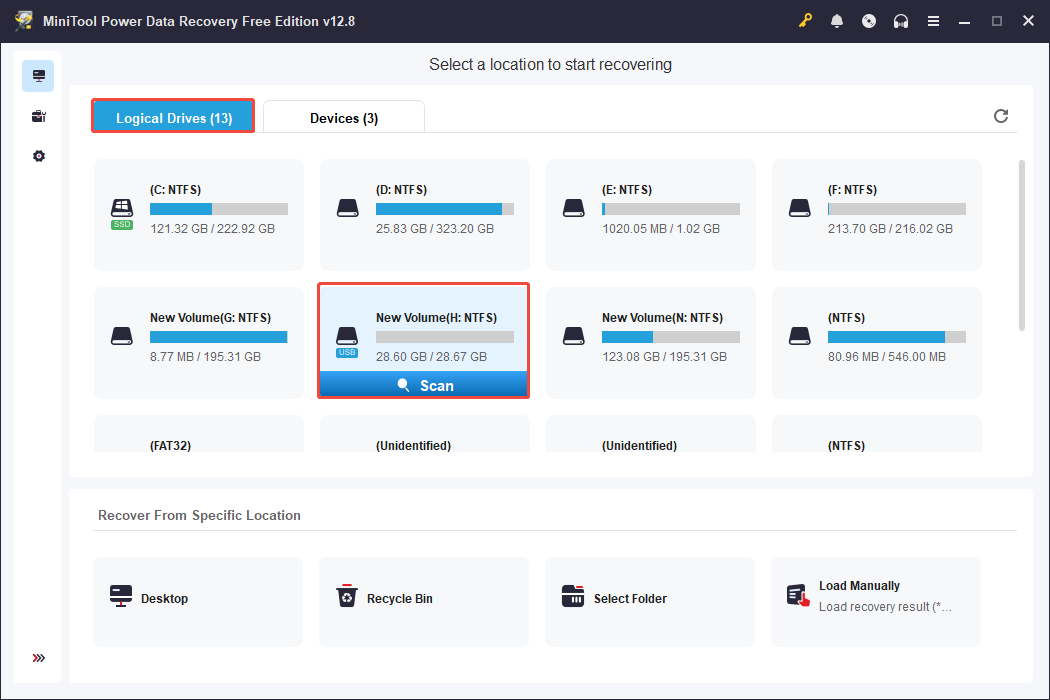
Step 2. After the scan finishes, unfold each folder under the Path category to find the files you want to recover. To quickly locate the videos, go to Type > Audio & Video.
Additionally, the Filter and Search features are useful for you to find the needed files faster.
To make sure the files are what you need, double-click each to preview.
Step 3. Select the desired files and click Save to choose an appropriate location different from the original location to store them.
How to Back Up PNY microSD Express U3 V30 A1 Flash Memory Card Data
If you like storing important data on the PNY microSD Express card, MiniTool ShadowMaker offers automatic backup solutions to prevent data loss.
This powerful tool allows automated, incremental backups that run in the background without disrupting your workflow on the PNY card.
Use this tool to schedule regular backups of the PNY card to internal/external drives or network drives to protect your 3A games, RAW photos, and 4K footage.
Download and install the trial edition (30-day free trial) to have a try.
MiniTool ShadowMaker TrialClick to Download100%Clean & Safe
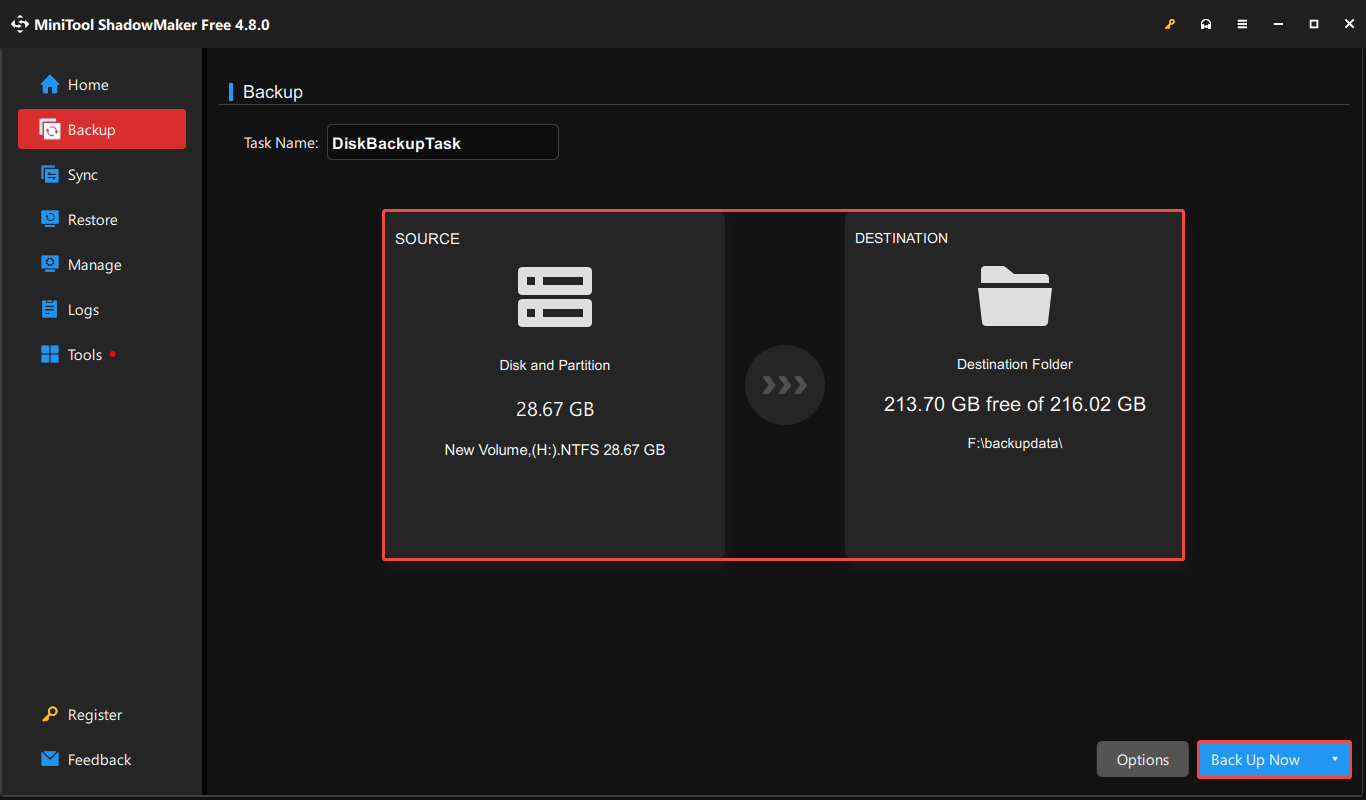
Step 1. Open MiniTool ShadowMaker, then click Keep Trial to proceed.
Step 2. Navigate to the Backup section.
Step 3. Click on SOURCE to choose the PNY microSD Express card to back up. Then, click the DESTINATION button to select a preferred directory for saving the backup files.
Step 4. Click the Back Up Now button.
Bottom Line
In a word, the PNY microSD Express U3 V30 A1 microSD flash memory card is a standout storage solution for its next-gen speed and reliability.
After reading this post, you should know the basic information, features, and specifications for the PNY microSD Express card.
If you encounter the PNY card data loss issue or want to back up the card data, we also provide two professional tools.
if you encounter problems when using MiniTool software, please feel free to contact us via [email protected].
User Comments :