
The QuickFontCache.dll not found issue can be triggered by multiple reasons and you may troubleshoot that based on your own condition. This article on MiniTool Website will present a series of useful methods and you can try them one by one. Some of them can help fix your problem.
QuickFontCache.dll Not Found
QuickFontCache.dll is a dynamic link library file, essential to the operation of FL Studio. When you attempt to get into the related software, the QuickFontCache.dll missing error can jump out to stop you from doing that.
The error can show you as the following formats:
- QuickFontCache.dll can’t be found.
- Can’t register QuickFontCache.dll.
- Can’t start FL Studio Producer Edition. QuickFontCache.dll component missing. Re-install FL Studio Producer Edition.
- QuickFontCache.dll Access Violation.
According to what inflicted users have reported, we have concluded some possible culprits for your reference. Some of the common ones are:
- Corrupted QuickFontCache.dll file caused by malware or virus infiltration.
- Software or hardware failure, such as bad sectors of hard drive.
- Invalid or corrupt QuickFontCache.dll registry entry.
- Inadequate disk space.
- QuickFontCache.dll maliciously deleted by different rogue or valid program.
Suggestion: Back Up Your Data
Many factors can trigger “QuickFontCache.dll not found” and the most common culprit is malicious or accidental deletion of QuickFontCache.dll, even some other data may get lost. It is recommended that you should back up your important data regularly to protect your data.
MiniTool ShadowMaker is a free backup software that can be used for a one-click system backup solution. Of course, file & folder and partition & disks are also available for backup. Backup schemes and schedules can be chosen for a better experience.
MiniTool ShadowMaker TrialClick to Download100%Clean & Safe
Fix: QuickFontCache.dll Not Found
Fix 1: Run SFC and DISM Scans
You can run SFC and DISM scans to repair system file corruptions and go to check for the QuickFontCache.dll not found issue has been removed or not.
Step 1: Open Search by pressing Win + R and input Command Prompt to choose Run as administrator.
Step 2: In the window, type sfc/scannow and press Enter to execute the command.
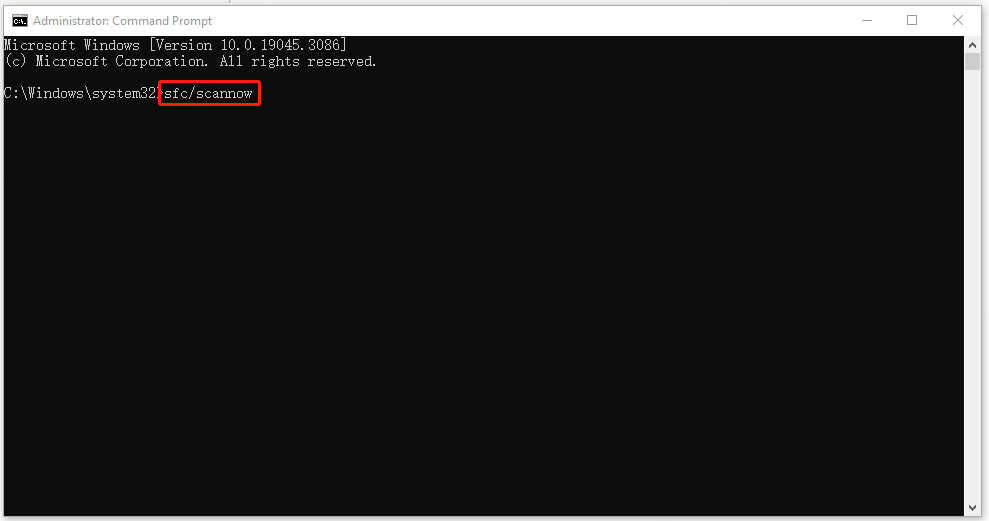
Step 3: Just wait until the process has been finished. Then you can execute the next command – DISM /Online /Cleanup-Image /RestoreHealth.
After that, you can close the window and restart your computer to check if the error persists.

Fix 2: Run a Malware Scan
In case the virus infiltration damage your QuickFontCache.dll file, you can run a full scan for your computer to fix QuickFontCache.dll not found.
Step 1: Input Windows Security in Search and go to the Virus & threat protection tab.
Step 2: Click on Scan options and choose Full scan and then click Scan now to start the process.
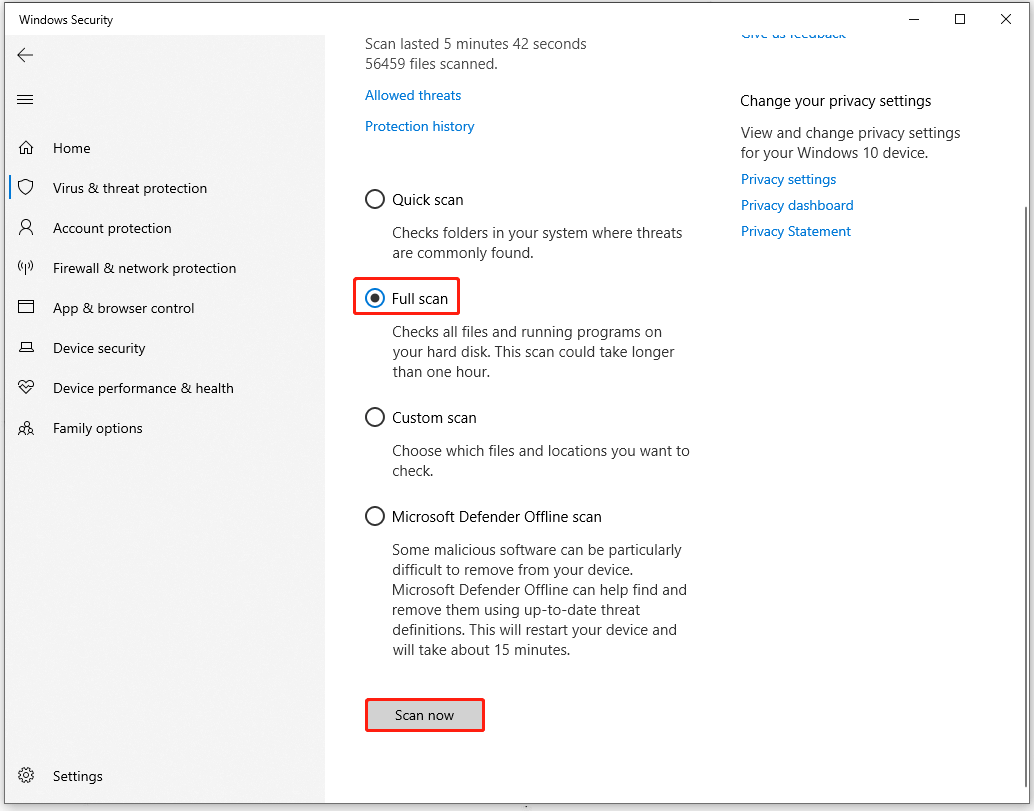
When the scan finishes, Windows Defender will show you the results and you can follow to fix that.
Fix 3: Clean Up Disk Space
Another method is to clean up disk space. But before you do that, you need to back up your important files and folders with MiniTool ShadowMaker in case of accidental deletion.
MiniTool ShadowMaker TrialClick to Download100%Clean & Safe
Step 1: Open File Explorer and go to This PC.
Step 2: Right-click on the drive you want to clean up to choose Properties.
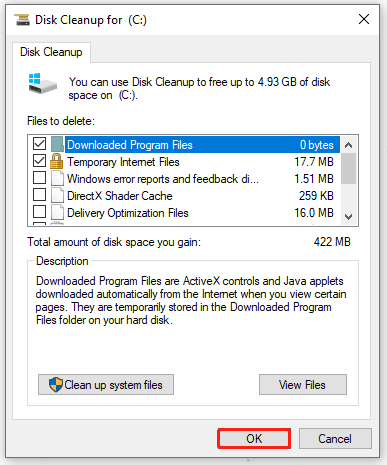
Step 3: Choose Disk Cleanup in the General tab and in the next window, check the options that you want to delete and click OK.
Fix 4: Update Windows
Apart from the above, you can check for your Windows updates. It is necessary to keep your Windows up to date so that everything on your system can perform well.
Step 1: Go to Start > Settings > Update & Security > Windows Update.
Step 2: Click Check for updates from the right panel and Windows will start downloading and installing the available updates.
Then you can restart the system to check if the QuickFontCache.dll is missing.
Bottom Line:
Struggle with the QuickFontCache.dll not found issue? This article has presented some available methods and you can try them one by one to get over the QuickFontCache.dll error.
User Comments :