
RoadCraft Application Has Stopped Working
RoadCraft, a vehicle simulation video game, has attracted many users to play it on a Windows 10 and 11 PC since its release. However, the RoadCraft Crash Dump Utility error ruins the happy day. Perhaps you are struggling with such an annoying issue.
When joining a friend or starting your own game, the “Crash Dump Sending Utility” window pops up, followed by “Application has stopped working”.
In this article, we will explore some possible fixes for this issue, and you can get back to the game.
#1. Verify Integrity of Game Files
Corrupt or missing files may trigger RoadCraft Crash Dump Utility, and verifying the integrity of game files can do the trick.
To do that:
Step 1: In Steam, go to Library.
Step 2: Locate RoadCraft and right-click on it to choose Properties.
Step 3: Head to Installed Files and then click the option that says Verify integrity of game files.
#2. Try DX11/DX12 in Launch Options
In Steam, you can try to add dx11/dx12 in launch options if the Crash Dump Utility error in RoadCraft happens.
Here are the steps:
Step 1: After opening the Properties window of RoadCraft in Steam, go to the General tab.
Step 2: Move to the Launch Options section, type in -dx11 or -dx12.
Step 3: Close this window and then run your game to see if the error persists.
#3. Disable Steam Input
Steam Input allows multiple types of controllers to be used in games on Steam. However, this feature can give rise to RoadCraft application has stopped working. So, disable it via these steps.
Step 1: In Properties of RoadCraft on Steam, move to the Controller tab.
Step 2: Select Disable Steam Input from the drop-down menu.
#4. Update BIOS
RoadCraft Crash Dump Utility application has stopped working can disappear after a BIOS update. Thus, give it a trial.
The update is crucial for the computer, so if any mistakes occur during the process, the system can fail to start up. Before proceeding, for safety, you had better back up your PC. MiniTool ShadowMaker, the best backup software, works well in PC backup. You can get it and begin file backup or system backup.
MiniTool ShadowMaker TrialClick to Download100%Clean & Safe
Next, take measures to update your BIOS.
#5. Update Graphics Card Driver
Issues with the graphics card driver often result in issues in games. In the case of RoadCraft Crash Dump Utility, make sure you install the latest GPU driver.
Here is how to do that:
Step 1: Open the website of AMD, Intel, or NVIDIA.
Step 2: Search for the proper graphics card driver depending on your GPU and download it.

Step 3: Run the downloaded file and finish the installation.

#6. Run RoadCraft as Administrator
When playing your game, you had better grant admin permissions to it. To fix the Crash Dump Utility error in RoadCraft, run it as an administrator.
Step 1: Open the installation directory of RoadCraft, such as C:\Program Files (x86)\Steam\steamapps\common\RoadCraft.
Step 2: Open root > bin > pc. Then, right-click on the RoadCraft exe file and choose Properties.
Step 3: In the Compatibility tab, tick Run this program as an administrator.
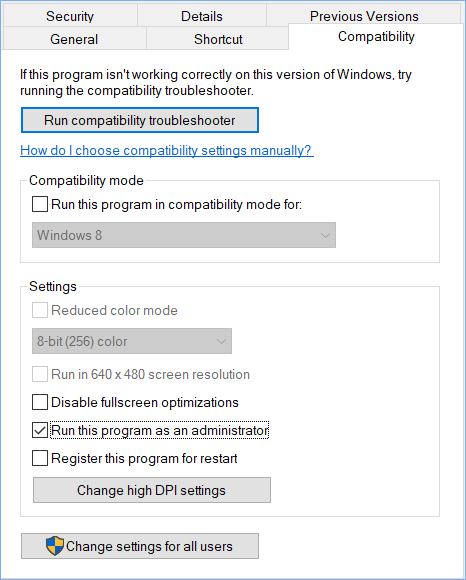
Step 4: Also, check the boxes of Run this program in compatibility mode for (Windows 8) and Disable fullscreen optimizations.
Step 5: Hit Apply > OK.
Other Generic Workarounds
Aside from those solutions, there are some other generic ways to address RoadCraft Crash Dump Utility:
- Increase virtual memory
- Reinstall the game
- Install Visual C++ Redistributables
- Allow the game exe file to Windows Security
- Run the game on a dedicated graphics card
The End
Don’t panic when meeting RoadCraft Crash Dump Utility application has stopped working. Apply these fixes in this post, and you will play the game smoothly.
About The Author

Position: Columnist
Vera has been working at the MiniTool Team for over 10 years as a technical editor and content writer. She mainly focuses on disk and partition management, data recovery, Windows backup and restore, and PC troubleshooting. Through in-depth software testing and hands-on experience, she has helped users solve a wide range of computer problems and better protect their data on Windows devices.
User Comments :