
When using Ryzen Master, it’s common to receive the “unable to initialize; kindly reinstall. Hence, aborting” error message. This post from MiniTool introduces how to fix the “Ryzen Master unable to initialize” issue in 4 ways.
The error message “Unable to initialize; kindly reinstall. Hence, aborting,” frequently appears in Ryzen Master due to initialization issues. It suggests that the software failed to launch properly and recommends reinstalling it to resolve the problem. This issue usually arises from an outdated or damaged installation of the program.
Way 1: Disable Microsoft Vulnerable Driver Blocklist
First, you can try to disable Microsoft Vulnerable Driver Blocklist to fix the “Ryzen Master can’t initialize” issue.
Step 1: Press Windows + R to open Run.
Step 2: Type regedit into the Run dialog and press Enter to open Registry Editor.
Step 3: Go to the following path:
HKEY_LOCAL_MACHINE\SYSTEM\CurrentControlSet\Control\CI\Config
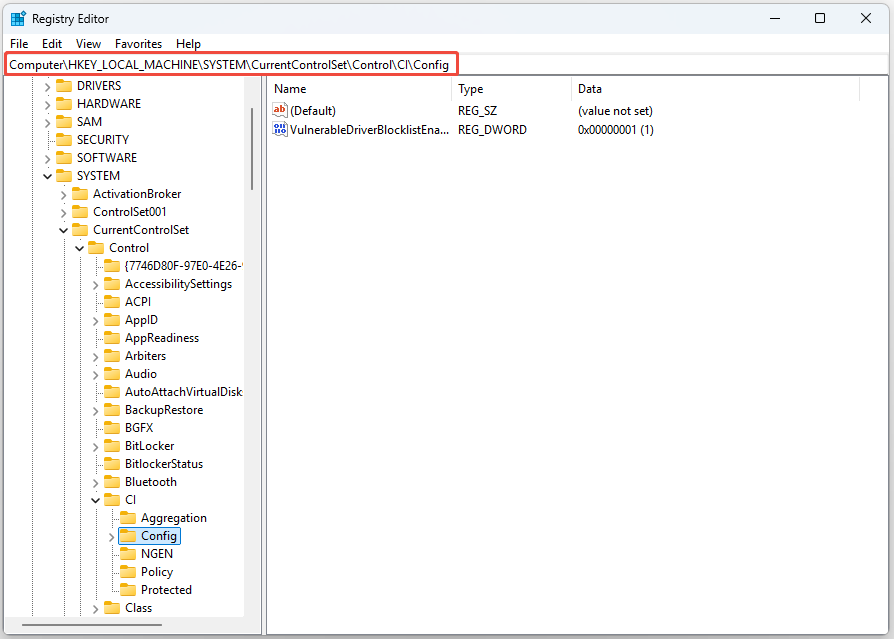
Step 4: Double-click VulnerableDriverBlocklistEnable from the right panel to open it.
Step 5: To disable Microsoft Vulnerable Driver Blocklist, set the value data to 0.
Step 6: Click OK to save the change.
Way 2: Disable Core Isolation Temporarily
If you turn on the Core Isolation Memory Integrity in Windows Security, the “AMD Ryzen Master unable to initialize” issue may appear. Therefore, disabling this feature might be a simple fix.
Step 1: Press Windows + I to open Windows Settings.
Step 2: Go to Update & Security > Windows Security > Device security.
Step 3: Click Core isolation details and toggle off Memory Integrity.
After disabling Core Isolation, it is recommended to back up your important data to prevent data loss. MiniTool ShadowMaker, a piece of free backup software, that can allow you to back up files, folders, partitions, disks, and even the system.
MiniTool ShadowMaker TrialClick to Download100%Clean & Safe
Way 3: Reinstall Graphics Drivers
You have to ensure that you are using the latest version of the graphics driver. You will meet the “Ryzen Master unable to initialize” issue if you have incompatible, corrupt, missing, or outdated drivers. To solve the issue, you need to update the driver.
Step 1: Open the Run box and type devmgmt.msc. Then press Enter to go to Device Manager.
Step 2: Double-click Display adapters to expand it. Then right-click your graphics card driver and choose Update driver.
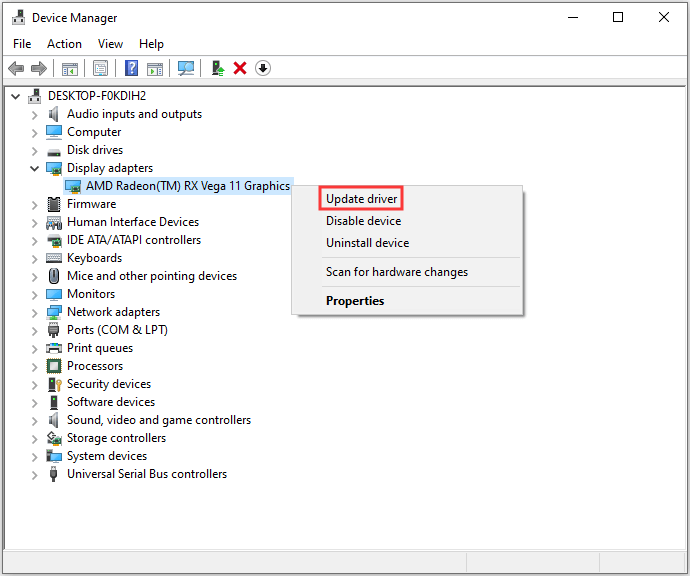
Step 3: You will be asked how you want to search for drivers in the pop-up window. You should choose Search automatically for updated driver software and then follow the instructions to complete the process.
Then, you can check to see if the issue has been fixed.
Way 4: Reinstall Ryzen Master
Another method to fix the “Ryzen Master unable to initialize“ issue is reinstalling Ryzen Master.
Step 1: Press the Windows + I keys together to open Settings.
Step 2: Go to App > Installed apps. The installed apps are listed here including the Windows pre-installed programs.
Step 3: Find Ryzen Master and choose it.
Step 4: Then, click the Uninstall button.
Final Words
Do not worry if you are experiencing the “AMD Ryzen Master unable to initialize” issue. The methods above can help you fix the issue. I hope the information I provided was useful and detailed.
User Comments :