
SSDs are popular today. But a USB flash drive which is equipped with Military-Grade AES 256-Bit XTS Hardware Encryption is also welcome. Now, let’s look at this SecureUSB BT Flash Drive.
SecureDrive Applies Encryption Technology to USB Flash Drives
Due to the good performance and large capacities, the portable SSDs have taken more and more market in the world. While flash drives seem to be less and less important. But, you still need to use USB flash drives in some cases.
For example, when you need to use a shuttle device to save your documents, images, movies, etc and want to take the device by your hand, the USB flash drive is still your best choice. And when it is convenient, you may also want security.
Here, we need to talk about SecureDrive. SecureDrive has applied the technology which has been used in the SecureDrive BT to its flash drive. And the drive is named as SecureUSB BT flash drive.
Introduction of SecureUSB BT Flash Drive
The capacity of the drive ranges from 4GB to 128GB. As for data security, it is using Military-Grade AES 256-Bit XTS Hardware Encryption. Besides, the drive is compatible with all operating systems. After buying the drive, you will get a three-year warranty.
![[SOLVED] How to Recover BitLocker Drive Encryption Easily](https://images.minitool.com/minitool.com/images/uploads/2018/09/bitlocker-drive-encryption-recovery-thumbnail.png)
Now, we will talk about the appearance of SecureUSB BT flash drive.
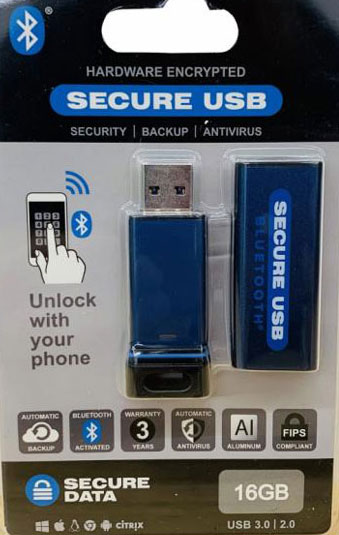
The packaging is the typical bubble pack we have all seen before. Capacity and compatibility are listed across the bottom with features just above.
The drive is using the traditional bubble pack. Its capacity and compatibility are all listed on the bottom of the front package.
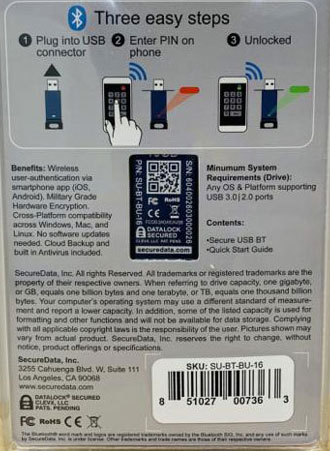
On the backside of the package, it is the instruction about the drive.
Then, put the drive out of the package and you can see that it is fully encased. And there is an opening at the bottom for a lanyard. Then, the brand is marked on the chassis tube. When you pull the drive from the tub, you can see there is a waterproof seal at the base and a USB 3.0 port on the opposite end.
The SecureUSB BT flash drive is using secure wireless authentication with your mobile device and it is remote management ready. By using the remote management functions, you are able to set geo and time fencing to control who has the right to access to the SecureUSB BT flash drive and when.
The flash drive is using the DataLock app. You can enter the App Store on your phone to get the APP. After installing the DataLock app, you can pair it easily on your phone.
When everything is prepared, you can change the settings for the drive like the drive’s name, password, etc. The locking options contains auto lock and step away feature. You can choose the one you want to use. If you are a watch user, you can enable AW to unlock the drive.
According to a test, the read and write speed of the SecureUSB BT flash drive can reach 160 MB/s and 24 MB/s. It seems that it is not suitable to transfer large files with it.
If you want to know more information about the drive, you can visit the SecureDrive official site to get it.
About The Author

Position: Columnist
Stella has been working in MiniTool Software as an English Editor for more than 8 years. Her articles mainly cover the fields of data recovery including storage media data recovery, phone data recovery, and photo recovery, videos download, partition management, and video & audio format conversions.
User Comments :