
Silicon Power is actually an international brand and a Taiwan-based manufacturer of storage devices like portable hard drives, USB flash drives, and solid state drives. In today’s post, I’ll introduce two of its hot products. After reading, you can decide whether to get one or not.
Founded in 2003, Silicon Power has provided a lot of storage devices for us:
- Silicon Power 2TB Rugged Portable External Hard Drive Armor A60
- Silicon Power S55 120GB 2.5″ 7mm SATA III Internal Solid State
- SILICON POWER Armor 2 TB External HDD – 2.5″ – A80 – USB 3.0
- Etc.
Now, I’m going to focus on two products which have been released recently: Silicon Power Bolt B80 & Mobile C50. I’ll introduce them in brief, if you’re interested, you may get one or go to the official website of Silicon Power to know more details.
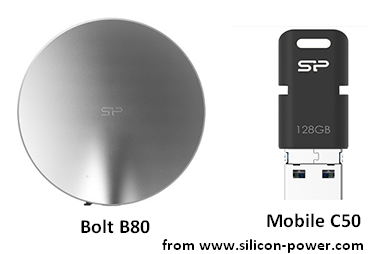
Silicon Power Bolt B80
Features
As an external SSD, the Bolt B80 is robust and refined and with a robust and refined. It has the following wonderful features:
- Unique shape & sophisticated design
- Three capacity available: 120GB, 240GB and 480GB
- Robust aluminum casing providing high durability
- Compact and lightweight for easy transport
- USB-C and USB 3.1 Gen 2 port
- Waterproof and dustproof, the IP rating is IP68
- 122cm military-grade shock resistant (it will keep running even when it hits the ground)
- Read speed is up to 500 MB/s and write speed is up to 450 MB/s (even a huge 4K video file can be transferred in the blink of an eye)
LED Design
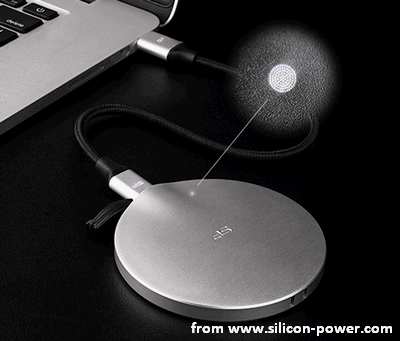
A LED is located on the top, behind some laser-cut holes. It’s pretty like the hidden power LEDs you can find on a MacBook. It is a good choice for laptop users because it is easy to carry and has large capacity & good drop resistance. With this LED, users are able to see whether the SSD is connected properly or not.
File System
This Silicon external SSD is pre-formatted as FAT32, so it is compatible with all your systems and devices. If you want to break through the limit of FAT32 (for instance, can’t use files bigger than 4GB), you may format the Bolt B80 to NTFS with Windows Disk Management or third party tool.
Click to know how to convert FAT32 to NTFS safely.
Mobile C50 Flash Drive
Features
The Silicon Mobile C50 flash drive is both good-looking and practical. It is a good choice for users who cares about appearance and practicability. Besides, it has the following features:
- Wonderful flexibility and freedom
- USB 3.1 Gen 1 ports
- Pretty innovative design
- Three capacity available: 32GB, 64GB and 128GB
- Small size without cables or network constraints
- Compact, can be attached to key rings through the hole
- COB technology with protection against water, dust, and vibration
- Easy to plug and remove due to good and ergonomic grip
- Provided with OTG capability, so it can be used as an external drive
Port
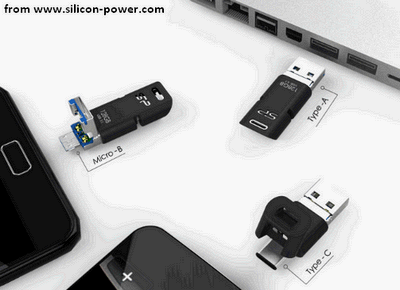
- The USB-C port is under a TPU cap on one end of the Mobile C50 flash drive.
- The USB-A plug is on the other end and covers a Micro-B.
Those three connectors makes it easy for you to share data among new-generation USB Type-C devices, any good ol’ USB laptop or PC, and micro-B smartphones or tablets. You are allowed to delete pictures and songs on your mobile devices to free up to 128GB storage at once. This Silicon flash drive achieves universal access and versatility on the go.
What if USB flash drive is not recognized as expected?
Clever Design
The Type-C connector is covered and protected by a sturdy and highly elastic rubber cap. It can be snapped open for over 10,000 times. Besides, it’s not necessary to worry about losing the connector (since it is attached to the flash drive tightly). Likewise, the micro-B is covered and protected by the USB connector. You just need to fold the outer one up to get it connected to any Android devices (easy plug and play).
Besides, the clever design of Silicon flash drive makes it easy to handle and transport the drive.
User Comments :