
What is smss.exe? Whether can I remove smss.exe from your computer? This post from MiniTool will show you what the smss.exe is and tells you whether you can remove it from your computer. In addition, you can also visit MiniTool to find more Windows tips and solutions.
What Is Smss.exe?
When users open the Task Manager, they see a process named smss.exe running in the background. They do not know what the smss.exe is. Some users might think if the smss.exe is a legitimate process or malware.
So, in this post, we will show you what the smss.exe is and also talk about whether you can remove it from your computer.
Smss.exe, whose full name is Session Manager Subsystem, is a component of the Microsoft Windows NT family of the operating system, starting in Windows NT 3.1. It is executed during the startup process of those operating systems. It is responsible for the user session.
The Windows Session Manager – Smss.exe is a Windows process that creates environment variables and it is legitimate for Windows, posing no threats to your computer.
The smss.exe is located at c:\windows\system32\smss.exe directory. It begins running during the startup process and additionally works for launching the winlogon.exe and csrss.exe process, setting system variables and other activities. Smss.exe is also able to stop the system from responding if winlogon.exe and processes don’t end up as expected, too.
In addition, the smss.exe is very small and consumes very less little system resources.
Is Smss.exe Safe?
Is smss.exe safe? Yes, the answer is positive. Because it is a component of Windows NT family of the operating system, it is safe and legitimate and does not put any threat to your computer. However, some malware may disguise them as smss.exe, which can pose a threat to your computer.
In this situation, you can check the location of the file. To check the location of smss.exe, there is an easy way.
Now, here is the tutorial.
- Open Task Manager.
- In the Task Manage window, navigate to the Details tab.
- Scroll down to find smss.exe file and right-click it.
- Then choose Open file location.
- Then it will see the location of smss.exe file.
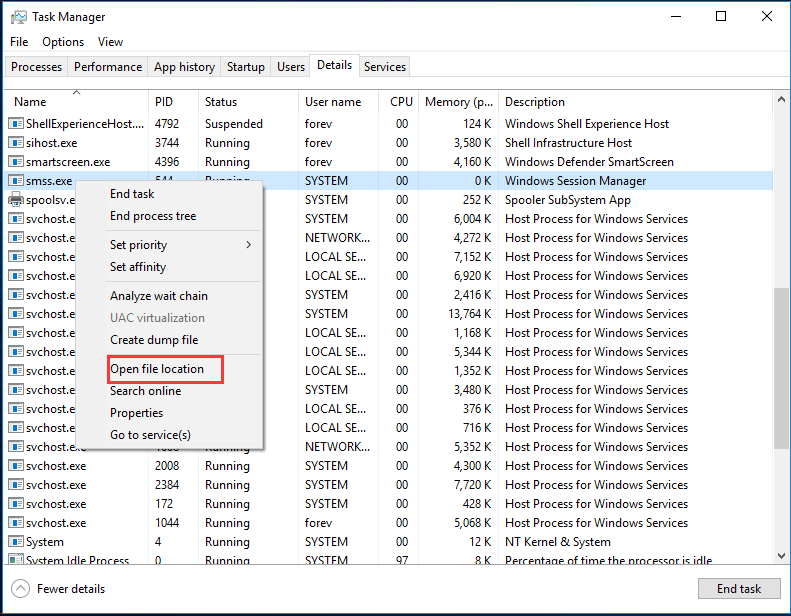
After that, you can check whether the location of smss.exe is in the c:\Windows\System21 folder. If it is, you don’t need to worry about it since it is a safe location. If it the location is somewhere else, the smss.exe is a Trojan and you need to run a virus scan on your computer. To scan your computer, Windows built-in feature – Windows Defender is also competent.
Whether Can I Remove Smss.exe?
As we have mentioned in the above part, the smss.exe is a safe and legitimate file developed by Microsoft. So, it is not recommended to remove it from your computer because it can help system to keep stable and run securely. If you disable it or remove it, the operating system may run improperly, giving rise to other system problems, such as Windows failed to boot. So, you had better not remove it from computer.
Final Words
What is smss.exe? Is smss.exe safe? Should I remove smss.exe from computer? After reading this post, we believe that you already have the answer. If you have any different opinions of smss.exe, you can share it in the comment zone.
User Comments :