
When you try to log in to your Microsoft account, you may receive the following error message – “The referenced account is currently locked out and may not be logged on to”. Luckily, this post from MiniTool provides several useful methods to fix the error.
This “the referenced account is currently locked out” error message indicates the fact that you have been typing a wrong password several times and Windows locked the account and prevented you from signing in for a particular period of time. Let’s see how to fix it.
Make sure you perform the basics first before you start to troubleshoot the issue.
1. Remove your network cable and restart your PC;
2. Disconnect the mapped drives, reset the password and try again;
3. Check your time and date settings.

Method 1: Edit Local Security Policy
If you encounter the referenced account is currently locked out error, it’s recommended you leave the PC for 30 minutes. The log-in screen may be unlocked after 30 minutes of waiting and you may get a second chance of accessing the desktop.
If you have managed to access your desktop successfully, you should disable the Account lockout threshold policy to fix the issue. Here is how to do that:
Step 1: Click the Windows key + R key at the same time to open the Run box. Then type secpol.msc and click OK.
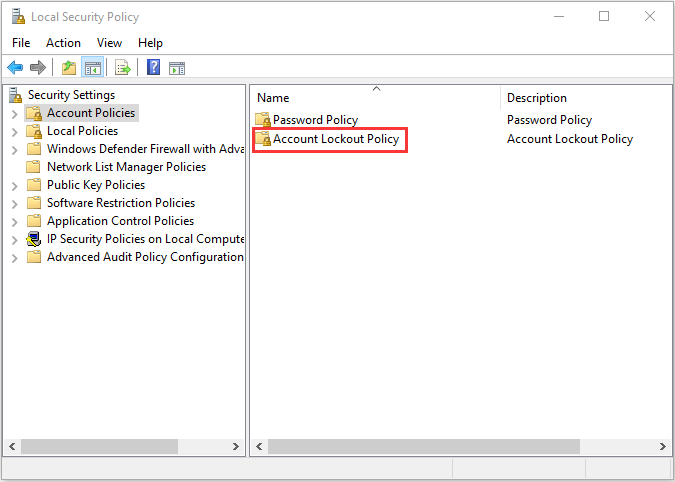
Step 2: When the Local Security Policy window opens, select Security Settings.
Step 3: Click Account Policies and select Account Lockout Policy.
Step 4: Double-click it, then right-click Account lockout threshold to choose Properties.
Step 5: Replace the existing value with 0 and click Apply to save the changes. Then press OK.
After that, check to see if the “the referenced account is currently locked out” error has been fixed. If not, try the next method.
Method 2: Check Your DNS Settings
You can also try checking your DNS settings. Follow the steps below to fix the “the referenced account is currently locked out and may not be logged on to” error.
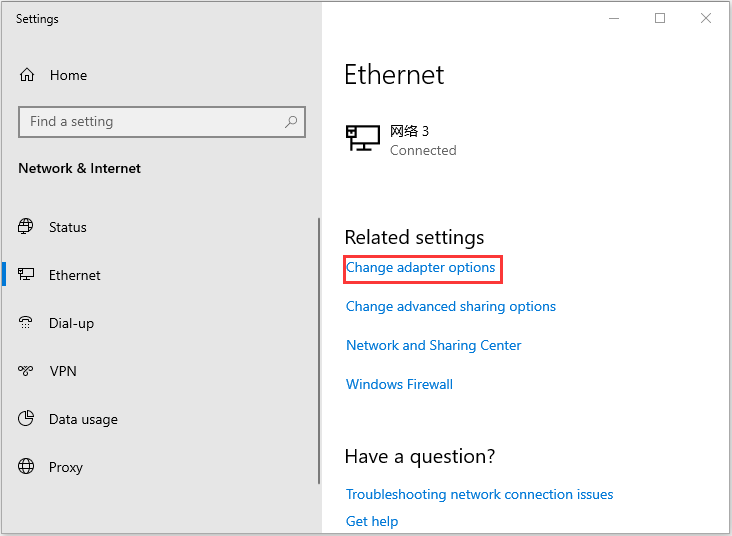
Step 1: Type Network Status in the Search box to open it. On the left pane, select Ethernet.
Step 2: Click Change adapter options on the right pane.
Step 3: Right-click Ethernet and select Properties.
Step 4: Find Internet Protocol Version 4 (TCP/IPv4) from the list and click Properties.
Step 5: Click Obtain DNS server addresses automatically and click OK.
Then, the issue should be fixed. If not, go to the following method to continue to fix it.
Method 3: Set the Account Password to Never Expire
You need to make sure the password is set to never expire in Local Users and Groups menu:
Step 1: Open the Run box, then type lusrmgr.msc and click OK.
Step 2: Select Users in the left pane and choose your account name. Right-click it to choose Properties.
Step 3: In the General tab, check the Password never expires box and click OK.
Now, the referenced account is currently locked out issue should be fixed.
Also see: How to Set a Password Expiration Date on Windows 10 for Security
Final Words
From this post, you can know how to fix the referenced account is currently locked out error. If you encounter the same issue, you can try the methods above to get rid of it.
User Comments :