
Something Bad Happened. Unknown Layout Specified in Manifest
Some users reported that they were stopped by some errors from accessing the Microsoft Store, one of which read “Something bad happened, Unknown layout specified in manifest”.
This error message can happen because of Windows Store bugs, system file corruption, misconfigured settings, and more. Targeting these issues, you may try the next methods to get rid of the Unknown layout specified in manifest error.
Fix: Something Bad Happened. Unknown Layout Specified in Manifest
Fix 1: Change Language and Region Settings
First of all, you need to check if your language and region settings are configured correctly. If not, please change it in the right way or you may be forced into this error message – “Something bad happened. Unknown layout specified in manifest” again.
Step 1: Open Settings by pressing Win + I and click Time & Language.
Step 2: Choose Region from the left panel and select the right country or region from the right panel; then you can change to the Language tab to choose your preferred language.
If you find nothing wrong with your language and region settings, you can try to change your Region and language setting to the UK. Some users tried it and have proved it can be useful.
Fix 2: Run Windows Store Apps Troubleshooter
If you want to scan and repair Windows Store bugs, you can use this built-in troubleshooter. It can resolve problems that may prevent Windows Store apps from working properly.
Step 1: Go to Settings > Update & Security > Troubleshoot and click Additional troubleshooters from the right panel.
Step 2: Scroll down to the bottom to choose Windows Store Apps and select Run the troubleshooter.
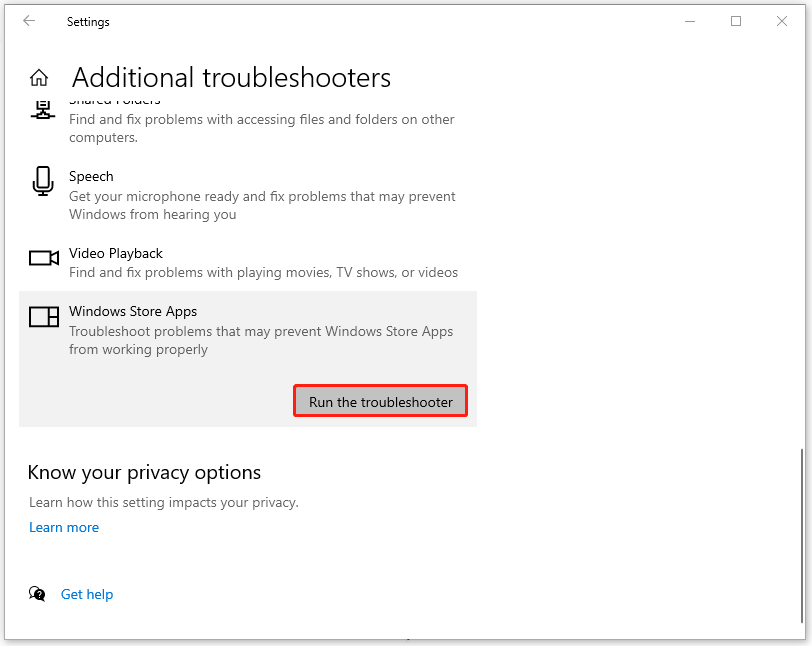
Then the tool will start detecting problems and you can follow the instructions to repair the issues.
Fix 3: Run SFC
The corrupted system files can lead to the “Something bad happened” error. But don’t worry; you can run System File Checker to scan for your system and this troubleshooter can automatically fix the detected issues.
Step 1: Type Command Prompt in Search and choose Run as administrator.
Step 2: Copy and paste this command – sfc /scannow and press Enter to execute this command.
Wait for a while when the process finishes and if it fails, you can proceed to execute another command – DISM /Online /Cleanup-Image /RestoreHealth.
Fix 4: Reset the Windows Store
The “Unknown layout specified in manifest” issue can be caused by system issues within the Windows Store platform. You may reset the Windows Store to get a fresh start when it malfunctions.
Step 1: Open Settings > Apps > Apps & features.
Step 2: Scroll down from the right panel to locate Microsoft Store and click Advanced options.
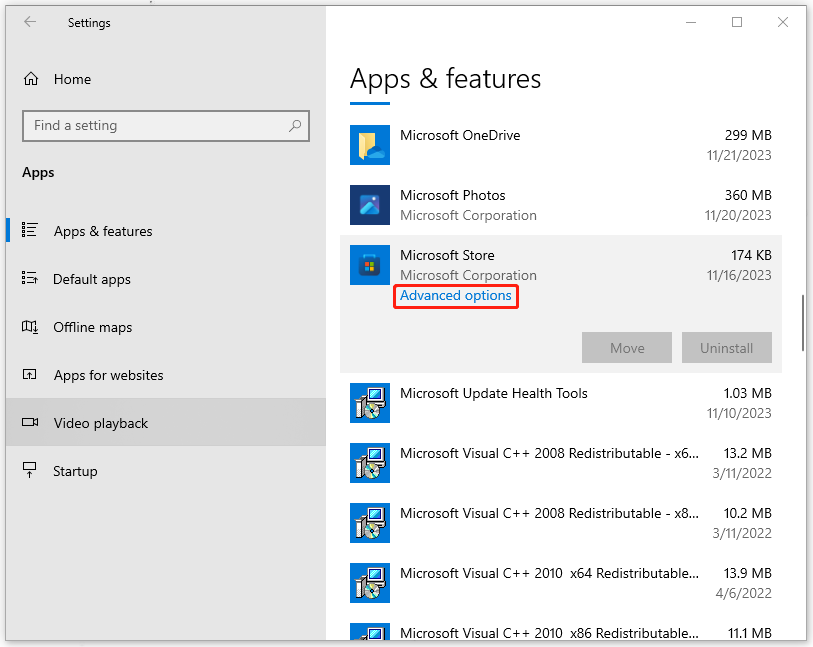
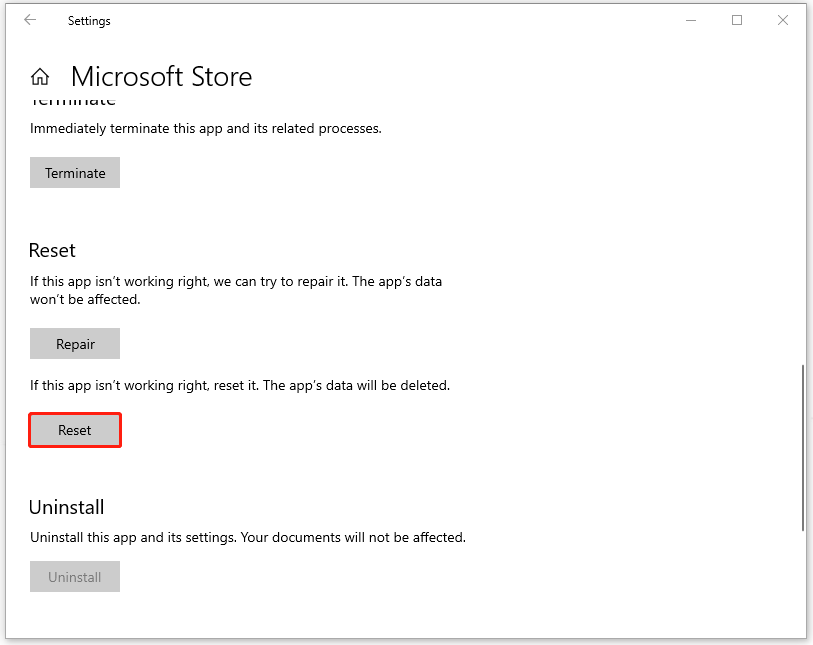
Step 3: Scroll down to the Reset section and you can click Repair first to see if the issue can be resolved; if not, please click Reset to delete the app’s data.
Fix 5: Reset Your PC
If all the above methods can’t resolve the “Unknown layout specified in manifest” error, there is the last one you can try – reset your PC.
But before you do that, you’d better backup data that matter so that you can make sure no important data will get lost. To do that, you can use MiniTool ShadowMaker, this free backup software, which allows you to backup files, folders, partitions, disks, and your system.
MiniTool ShadowMaker TrialClick to Download100%Clean & Safe
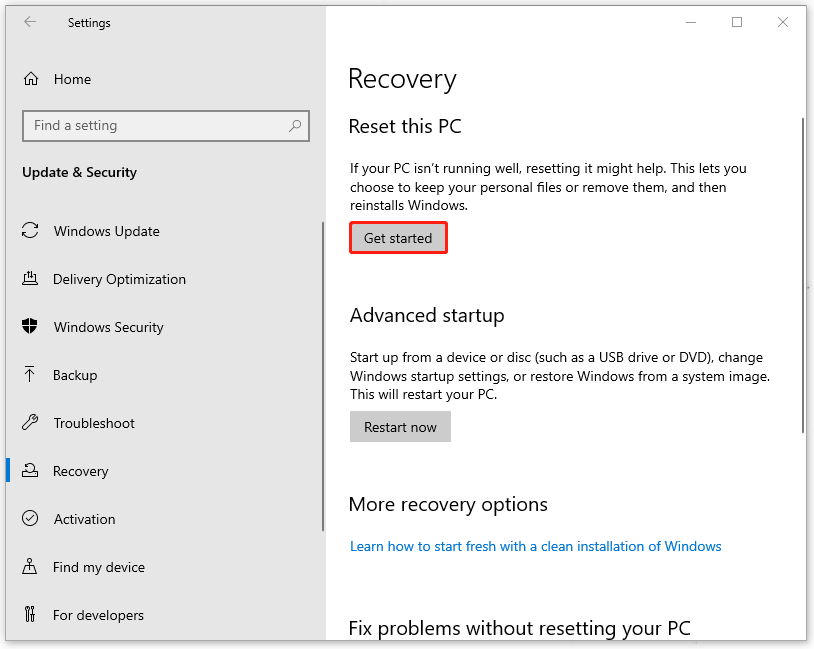
Step 1: Open Settings > Update & Security > Recovery.
Step 2: Click Get started under Reset this PC from the right panel and then follow the next on-screen instructions to choose your preferred options.
Bottom Line:
After reading this article, the “Unknown layout specified in manifest” issue may be resolved by the above-recommended methods. Hope this article is useful for you.
User Comments :