
What is wacom_tablet.exe? Is the Windows process safe to run? Some people find wacom_tablet.exe can't end process and when this Windows system error happens, you may be overwhelmed and don’t know where to start. On MiniTool, this article will resolve your concerns.
What Is Wacom_Tablet.exe? Is It Safe?
The Wacom_Tablet.exe file is a component of Wacom Technology, Corp. Tablet Service. Wacom_Tablet.exe is an executable file in the Windows operating system. The file extension is executable.
The files themselves are not harmful, but trojans can easily infiltrate execution files, masquerading as file patterns you are familiar with, making them difficult to discern.
Besides, this file, usually, works in the background silently, which makes you hard to notice its presence; but recently, some users find a system error associated with the wacom_tablet.exe Windows process – wacom_tablet.exe can’t end process. Faced with that, you can use antivirus first to check if that is malware and then you can try the following methods.
What Should You Do When Wacom_tablet.exe Can’t End Process?
Fix 1: Run SFC and DISM Commands
People encountered the wacom_tablet.exe system error when the corrupted system files exist. You can use SFC and DISM scans to fix the errors.
Step 1: Input Command Prompt in the Search box and run it with admin right.
Step 2: Then input the following commands and press Enter after each of them to run them one by one.
- sfc /scannow
- DISM /Online /Cleanup-Image /RestoreHealth
Wait until the commands finish and then you can check if the wacom_tablet.exe system error has been gone.
![CHKDSK vs ScanDisk vs SFC vs DISM Windows 10 [Differences]](https://images.minitool.com/minitool.com/images/uploads/2020/03/chkdsk-vs-scandisk-vs-sfc-vs-dism-thumbnail.jpg)
Fix 2: Update Drivers
Another possible reason that can trigger the wacom_tablet.exe system error is your outdated related drivers. If you ignore the update demand, please finish that.
Step 1: Right-click on the Start icon and choose Device Manager.
Step 2: Open Disk drives and right-click the related driver to choose Update driver.
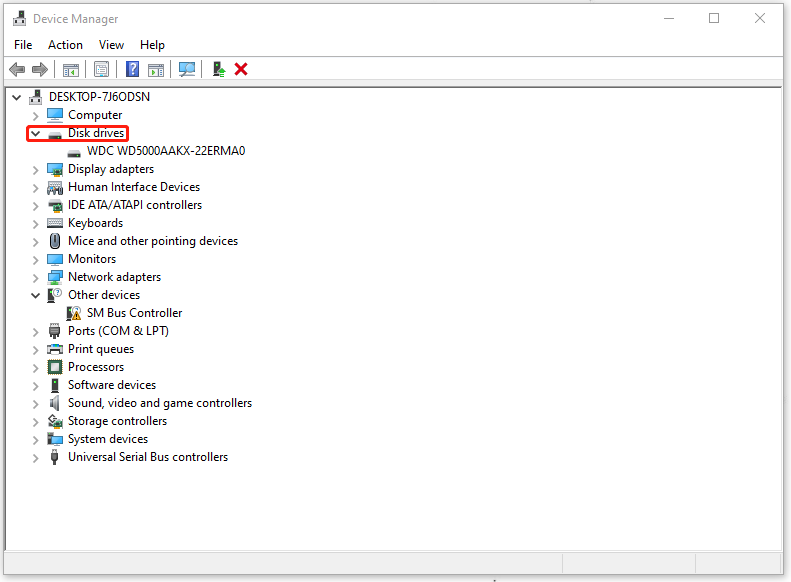
Then you can follow the on-screen instructions to finish that.
Fix 3: Perform a Disk Cleanup
It is highly recommended to perform a disk clean because this error happens for your system drives. Some corrupted files in that drive can make wacom_tablet.exe can’t end process.
But before you get the method started, you’d better back up your important data first in case of any mistaken deletion. In this way, you can use this one-in-all backup program – MiniTool ShadowMaker. It can help you back up systems, files, folders, partitions, and disks. More features and functions wait for your try!
MiniTool ShadowMaker TrialClick to Download100%Clean & Safe
Step 1: Open Run by pressing the Win + R keys and input Cleanmgr.exe to enter.
Step 2: When the window pops up, choose the wanted drive and check the unwanted files to delete.
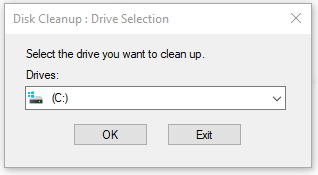
Step 3: Click OK to ensure and check if the issue has been resolved.
Fix 4: Use System Restore
The last method is to use a system restore. But this fix is only available for those who have created a system restore point in advance. By this method, you can restore your Windows installation to the last working state.
Step 1: Input Control Panel in Search and open it.
Step 2: Change View by: to Small icons and choose Recovery.
Step 3: Go to Open System Restore > Next and choose the restore point you have created.
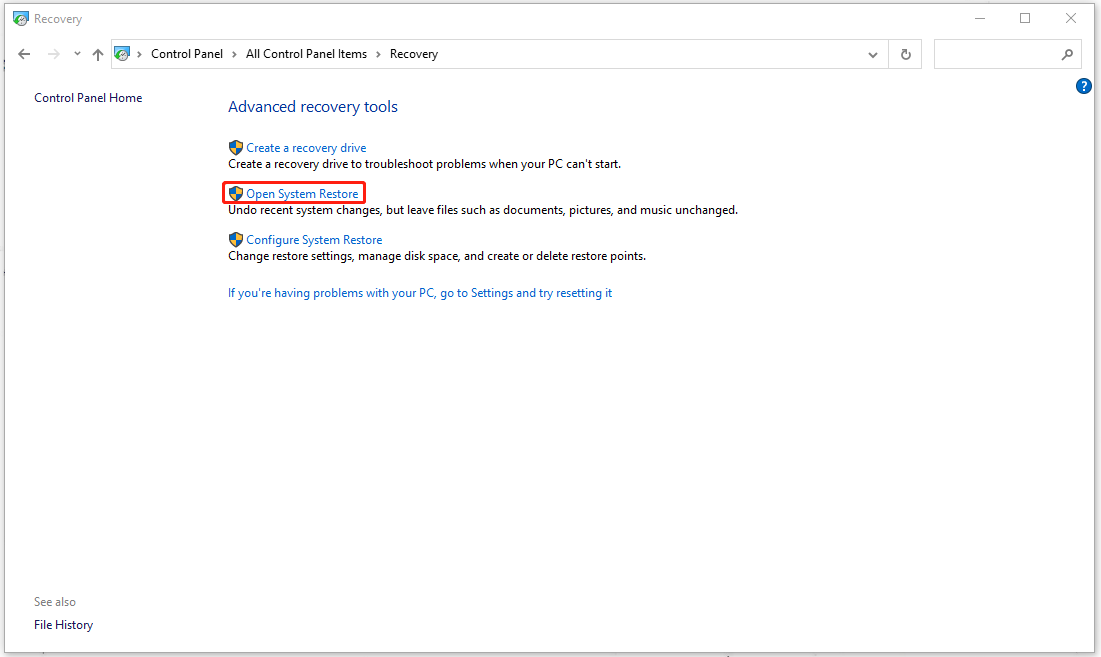
Then you can follow the on-screen instructions to finish the restoration.
Bottom Line:
Wacom_Tablet.exe can’t end process? Now, you can easily get rid of this trouble by following the above methods. Hope this article can be useful for you!
User Comments :