
The release date of Windows 10 19H2 is approaching, many users are preparing to install this new update. Yet, what I want to say about it is that it will only include a few minor improvements. In contrast, the Windows 10 20H1 and 20H2 that will be released in 2020 include some new features to improve the Windows 10 user experience.
Windows 10 20H1 & Windows 10 20H2
The Windows 10 20H1 and 20H2 are the major biannual updates for 2020 and they will be very different from the previous updates. The first 2020 update (20H1) is planned to be finalized in December while the release date of it is expected to arrive much earlier than the traditional spring timeframe; it may be released in January 2020. This is due to mainly two reasons: Windows is moving under Azure and adopting the development cycle which is based on “semester” and already used in Azure.
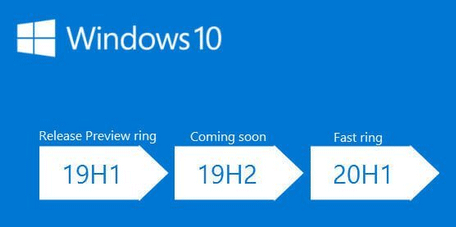
The Windows 10 20H2 is obviously the second major feature update of 2020. Currently, the preview of 20H2 builds is out and sent to Insiders. The finalization of Windows 10X is completed and released in the summer of 2021. According to news, the Windows 10X is suitable for more devices than just the dual-screen ones. The release of 20H2 is very important for the availability of Windows 10X on foldable PCs (going to be shipped in fall 2020).
MiniTool is so considerate that it provides various tools for Windows 10 management and optimization.
Please read this page carefully if you’d like to improve the performance of your Windows 10 computer:

Top Features of Windows 10 2020 Updates
There are mainly 5 Windows 10 20H1 features.
Feature 1: Windows 10 Cloud reset.
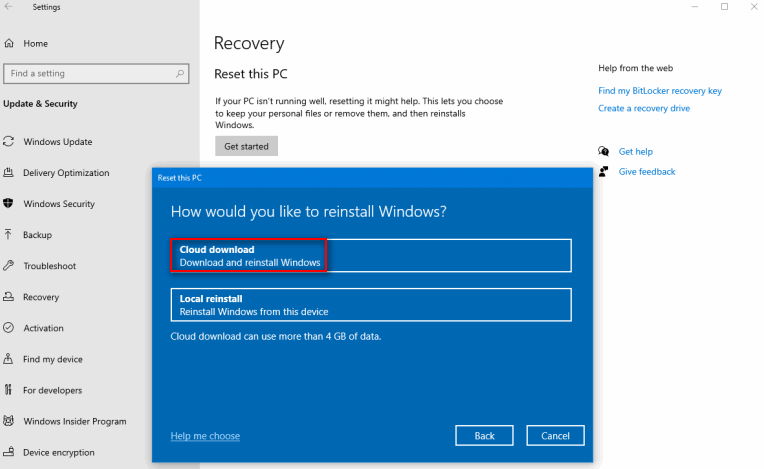
In the past, you have no choice but to refer to the OS files and USB sticks while you plan to fresh install your Windows 10 system. The 20H1 offers you a new choice: reinstalling Windows 10 from the Cloud. This will greatly accelerate the reinstall process as long as your internet speed is fast enough.
How to use Cloud reset:
- Click on the Start button.
- Choose Settings icon from the left sidebar.
- Select Update & Security.
- Choose Recovery option from the left pane.
- Click on the Get started button under Reset this PC section in the right pane.
- Choose Keep my files or Remove everything according to needs.
- Select Cloud download and follow the instructions to complete.
Feature 2: change bandwidth limits.
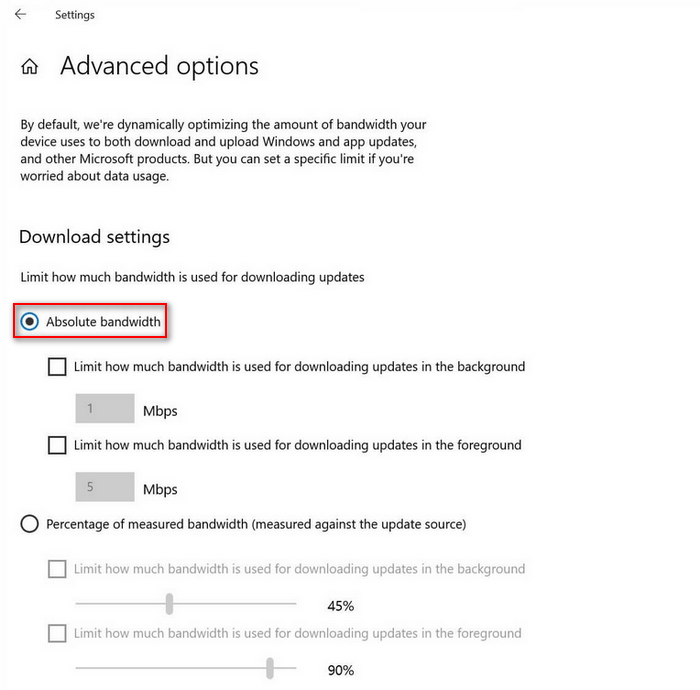
In the new 20H1, you’re able to limit the bandwidth that can be used to download Windows 10 updates. That is to say, the absolute value for both the background and foreground downloads is changeable.
How to change Absolute bandwidth limit:
- Press Start + I.
- Select Update & Security.
- Choose Delivery optimization.
- Click Advanced options.
- Check Absolute bandwidth under the Download settings section.
- Select the desired options.
Feature 3: chat-based Cortana.
The Cortana in the new Windows 10 update will allow you to get things you want by typing or speaking natural language queries. The better speech and language models are finally there thanks to Microsoft Research AI Center’s efforts.
Feature 4: add community cameras to Windows 10.
You are finally able to pair a network camera (useful for surveillance and security purposes) to your Windows 10 PC with the release of Windows 10 20H1 update. What does this mean? It actually means that the corresponding PC camera app can be used to capture photos and stream videos by virtue of the community digital camera.
Feature 5: make your device passwordless.
Both security and convenience are important to Windows 10. Typing your Microsoft Account every time you start the PC is not so convenient. Therefore, the new Windows 10 update provides a feature to help users go passwordless.
- Open Settings.
- Select Accounts.
- Choose Sign-in options from left pane.
- Turn the switch on under Make your device passwordless section.
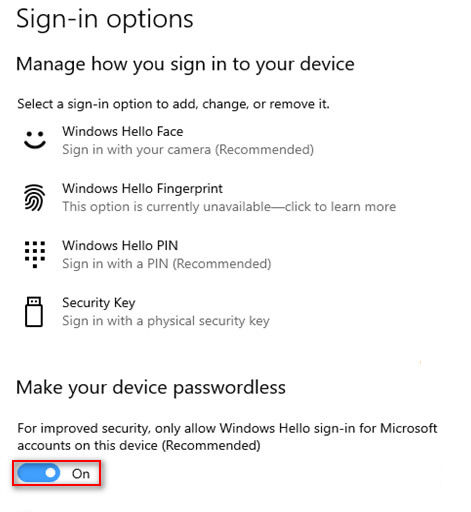
You Can Now Unlock Your Microsoft Account Without Password!
One of the biggest new features you will find in Windows 10 20H2 is Windows 10 X. What is it? It’s actually a special version of operating system designed for dual-screen and foldable devices by taking productivity into consideration.
That’s all I want to talk about the Windows 10 2020 updates and features.
User Comments :