
The new Windows 10 build was rolling out on January 8, 2020 to the Fast ring Insiders. The Windows 10 preview build 19541 brings a lot of new features and updates as expected. It’s not certain that the new build will become part of the 20H2 development cycle because the Fast ring builds are now not linked to a specific Windows 10 update anymore.
Windows 10 Preview Build Is Rolling Out on January, 8
The Windows 10 Build 19536 for Insiders in the Fast ring was released in December, 2019. One month later, on January 8, 2020, the latest Windows 10 preview build 19541 was released also to the Insiders in the Fast ring. (Please contact MiniTool to solve various Windows 10 issues.)
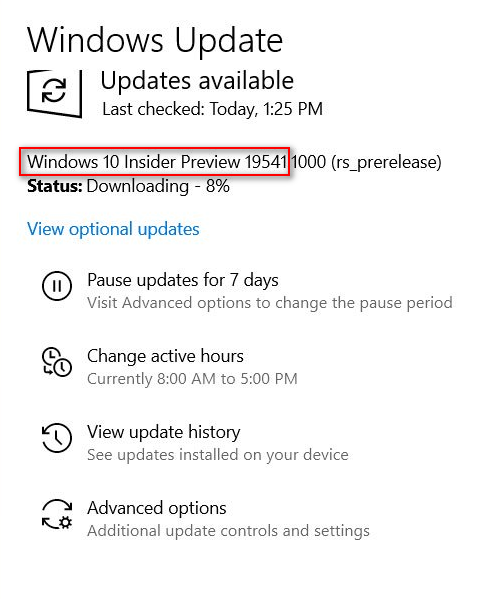
Though this new Windows 10 build doesn’t include some of the most important updates and new features, it still brings some minor new features and improves that you should pay much attention to. The Windows Insiders can go to update to the build 19541 by opening Settings -> selecting Update & Security -> choosing Windows Update -> clicking on Check for updates.
If you run into a problem while updating Windows 10 on your device, you should read this post which involves the solution for fixing some common update errors:
Now, I’m going to show you the new features and updates in the new Windows 10 build. Please take a look at them carefully before you start to get a 19541 for your system.
Location In-use Icon Update
According to Insiders’ feedback, the icons they can see in the notification area will be changed when any one of the apps is using their location. If you are not so clear about what I’m talking about, please look at the picture below to feel the change.
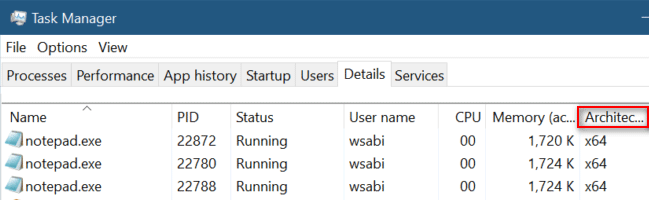
Add a Feature to Show Architecture of Process in Task Manager
You can access the Task Manager in a Windows 10 system easily by just two steps:
- Right click on any empty area on the taskbar.
- Choose Task Manager from the context menu appear then.
When the Task Manager is opened, the processes tab will be checked by default. As the Windows Insiders described, they shifted to the Details tab and found an option had been added to show the architecture of each process in the list.
How to add show architecture option:
- Right click on a column header.
- Choose Select Columns from the menu.
- Look for Architecture from the list and select it.
- Now, you can see the Architecture column under the Details tab of Task Manager.
Update in the Cortana Application
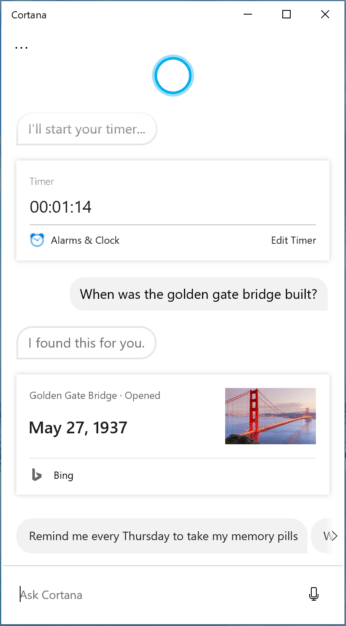
By releasing the new Windows 10 preview build, Microsoft want to let its Insiders know that two things are back online for their Cortana app; they are respectively Bing Instant Answers and Timers.
Besides, Microsoft confirmed that it will work on getting back the jokes & other assistant conversations and keeping them running well.
How to test your Cortana?
If you are one of the Insiders and using English (United States), you can do the following things to try it out.
- Initialize Cortana by saying Hey Cortana or just open the textbox.
- Ask Cortana to set a timer for 10 minutes or just type the command into the textbox.
Also, you can ask Cortana other things, such as When was the golden gate bridge built.
Fixed Some Issues in 19541
There’s a list of the issues which you can find in the previous version and now fixed.
- The issue that has found to have impact on the System Settings reliability has been fixed.
- The issue that will lead to Windows Update “Reboot needed” notifications persisting reboot has been fixed.
- The issue that will influence the update speed in Task Manager and set it to Paused has been fixed.
- The issue that could cause the problem – Start not saying the correct index of an app – in all apps list while using Narrator has been fixed.
- The issue that acrylic is not shown at the top of the Search window has been fixed.
- The issue that makes Feedback Hub undisplayed the store apps in the list of contexts while users are logging feedback under the Apps category has been fixed.
- The same issue that lead to the improper state notification in apps after installation (it still shows Install in the Microsoft Store when it is expected to show Launch) has been fixed.
For more updates and improvements on the new Windows 10 preview build – 19541, you should discover yourself after participating in Windows Insider Program.
User Comments :