
Are you running into the Windows 11 memory leak problem after upgrading Windows 10 to the new operating system? Does Windows 11 File Explorer have high memory usage? If you encounter this issue, here is how to get rid of the trouble. Just read this post from MiniTool to get details.
Memory Leak Windows 11
Memory leak refers to that a program takes up too much RAM and doesn’t release it after you close the program. Essentially, it eats up the needed RAM when opening and won’t return the memory to the pool when closing.
The memory leak is a common problem that often happens in Windows 10. When searching for Windows 10 memory leak in Google, you can find many articles and forums focusing on this topic. To fix the issue, you can refer to one of the articles – How to Fix Memory Leak in Windows 10 [Full Guides].
In fact, the memory leak is not a specific issue in Windows 10 and it can also happen in Windows 11. Microsoft recently has released Windows 11 final version. Although it brings a few new features and improvements, a serious performance issue comes – high memory usage, especially on File Explorer.
Actually, a Reddit user gyrohan269 has been complaining about a memory leak in Windows Explorer for two months. He writes File Explorer continuously occupies memory and no longer released the occupied RAM when opening and closing folders. This situation has been confirmed by many users.

This memory leak bug is always frustrating and it may cause the system to slow down and become unresponsive. What if you also run into the issue after upgrading to Windows 11? Get the answer from the following part.
How to Fix Windows 11 File Explorer High Memory Usage
According to reports, the Windows 11 memory leak bug is caused by Windows 11 File Explorer update. Currently, Microsoft hasn’t given a solution. But some users have sorted out their own workarounds and now let’s go to see some.
Restart File Explorer or Reboot Your PC
To get rid of the memory leak situation, you can restart File Explorer. Go to Task Manager, click Processes, right-click Windows Explorer and choose Restart.
This can free up the occupied memory resources for the moment but it is not the final solution. If you don’t shut down your computer often, perform this operation on a regular basis. This may be inconvenient and consuming.
Go Back to Windows 10
If you have just upgraded to Windows 11 from Windows 10 and don’t want to manually release RAM, you can roll back to Windows 10 if the memory leak problem always bothers you. Just go to Start > Settings > System > Recovery, then click Go back under Previous version of Windows. Then, follow the on-screen instructions to revert to Windows 10.
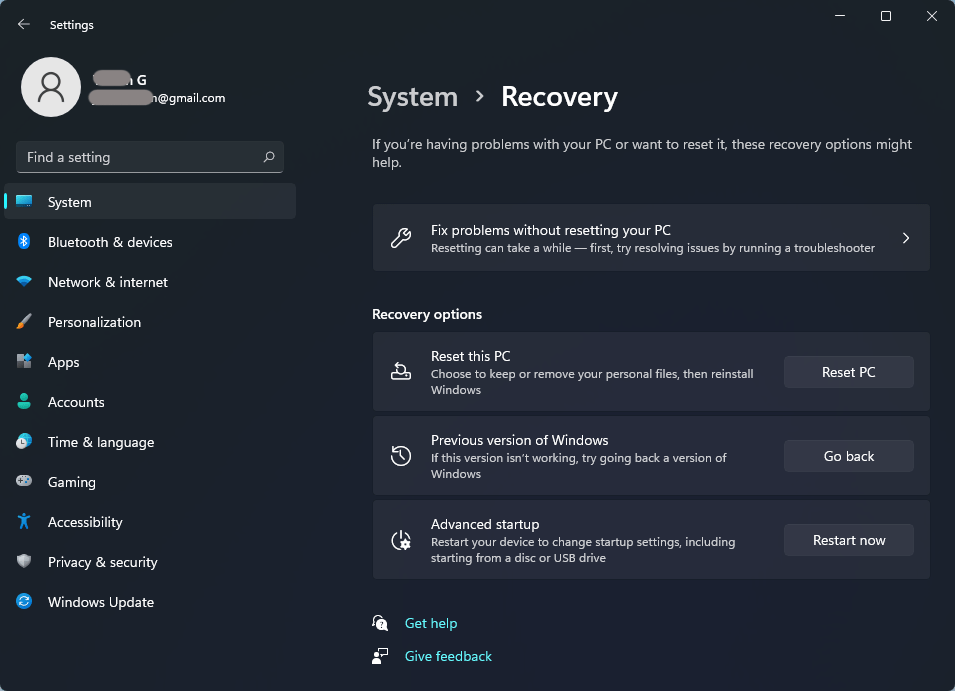
To know more information, refer to this post – [3 Ways] How to Uninstall Windows 11 and Go Back to Windows 10.
Final Words
How to get rid of the issue of memory leak bug Windows 11? If you run into Windows 11 File Explorer high memory usage caused by the bug, try the above ways to run your computer smoothly. Of course, if you have any other fixes, let us know in the comment part below.
About The Author

Position: Columnist
Vera has been working at the MiniTool Team for over 10 years as a technical editor and content writer. She mainly focuses on disk and partition management, data recovery, Windows backup and restore, and PC troubleshooting. Through in-depth software testing and hands-on experience, she has helped users solve a wide range of computer problems and better protect their data on Windows devices.
User Comments :