
A Brief Introduction to Windows XP Vienna Edition
Windows XP Vienna Edition is an unofficial Windows version, a modified version of the official Windows XP edition. It perfectly combines the features of Windows XP and Windows Vista, including some built-in applications and features. This operating system allows you to add different applications to the desktop’s quick launch bar so that you can directly start the application without opening the main menu.
As for the system appearance, Windows XP Vienna Edition uses the Vienna Dock interface and Aero interface elements, making its interface look simple and modern. This operating system has a transparent taskbar and Vista-style icons, as well as 25 themes and Windows 7 visualization, and is highly customizable.
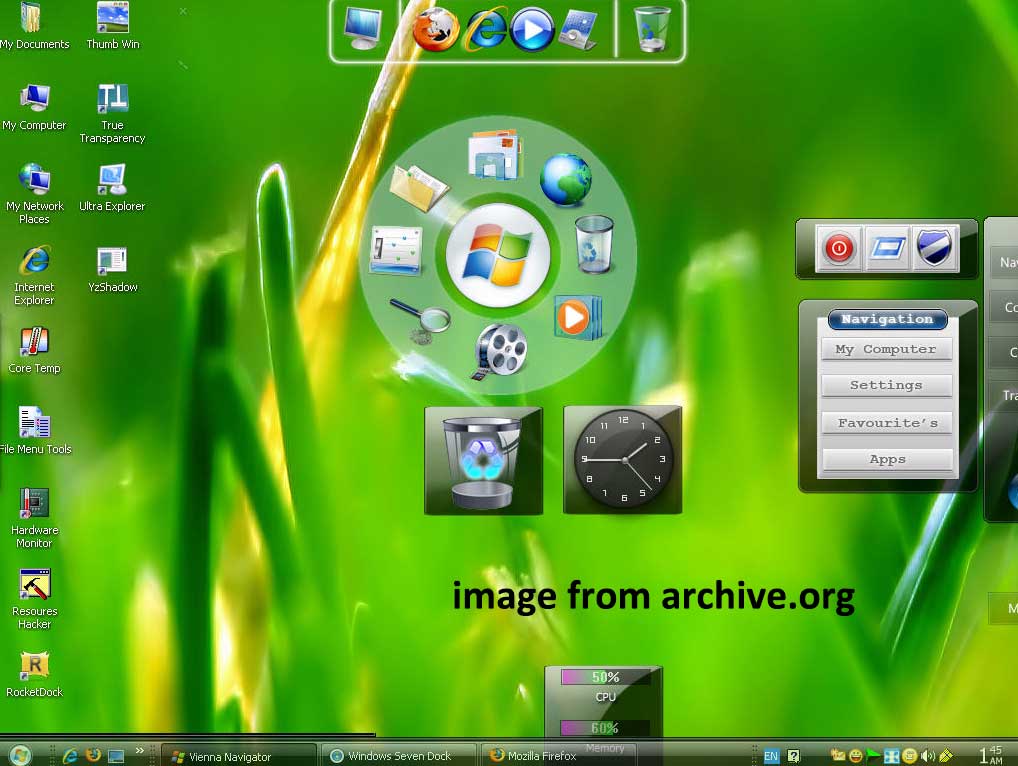
For the specific system features and appearance characteristics, you can download and install Windows XP Vienna Edition to your computer and experience it yourself.
Important Notice About Windows XP Vienna Edition Download
As mentioned before, Windows XP Vienna Edition is an unofficial version of Windows XP, so it is not officially supported by Microsoft. This means that this system is vulnerable to malware, viruses, and other security threats. In addition, this system has been released for more than ten years and is very old. It may not be compatible with some modern applications, hardware devices, and drivers.
Therefore, if you want to experience Windows XP Vienna Edition, we recommend that you install it on a virtual machine or an unused computer to avoid potential risks.
MiniTool ShadowMaker TrialClick to Download100%Clean & Safe
How to Download and Install Windows XP Vienna Edition
System Requirements for Windows XP Vienna Edition
Before you start to download this Windows OS, make sure your PC meets the following minimum system requirements.
- Memory (RAM): 512 MB of RAM required.
- Hard disk space: 700 MB of free space required.
- Processor: Intel Pentium 4 or later.
Windows XP Vienna Edition ISO file has been added to the archive, and you can follow the steps below to download and install it.
Windows XP Vienna Edition Free Download
First, go to this page: https://archive.org/details/wxve_20210811. Then scroll down the page and click the ISO IMAGE option to download the ISO file.
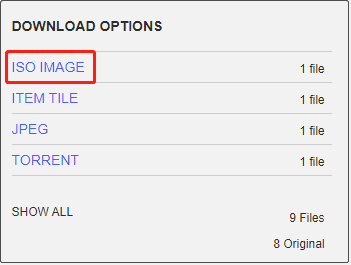
Alternatively, you can visit this page and click the Download button to download the rar file: https://mega.nz/file/vI9FTJoR#gZwEgRyEQSH4RjnJGgESLiIr-HwyDyCl3evKcCoMASk.
Windows XP Vienna Edition Install
Once you get the ISO image, you can download VMware Workstation and then install Windows XP Vienna Edition on the virtual machine. For VMware Workstation 17, click the Create a New Virtual Machine button and select the downloaded ISO file, then click Next and follow the on-screen instructions to complete the installation process.
MiniTool Power Data Recovery FreeClick to Download100%Clean & Safe
Bottom Line
Reading here, you should know where to get Windows XP Vienna ISO image and how to install it on your computer. Hope you can enjoy this old-school system after following the steps above.
About The Author

Position: Columnist
Shirley holds a bachelor’s degree in English and has been an editor at the MiniTool Team for many years. She specializes in IT-related content, with a focus on data recovery, file backup, disk management, and other technical topics. She is committed to delivering clear, accurate, and practical solutions to help users resolve common computer issues.
User Comments :