
Quick Answer
“This Copy of Windows Is Not Genuine” means Windows activation failed, usually on Windows 7 build 7600/7601 after updates or license issues. You can fix it by checking activation, uninstalling bad updates, running activation commands, or using a genuine license.
What Does “This Copy of Windows Is Not Genuine” Mean
“This Copy of Windows Is Not Genuine” is an activation-related notification. It means Windows cannot verify that the installed copy is properly licensed.
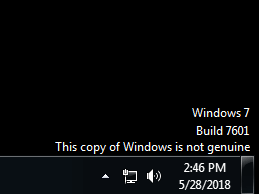
The issue is most common on Windows 7 build 7600/7601 and may happen because of an invalid product key, system changes, activation failures, or certain Windows updates.
Although Windows may continue running, some features may be limited until the activation issue is resolved.
What Causes This Copy of Windows Is Not Genuine
Common causes include:
| Cause | Description |
| Invalid product key | License key cannot be verified |
| Pirated Windows copy | Activation check fails |
| KB971033 update | Windows 7 activation detection update |
| License conflict | Key used on multiple devices |
What Happens If Windows Is Not Genuine
A non-genuine Windows copy may cause:
| Issue | Description |
| Black desktop background | Windows may reset wallpaper |
| Limited personalization | Some settings become unavailable |
| Activation reminders | Notification keeps appearing |
The notification itself does not delete your files, but creating a backup before changing system settings is recommended.
How to Fix This Copy of Windows Is Not Genuine
Before applying advanced fixes, check your Windows activation status first.
①Uninstall KB971033 Update
Perhaps your Windows was running without any trouble until Windows 7 KB971033 update was installed. This update includes Windows Activation Technologies that help detect your Windows operating system.
Once it finds out the copy of Windows is not genuine, you may receive a message on the lower right part of the desktop stating “Windows 7 build 7601 this copy of Windows is not genuine”.
Hence, you can choose to uninstall this update to remove Windows 7 genuine notification build 7601/7600.
Back up Your Computer with MiniTool ShadowMaker
Windows has a built-in backup tool that can help you create a system image and back up files. However, using this tool sometimes causes issues like Windows backup stuck at creating system image.
Additionally, this tool is not flexible enough to back up the entire disk; it doesn’t even support differential backups. Hence, we recommend using third-party software for computer backup.
MiniTool ShadowMaker, safe and reliable Windows backup software, is gaining popularity because of its powerful features.
File backup, system backup, disk backup, and partition backup can be realized with this professional backup tool. The corresponding restoration is also included.
Multiple backup modes – automatic, incremental and differential backup – can be created. Meanwhile, disk space management (delete old backups) is enabled if you choose a backup scheme. Importantly, MiniTool ShadowMaker enables you to clone a hard drive with ease.
Now, get MiniTool ShadowMaker Trial Edition to free try for 30 days or directly get its Professional Edition to safeguard your computer.
MiniTool ShadowMaker TrialClick to Download100%Clean & Safe
Let’s see how to use the best backup software to back up your computer before uninstalling Windows 7 KB971033 update to fix “this copy of Windows is not genuine”.
Step 1: Launch MiniTool ShadowMaker.
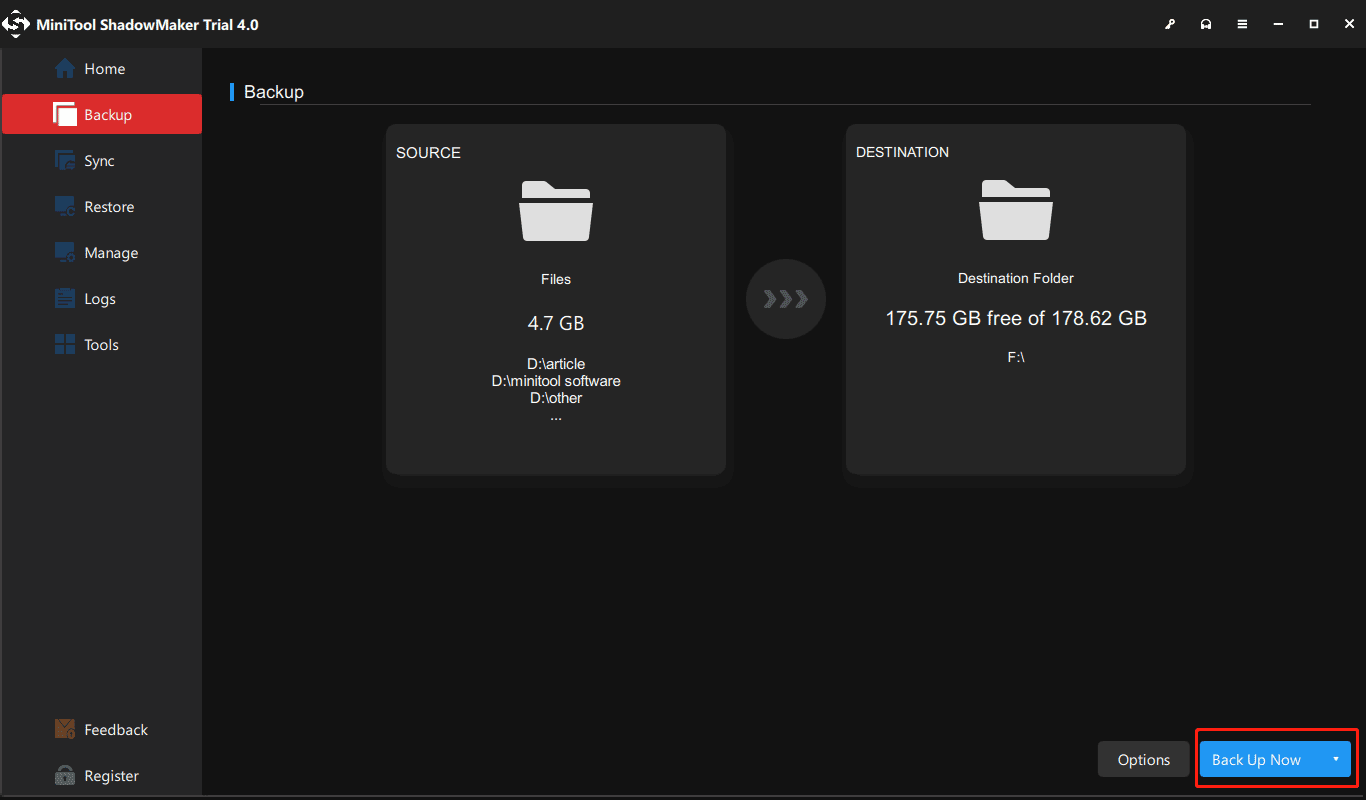
Step 2: In the following Backup page, select the backup source and storage path. By default, all system partitions are selected. If you need to back up files, partition or the entire system disk, enter the Source section to choose a type. Then, Choose a location to store the backup image file.
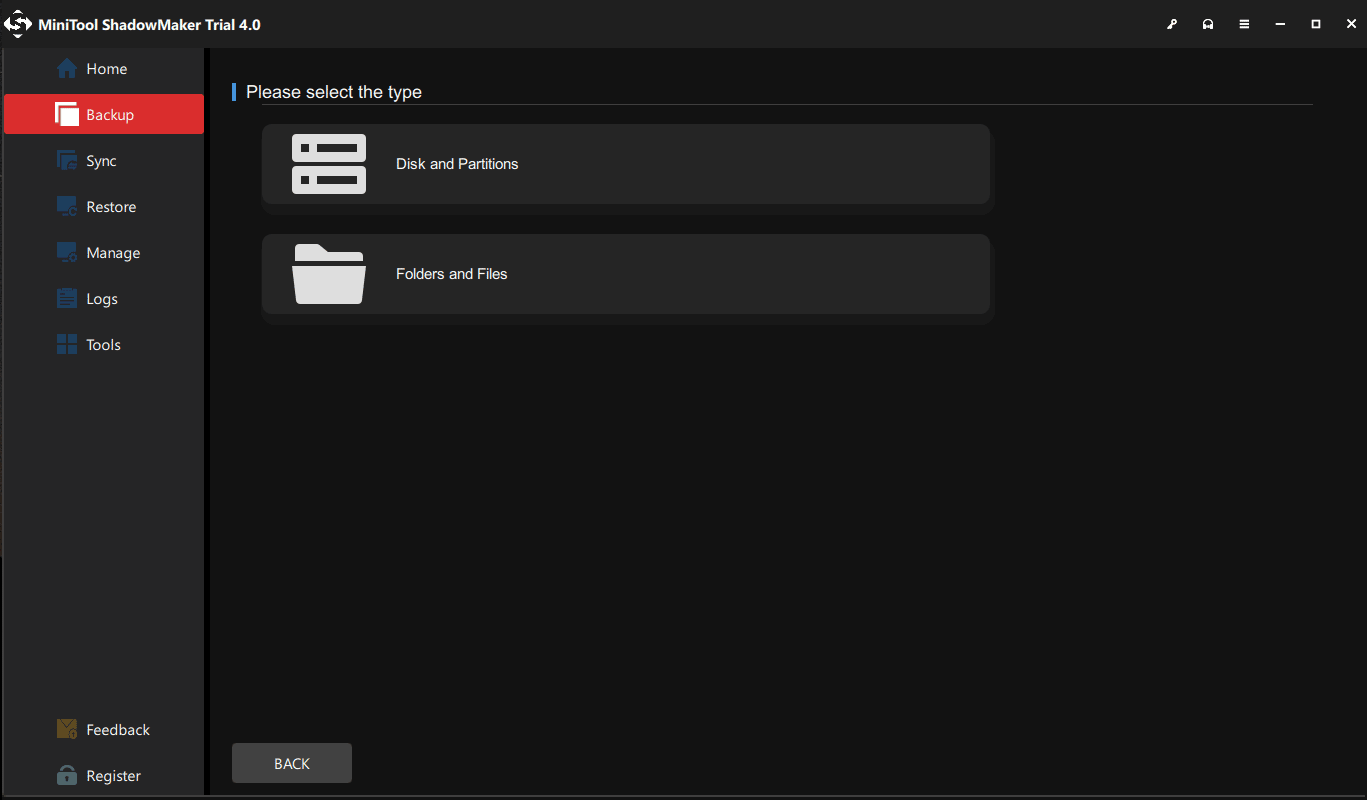
Step 3: Go back to the Backup page and click Back Up Now to start the backup.
Uninstall Windows 7 KB971033 update
Since the computer has now been backed up, you can uninstall the Windows update to fix “this copy of Windows is not genuine build 7600/7601”.
- Click the Start button, and open Control Panel window.
- Choose the System and Security section.
- Go to Windows Update part, and click View installed updates option. Or click on View update history and hit the Installed Updates link at the top.
- Find the update of KB971033 and right-click on it to choose Uninstall button.
After completing the update, Windows 7 not genuine issue should be solved. If the message still exists, try the following method.
②Using SLMGR -REARM Command
In Windows, there is a built-in Windows 7 not genuine removal tool you can use to make Windows 7 genuine.
SLMGR, short for Windows Server License Manager Script, is the command prompt version of Microsoft licensing tool. And REARM command will help reset the licensing status of your machine.
Now, you can use SLMGR -REARM command to remove “this copy of Windows is not genuine 7601/7600 issue”.
- Go to Start menu and search for Command Prompt. Right-click on cmd.exe in the search result and choose Run as Administrator.
- Type SLMGR -REARM command in the pop-up window, and press Enter.
- A pop-out window shows that your command has completed successfully and requires you to restart the system. Click OK to let all changes take effect.
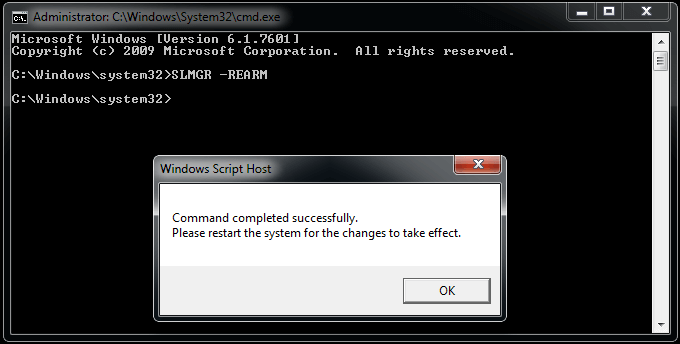
After finishing the activation, you can use the version of Windows for 30 more days.
You can choose to reactivate it every 30 days for 3 times. That is, you essentially get 120 days for this version of Windows.
To break the limit, here is what you can do:
- Open the Run window by hitting Win + R keys, input regedit.exe in the text box and press Enter to launch Registry Editor.
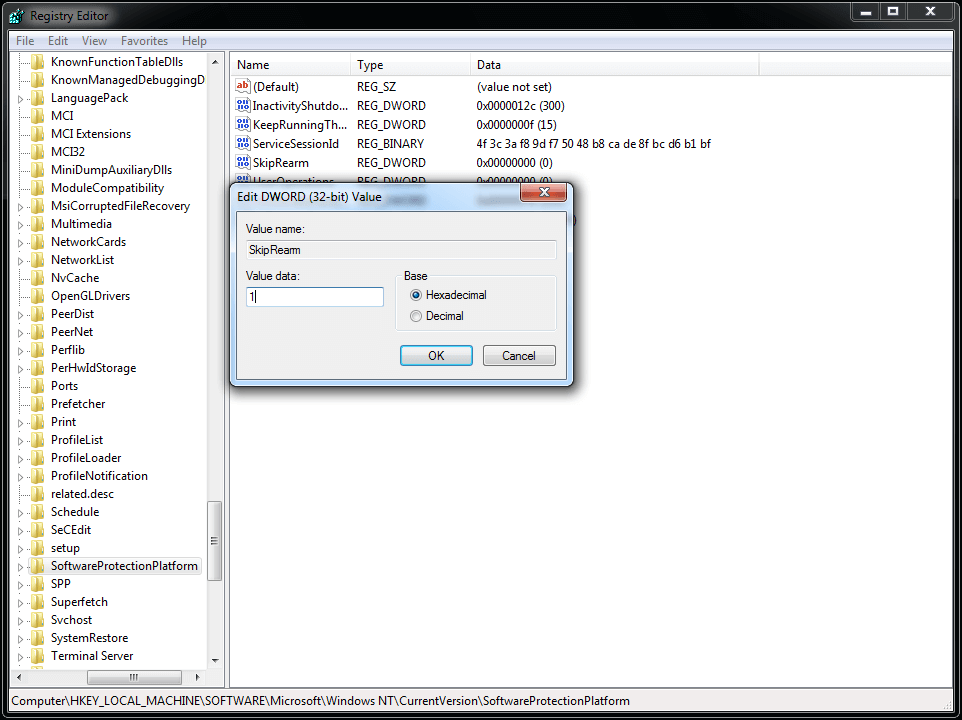
- Navigate to HKEY_LOCAL_MACHINE > Software > Microsoft > WindowsNT > Current version > SoftwareProtectionPlatform.
- Find SkipRearm and right-click it to choose Modify.
- Change the value from 0 to 1.
- Restart your computer.
You can now use the slmgr -rearm command for another 8 times, which is another 240 days. In total, you will get free Windows 7 for 120 + 240 = 360 days.
③Turn off the Windows Automatic Update
In addition to the above three methods, you can try to disable Windows updates. When Windows Update is turned on, it will try to keep itself up to date by telling you “this copy of Windows is not genuine”.
Steps to turn off the updates:
1. From the Start menu, choose Control Panel to open it.
2. Go to System and Security > Windows Update > Turn automatic updating on or off.
3. Select Never Check for Updates (not recommended) option from Important updates section.
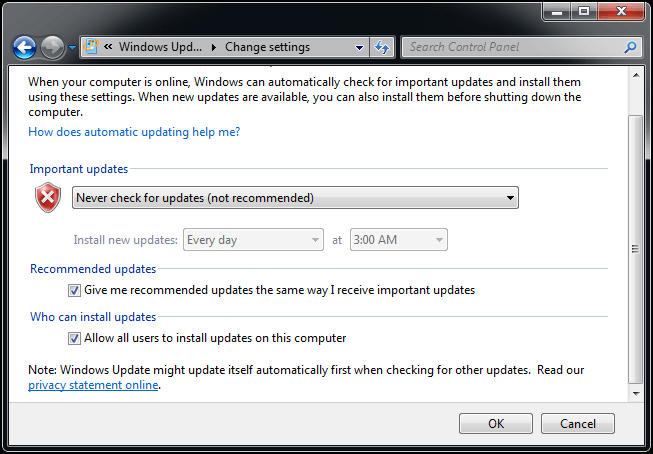
4. Click on OK to change the setting.
④Register Windows Genuine When This Copy of Windows Is Now Genuine 7601 Crack
If you are using a pirated version of Windows, Windows 7 not genuine message might occur every time you turn on your computer one month after installation. There might also be some bugs on the pirated version, causing many problems. Under these circumstances, we suggest purchasing a license key of the genuine Windows.
How to make Windows 7 genuine permanently? Follow these instructions to activate your copy of Windows.
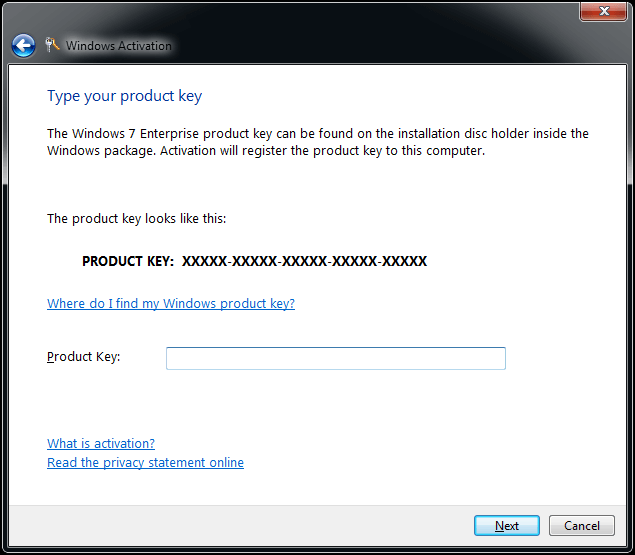
- In Windows 7, click Start to search for Activate Windows.
- Click Retype your product key if you have a key.
- Input the license into the text box. After a while, the Windows is registered and Windows 7 build 7601 not genuine message will no longer display on the desktop.
Sometimes you may suddenly receive “this copy of Windows is not genuine” message although you are using a genuine Windows. This is because the license is shared with other persons and Microsoft can stop your certificate due to it being used on multiple computers. In this case, you can ask Microsoft for help.
How to Fix This Copy of Windows Is Not Genuine ErrorClick to Tweet
After learning Windows 7 not genuine fix, some of you may be wondering about the reasons for “this copy of Windows is not genuine” issue and the problems that you may face in case of this issue.
Final Words
It is really annoying to see the error “this copy of Windows is not genuine build 7601/7600” every time you log into Windows. We hope the above methods solved your issue.
On the other hand, remember to tell us if you have any suggestions of making Windows 7 genuine or questions during using MiniTool ShadowMaker to back up the computer. Just leave a comment in the following zone or send an email to [email protected].
This Copy of Windows Is Not Genuine FAQ
About The Author

Position: Columnist
Charlotte is a technology columnist with a strong focus on the Windows operating system, specializing in disk management, backup, and data recovery. She is passionate about analyzing computer errors, identifying root causes, and delivering practical solutions. In her free time, she stays updated on the latest developments in computer systems and hardware while continuously learning new technologies to broaden her expertise. Her writing style is clear and easy to understand, making complex technical topics accessible even to users with limited computer knowledge.
User Comments :