
If you are not allowed to activate your Windows build and encounter Activation error 0xc004f063, you can read this post written by MiniTool. It will show you some feasible methods to fix this issue. Hope this post will be helpful to you.
You may be unable to activate your Windows build. The error code that occurs when this procedure fails is 0xc004f063 and the error code is always accompanied by the error message “he Software Licensing Service reported that the computer BIOS is missing a required license”.
This problem is more common on Windows 7, but also appears on Windows 8.1 and Windows 10. What’s causing the Activation error 0xc004f063? Here are several possible reasons: licensing restriction, BIOS inconsistency, system file corruption and license key inconsistency.
If you are struggling with Windows Activation error 0xc004f063, follow the instructions below to fix this issue.
Method 1: Run the Activation Troubleshooter (Windows 10 Only)
If the problem is caused by some kind of licensing restriction, you can try to run the Windows Activation troubleshooter to correct it. Here’s a quick guide.
Step 1: Press the Windows key + R key to open the Run window. Next, type ms-settings:activation and press Enter to open the Activation tab of the Settings screen.
Step 2: In the Activation tab, click the Troubleshoot button from the right side.
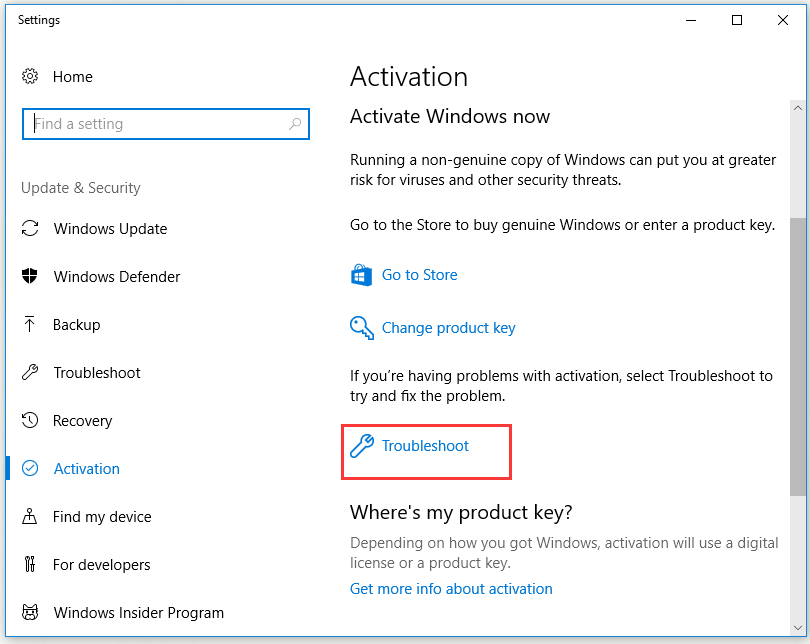
Step 3: After the troubleshooter finishes detecting the problems, click Apply this fix to perform a repair strategy.
After you finish this method, restart your computer and check if Activation error 0xc004f063 is solved.
Method 2: Activate Your Windows with SLMGR
If you see Activation error 0xc004f063 when you try to activate a PRO key immediately after submission, the problem is likely due to the fact that the BIOS is still using the Windows Home key. This is common in cases where you previously brought in a pre-activated computer and then reset it.
In this case, your operating system will try to activate the operating system using the key stored in the BIOS, regardless of the activation key you are trying to force. You can override the incorrect activation key by executing a series of commands with Command Prompt.
Step 1: Type cmd in the search bar, right-click Command Prompt and then click Run as administrator.
Step 2: Execute the following commands (replace Windows Key with your license key) to change the used license key to the correct one:
slmgr /ipk <Windows Key>
slmgr /ato
After the procedure is completed successfully, restart your computer and check if Activation error 0xc004f063 still exists. If your Windows build is still not activating, try the next method below.
Method 3: Run SFC and DISM Scans
If Activation error 0xc004f063 is caused by some type of system file corruption, you can try to run SFC and DISM scans to fix this issue.
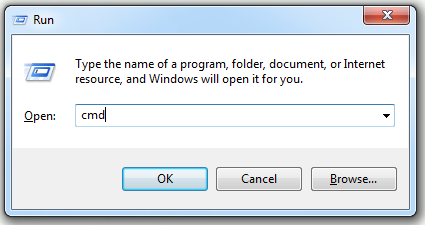
Step 1: Press the Windows + R keys to open the Run dialog box, type cmd and then press Ctrl + Shift + Enter to open an elevated CMD prompt.
Step 2: Type the following commands and press Enter to initiate each DISM scan:
Dism.exe /online /cleanup-image /scanhealth
Dism.exe /online /cleanup-image /restorehealth
Step 3: Wait until the DISM scan is complete, restart your computer.
Step 4: Open Command Prompt as an administrator again. Type sfc /scannow in the window and then press Enter to initiate the SFC scan.
Step 5: Restart your computer once again and check if Activation error 0xc004f063 is resolved at the next system startup.
If the same Application Error 0xc0000906 still exists, try the next method below.
Method 4: Contact Microsoft’s Support
If none of the methods above can help you to activate your Windows build and you’re still encountering the 0xc004f063 error, you’d better contact Microsoft’s support and ask them to activate your operating system.
The quickest and easiest way to reach them is to dial a toll-free number specific to your country or region. You can check Microsoft Support numbers from this link.
You need to answer several security questions to confirm that you are the owner of the license. After confirmation, they will help you remotely activate the license.
Bottom Line
That’s all the information about the methods to fix the Activation error 0xc004f063. If you encounter the same issue, try the methods mentioned above.
User Comments :